Developer Installation Guide
This guide sets up a development environment for Smarter on your own computer, built from
source code: the Django backend in smarter-sh/smarter,
and, if you work on the user interface, the React web console in
smarter-sh/smarter-console. It covers
initializing the environment from scratch, the .env file, building, running the platform
locally, and running the tests. To run Smarter without changing its code, the
Quick Start Guide uses the pre-built images on
Docker Hub instead.
This eight-minute developer onboarding video walks through the same steps.
Prerequisites
Before attempting to set up this project, make sure that the following are installed on your computer:
Docker Desktop or Docker CE 25.x or later, with Docker Compose
Node.js 24 or later, and npm
Python 3.14 or later
git 2.x or later
make 3.8 or later
openssl, which
makeuses to create the.envfile’s encryption key
The repository has a setup script for each operating system, in setup/, that installs these and the native libraries that the local Python virtual environment builds against. Read the script and the README beside it before you run it.
Operating system |
Script |
Run it with |
|---|---|---|
macOS |
|
|
Debian or Ubuntu |
|
|
Windows |
|
The macOS and Ubuntu folders also have a .zshrc.example, with the paths and compiler and linker
flags that the virtual environment’s native packages need. Merge what you need into your own
~/.zshrc rather than replacing it.
Give Docker at least 8 GB of memory and 4 CPUs. The test suite runs several copies of the platform at once, one per CPU it has room for (see Running the Tests).
If you work on cloud infrastructure, you’ll also need these:
terraform, latest
terragrunt, latest
awscli, latest
Initializing the Environment from Scratch
Clone the repository, then initialize it:
git clone https://github.com/smarter-sh/smarter.git
cd smarter
make         # creates .env, with a new encryption key, then lists every make command
make init    # up to 20 minutes
Any make command creates the .env file the first time it runs, if there isn’t one (see
The .env File). Add your LLM provider API keys to it before make init, so that the platform
stores them as it initializes.
make init runs these steps, each of which is also a make command of its own:
Step |
What it does |
|---|---|
|
Checks that Python 3.14 is installed, and that Docker is running. |
|
Creates the Python virtual environment, |
|
Downloads the web console release that |
|
Collects the static files, the web console’s included, into |
|
Builds the |
|
Starts the containers, creates the |
|
Installs the pre-commit hooks (see Code Style and pre-commit). |
When it’s done, the containers are still running, and the web console is at http://localhost:9357/. Sign in as:
Username:
adminEmail:
admin@example.com(oradmin@yourSMARTER_PLATFORM_ROOT_DOMAIN)Password:
smarter
MariaDB is at localhost:3306, as user root, password smarter. These are local
development credentials only.
To start over from nothing, run make tear-down (it deletes the virtual environment and prunes
Docker’s unused images, containers and volumes), delete the mariadb-data/ folder, which holds
the local database, then run make init again. Keep your .env: its encryption key is what
decrypts the Secrets stored in the database.
The .env File
The .env file in the root of the repository holds your local configuration. make creates it
from .env.example, which
documents every value, and Docker Compose, the Makefile and Django all read it. Git ignores it:
never commit it.
Required
Only one value is required, and make sets it for you:
SMARTER_PLATFORM_FERNET_ENCRYPTION_KEYEncrypts Smarter Secrets, such as API keys, in the database.
makeappends a new key when it creates.env. To make one yourself:openssl rand -base64 32 | tr '+/' '-_'Every process (
smarter-api, each worker, eachmanage.pycall) must use the same key. If the key changes, every Secret in the database becomes unreadable.
The other values in the Local development section of .env.example are already set for local
work (SMARTER_ENVIRONMENT=local, SMARTER_DEBUG_MODE=true, and so on). Leave them as they
are.
Recommended
The platform runs without any other value. A feature whose setting is missing logs an error that says what to set when you use it. For example, a prompt to an LLM provider that has no key fails with an error that names the key. To try the example LLMClients, set at least:
SMARTER_APP_PROVIDER_OPENAI_API_KEYOpenAI is the default LLM provider, used by most of the example LLMClients.
The other providers (SMARTER_APP_PROVIDER_ANTHROPIC_API_KEY, ..._GEMINI_API_KEY,
..._MISTRAL_API_KEY and so on), the web search tools (SMARTER_APP_LLMTOOL_TAVILY_API_KEY,
SMARTER_APP_LLMTOOL_BRAVE_SEARCH_API_KEY) and GITHUB_TOKEN are optional. make init
stores the provider keys as Smarter Secrets. If you add one later, restart the platform, then run
the command that stores it:
docker exec smarter-api python manage.py initialize_providers
The cloud deployment, email and social sign-in values are for deployed platforms; you don’t need them locally. Configuration explains how these values become Smarter’s settings.
Building the Application
The platform runs from one Docker image, smarter, used by every container except MariaDB and
Redis. The containers don’t mount your source code: each one runs the copy of the code that
was built into the image. After you change the code, rebuild, then restart:
make build   # a few seconds, once Docker has cached the requirements
make run
make build copies the host’s smarter/staticfiles/ into the image rather than collecting
the static files itself. So when the static files change, which includes installing another build
of the web console, collect them first:
make console          # the pinned release of the web console
make collectstatic    # into smarter/staticfiles/
make build
Without make collectstatic, the web console’s pages answer 503. Django caches a missing console
build, so restart smarter-api after fixing the static files.
make docker-build-for-react is the full build that CI uses: it runs collectstatic inside
the image instead. make help lists every other command.
The Web Console
The web console is a single-page React app. Its source is a repository of its own,
smarter-sh/smarter-console, an npm workspace
of the console and the packages it’s built from, Smarter Chat included. Django serves the console’s
page at every console path, and the console talks to the backend only over HTTP: the web console
api (/api/web/), the public api (/api/v1/) and the session (/api/web/session/). See
ADR-035.
This repository doesn’t build the console. It installs a released build: each smarter-console
release attaches smarter-console-<version>.tar.gz, and smarter-console-version.txt pins the
version that make console downloads. To work on the backend alone, that’s all you need.
To change the console, clone it next to this repository:
cd ..
git clone https://github.com/smarter-sh/smarter-console.git
cd smarter-console
make init    # once: a Python venv for pre-commit, npm install, and the pre-commit hooks
make dev     # Vite's dev server, at http://localhost:5173/
make dev serves the console with hot reload, and proxies the backend’s paths (/api,
/admin, /static, /ws and others) to the Smarter dev server at http://localhost:9357, so
start the backend first, with make run here. Sign in with the same admin credentials.
To try a console change inside the platform itself, before it’s released, build it and install the build here instead of the pinned release:
# in smarter-console
make build                                            # into dist/react/<package>/

# in smarter
make console-local CONSOLE_DIST=../smarter-console/dist
make collectstatic
make build && make run
make console puts the pinned release back. The console’s tests (Vitest), lint (ESLint,
Prettier, TypeScript) and Storybook stories run in its own repository, with make test,
make lint and make storybook, and its README covers them, along with the Keen Bootstrap
theme that styles it. The theme’s compiled stylesheets are committed in this repository, under
smarter/smarter/static/assets/.
Launching the Application Locally
make run
make run is docker compose up: it starts every container and stays attached to their logs,
so it doesn’t return. Keep it running in a terminal of its own, and stop it with Ctrl-C (or
docker compose down, from another terminal). The platform is ready when
curl -I http://localhost:9357/ answers 302, a redirect to the sign-in page.
Container |
What it runs |
|---|---|
|
The Django application server, at http://localhost:9357/ |
|
The Celery worker that runs background tasks |
|
The Celery worker for infrastructure tasks (DNS, certificates, Kubernetes) |
|
Celery Beat, which schedules the periodic tasks |
|
MariaDB, at |
|
Redis, the cache and the Celery broker, at |
Useful local addresses:
http://localhost:9357/: the web console
http://localhost:9357/admin/: the Django admin
http://localhost:9357/admin/waffle/switch/: the feature switches, which turn features, middleware and logging on and off at runtime, without a restart
http://localhost:9357/docs/openapi/: the REST api’s OpenAPI documentation
To run a management command or open a shell in the application container:
docker exec -it smarter-api python manage.py <command>
docker exec -it smarter-api bash
Running the Tests
make docker-test                                                    # the whole suite
make docker-test LABELS=smarter.apps.secret.tests.test_models       # one module
make docker-test is how Smarter’s Python tests are run, locally and in CI. It builds the
smarter image from your working tree, copies the local database, then runs the suite in
shards, each in a Docker stack of its own, all at once. It prints each shard’s result and every
failing test, and writes each shard’s log to .test-shards/. The whole suite takes several
minutes. LABELS takes one or more dotted paths (an app, a module or a test) and runs them in
one shard; SHARDS=<n> sets the number of shards.
The platform must be running (make run), because the shards copy smarter-mariadb’s
database. Otherwise the tests stop with Couldn't dump smarter-mariadb's database. Is it running?.
Some tests send real, billable prompts to the LLM providers whose keys you set. Tests that use real
cloud infrastructure are tagged infrastructure, and skipped.
Write tests for every change, one test module per source module. New code needs at least 90% coverage in its Django app or subsystem, which CI reports on each pull request. See Unit Testing for the base classes, fixtures, sharding and the traps to avoid.
Code Style and pre-commit
To preserve your own sanity, don’t spend time formatting your Python, Terraform, JS or any other
source code: pre-commit runs automatic formatters and linters, such as black, isort, flake8, mypy
and Prettier, on every commit, and fixes or rejects the commit based on the policy files in the root
of this repository. make init installs the hooks (make pre-commit-init does it alone). To
run every hook on every file, as a check that your environment is set up correctly:
make pre-commit-run
To lint only the files you changed:
source venv/bin/activate
git diff --name-only | xargs pre-commit run --files
Output should look similar to the following:
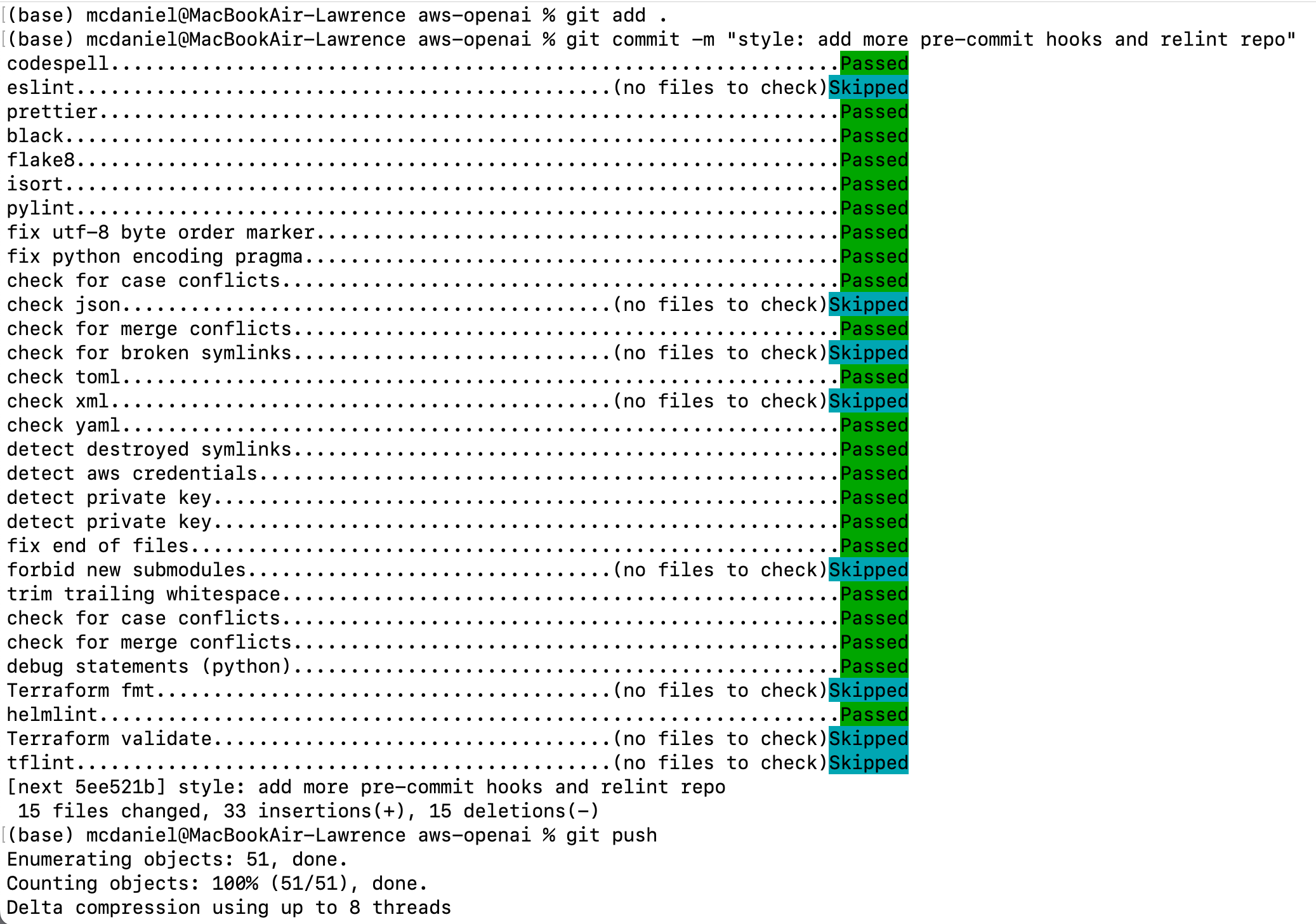
pre-commit output
Good Coding Best Practices
This project demonstrates a wide variety of good coding best practices for managing mission-critical cloud-based micro services in a team environment, namely its adherence to 12-Factor Methodology. Please see this Developer Guide for additional details.
We want to make this project more accessible to students and learners as an instructional tool while not adding undue code review workloads to anyone with merge authority for the project. To this end we’ve also added several pre-commit code linting and code style enforcement tools, as well as automated procedures for version maintenance of package dependencies, pull request evaluations, and semantic releases.
Repository Setup
Github Secrets setup
Common secrets for automated CD/CD processes are managed with GitHub Secrets. The GitHub Actions automated processes depend on several of these. When creating pull requests, the GitHub Actions will use these secrets, github.com/smarter-sh/smarter/settings/secrets/actions, so there’s nothing special for you to do.
On the other hand, if you’ve forked this repo and are working on your own independent project, then you’ll need to initialize each of these yourself.
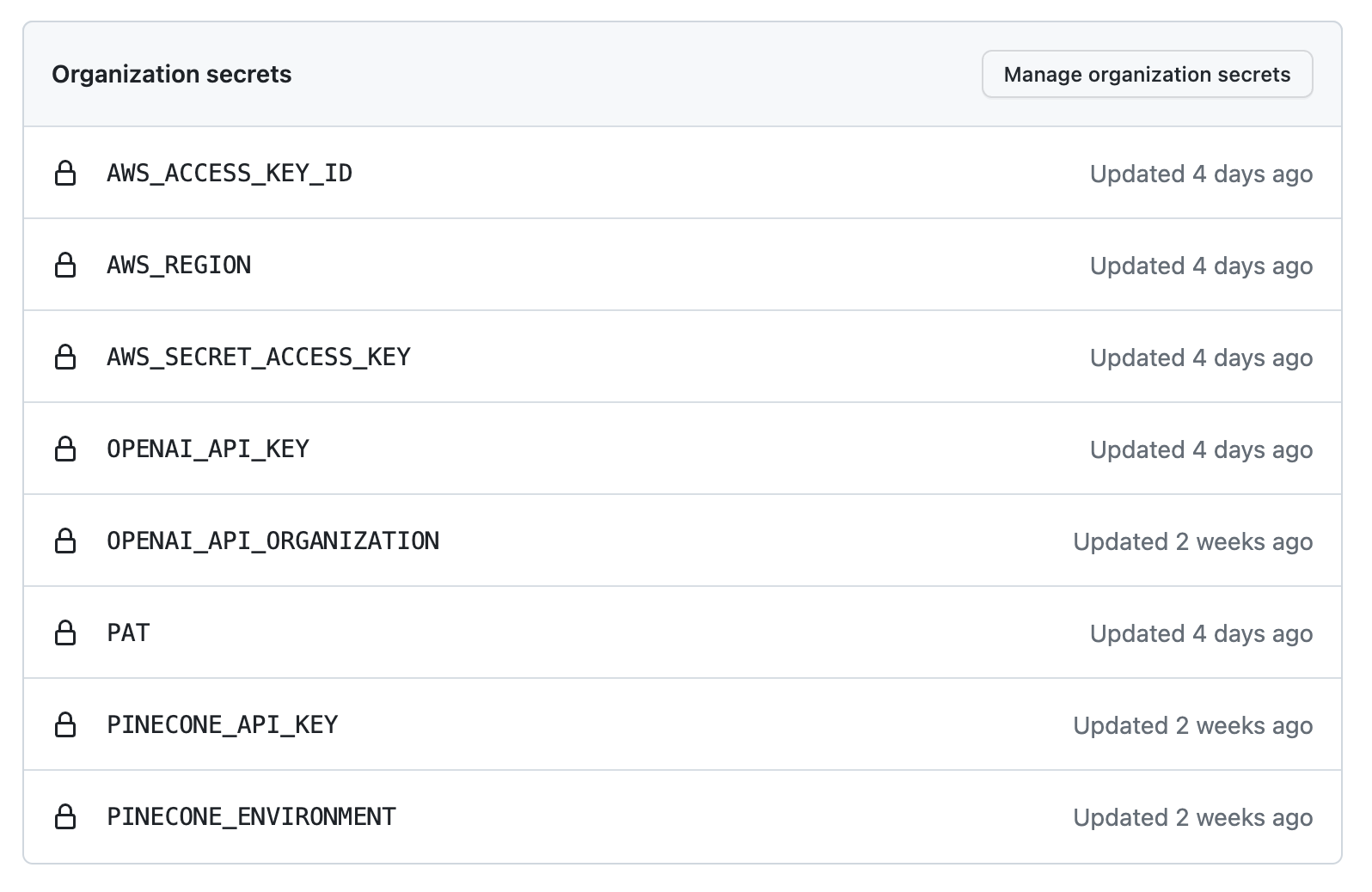
Github Secrets
Kubernetes Secrets
The Terraform code in this repo generates several sets of sensitive data that are persisted to Kubernetes Secrets. This configuration data is tightly integrated to the CI/CD build and deploy workflows, and fully automates configuration of all back end services on which Smarter relies including for example, MariaDB, SMTP Email, AWS S3, AWS Elastic Container Registry, and Kubernetes itself.
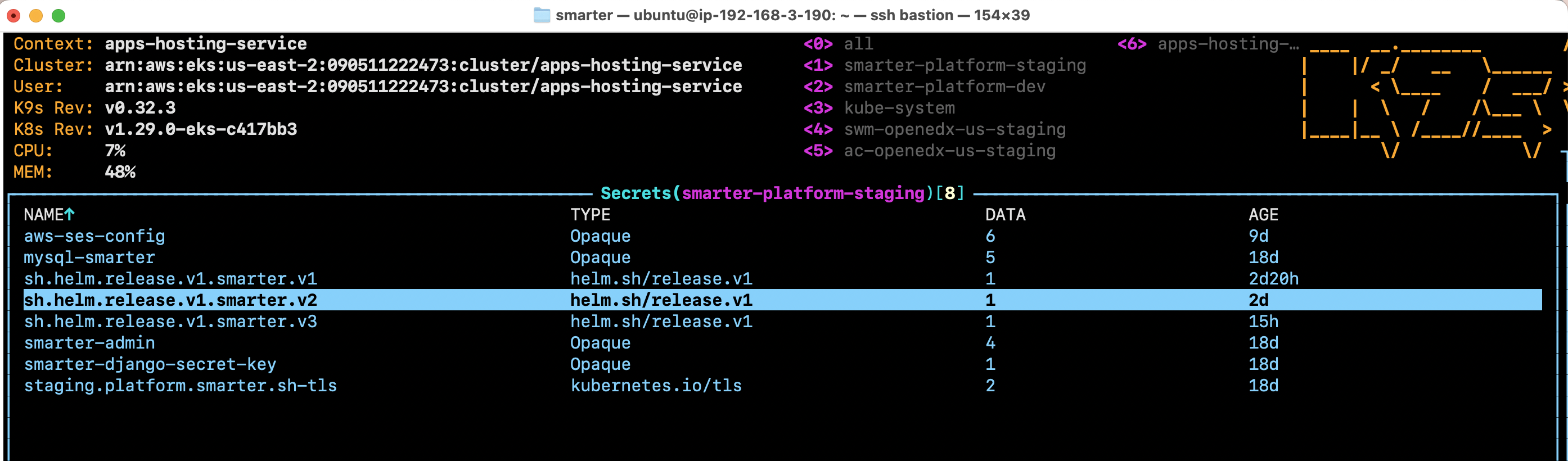
Kubernetes Secrets
GitHub Actions
This project depends heavily on GitHub Actions to automate routine activities, so that hopefully, the source code is always well-documented and easy to read, and everything works perfectly. We automate the following in this project:
Code style and linting checks, during both pre-commit as well as triggered on pushes to the main branch
Python unit tests, in eight shards, on every pull request (the web console’s tests run in smarter-console’s own workflows)
Docker builds
Environment-specific deployments to Kubernetes
Semantic Version releases
version bumps from npm, PyPi and Terraform Registry
A typical pull request will look like the following:
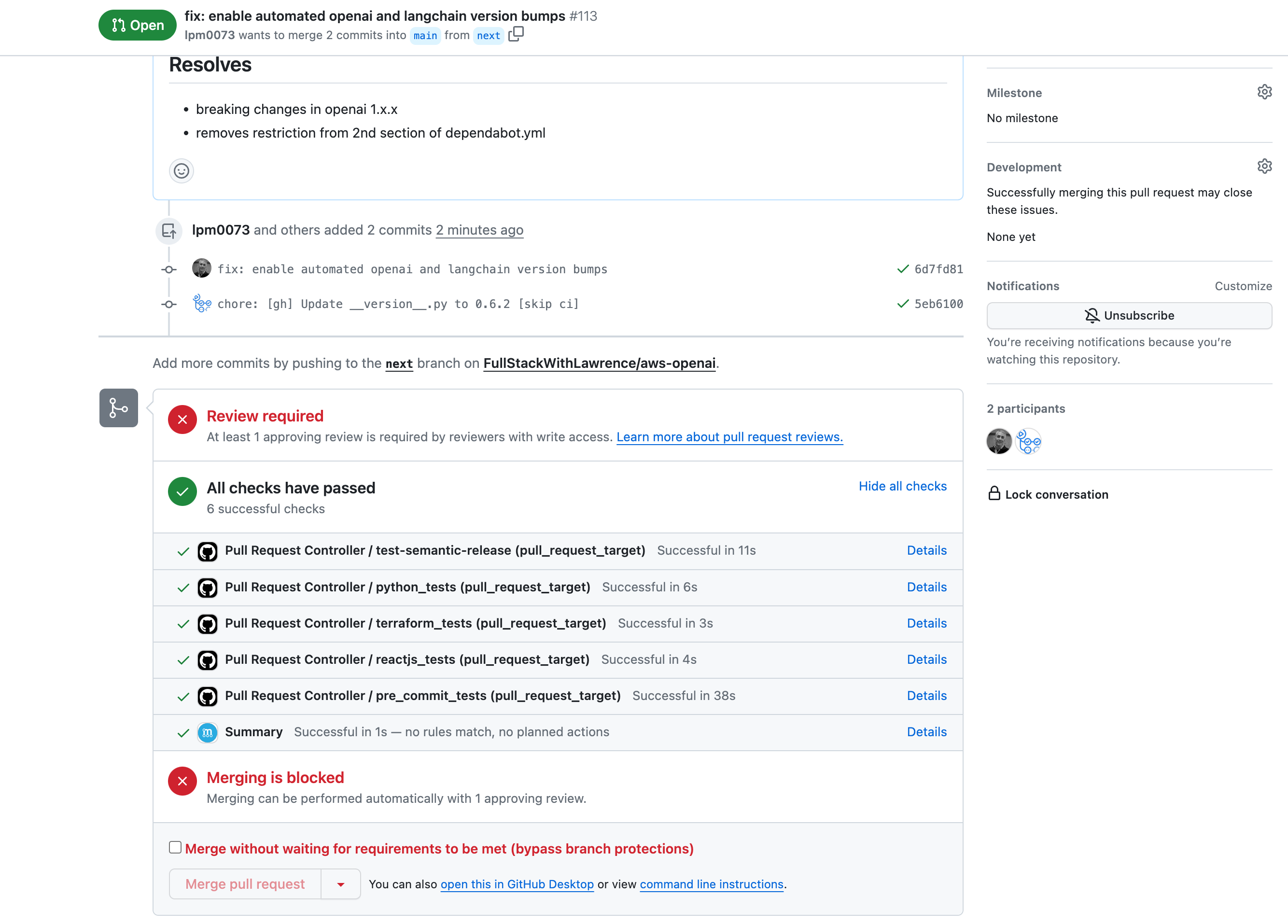
Automated pull request
Docker Setup
You can leverage Docker Community Edition and Docker Compose to stand up the entire Smarter platform in your local development environment. This closely approximates the Kubernetes production environment in which Smarter actually runs. Everything is substantially created with these files located in this repo:
Dockerfile: This defines the contents and configuration of the Docker container used to deploy the Smarter application, worker, and Celery Beat service in all Kubernetes environments as well as in your local Docker CE environment. Thus, think twice before pushing modifications to this file, as there could be unintended consequences.
docker-compose.yml: This simulates the Helm deployment charts used for Kubernetes based staging and production environment. It defines all services that makeup the application stack, including MariaDB and Redis.
docker-compose.shard.yml: The stack that each test shard runs in.
Helm Chart: Smarter is deployed to Kubernetes via this locally managed Helm chart. You can use this as a reference for questions regarding ports, network configuration, horizontal and vertical scaling configuration, and Docker Container configurations for each service.
Python Setup
Smarter is built substantially on the Django web development framework for Python, Django REST Framework and Pydantic data validation library. Smarter strictly follows generally accepted best practices and coding conventions for all of these. Thus, to work effectively on this project you’ll need familiarity with all of these third party code libraries. Also note that this project leverages Dependabot and Mergify for managing version numbers of all Python dependencies that are used in this project. These two services monitor all of the Python (and NPM and Terraform) dependencies for the project, automatically bumping package versions as well as running unit-tests in order to guard the main branch against breaking changes. Versions should therefore always be up to date at the moment that you clone the repo, and it should not be necessary for you to manually bump PyPi package version numbers inside the Python requirements files.
Python requirements: smarter/requirements.
Django settings: smarter/smarter/settings
Dependabot configuration: .github/dependabot.yml
Mergify configuration: .mergify.yml
The local virtual environment, venv/, is for your editor, pre-commit and make collectstatic.
The platform itself, and its tests, run in the containers. To recreate the virtual environment and
activate it:
make python-init
source venv/bin/activate
Configuration Data
Smarter generally follows Django’s convention of storing most
configuration data in environment-specific python modules that are
accessible via django.conf.settings. However, in light of the fact
that Smarter uses a LOT of configuration data, and that this
configuration data necessarily lives in many different locations, it
also has its own configuration module, based on
Pydantic, in
smarter/smarter/common/conf.
It is accessed as follows:
from smarter.common.conf import smarter_settings
See Configuration.
AWS Cloud Infrastructure
Smarter runs on AWS cloud infrastructure. Please take note that all
Smarter cloud resources reside on a private network that is not publicly
accessible to anyone; not even admins. The only public entry point is the
load balancer in front of the ingress controller. There is no SSH host.
To perform diagnostics and administrative activities you use kubectl,
which reaches the cluster through the EKS API with your IAM credentials,
and the bastion pod, a shell that runs inside the platform’s namespace:
kubectl exec -it -n <namespace> deploy/smarter-bastion -- bash
The bastion pod runs the platform’s own image as a non-root user. It holds the MariaDB client and the AWS CLI, and receives only the database, S3 and AWS settings, not the platform’s other secrets.
Kubernetes
A single, shared Kubernetes cluster hosts test, staging and production
environments. Request an IAM user that is mapped to the cluster, then run
kubectl from your own computer. k9s, an ASCII
gui-based application, is especially helpful if you’re unfamiliar with
the inner workings of Kubernetes.
MariaDB
Smarter persists most of its data to MariaDB running as a pod on Kubernetes.
The database is reachable only from pods inside the cluster. For SQL tasks,
open a shell in the bastion pod, whose welcome banner shows the mariadb
command for connecting. To use a desktop client such as MySQL Workbench,
forward the port with kubectl port-forward and connect to localhost.
Other Resources
You can request an IAM user account in order to gain AWS console access to other cloud resources used by this project. But please be aware that all Smarter infrastructure is managed by Terraform meaning that – best case scenario – any changes that you might make from the console are assured to be overwritten at some point. Smarter leverages the following additional AWS resources:
Virtual Private Cloud
Certificate Manager
Cloudfront Content Delivery Network
Elastic Container Registry
Route 53 DNS management
S3 cloud storage service
SES SMTP email service
EC2 compute infrastructure and load balancers