Security
A production Smarter platform is secured in two layers. The cloud infrastructure, which smarter-infrastructure builds with Terraform on AWS, controls who and what can reach the cluster, its pods and its data. The application and its Helm chart control what each request, user, API key and LLM tool can do. This page describes both, as they are configured when you install as Production Deployment describes, and says what Smarter leaves to you.
Smarter’s security design follows ADR-016: use Django’s and Kubernetes’ well-maintained protections, and add Smarter’s own only where an AI platform needs more.
Network
The VPC
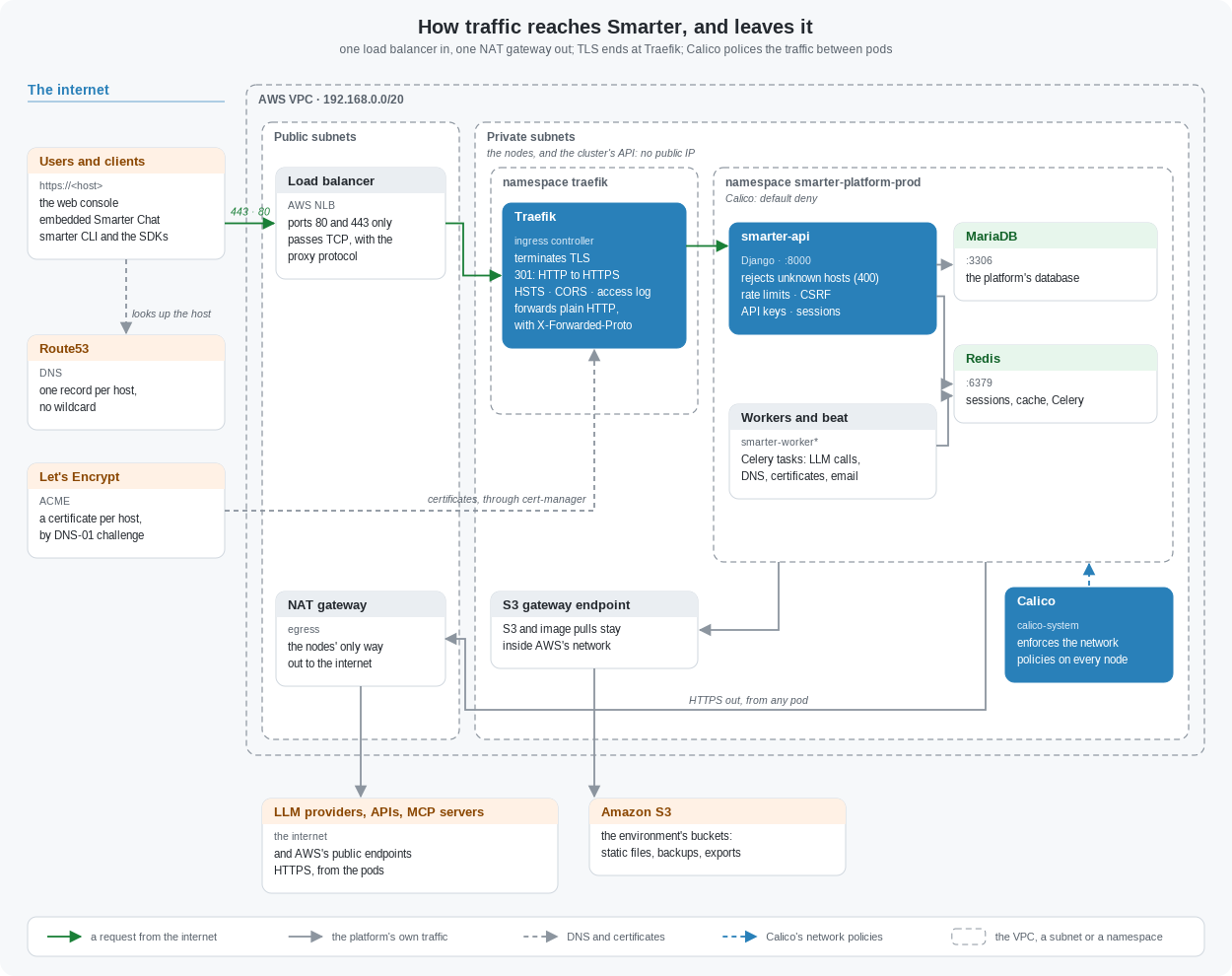
smarter-infrastructure creates the VPC, 192.168.0.0/20, with public, private, database and intra
subnets in each availability zone. The EKS control plane and every node are in the private
subnets, with no public IP address, and reach the internet through a NAT gateway. Only the load
balancer is in the public subnets. An S3 gateway endpoint keeps the pods’ S3 traffic, including
image pulls, inside AWS’s network.
The cluster’s API endpoint is reachable both from inside the VPC and publicly, authenticated by
AWS IAM. Restrict its public access to your own addresses (endpoint_public_access_cidrs of the
EKS module) if your policies require it.
Ingress: one load balancer, Traefik and TLS
Every request from the internet arrives through one AWS Network Load Balancer, on ports 80 and
443 only, and goes to the Traefik ingress controller, in its own traefik namespace:
TLS terminates at Traefik, with a certificate per host that cert-manager obtains from Let’s Encrypt, by DNS-01 challenge against Route53. Traefik forwards the request to the app as plain HTTP inside the cluster, with
X-Forwarded-Proto. Traefik trusts the forwarded and proxy protocol headers only from the VPC’s addresses, so a client can’t forge them.HTTP is redirected to HTTPS (301), and HSTS is set, by Traefik middlewares, for every host in one place, deployed LLMClients and custom domains included.
includeSubDomainsandpreloadstay off, because deployed LLMClients live under the platform’s domains.CORS headers are set by a Traefik middleware for the platform’s and the API’s domains, and by Smarter’s own middleware (below).
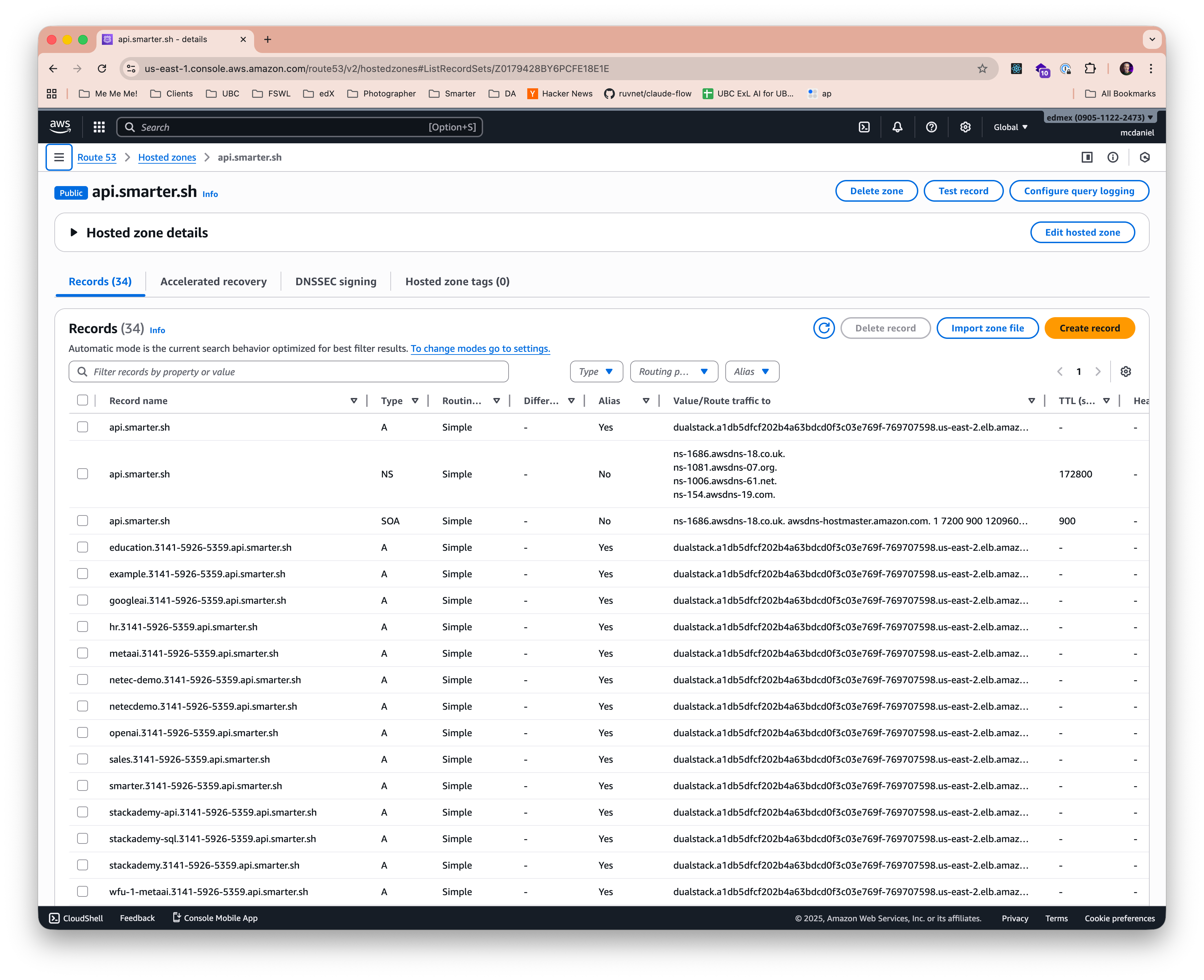
No wildcard DNS. Each deployed LLMClient gets its own DNS record in a Route53 hosted zone, its own Ingress that answers only for its own host name, and its own certificate. A request for an undefined subdomain reaches nothing, which prevents subdomain takeover.
Node security groups
With enable_enhanced_security (on, in smarter-infrastructure’s aws/stack/stack.hcl), the
nodes’ security group replaces the EKS module’s recommended rules with a narrower set:
Ingress: traffic from inside the VPC (the load balancer, the control plane’s kubelet calls on 10250, DNS), the NodePort range from the load balancer, and ICMP “fragmentation needed”, for path MTU discovery.
Egress: node-to-node traffic, HTTP and HTTPS, DNS, NTP, SMTP (25 and 587), and replies on ephemeral ports.
There is no SSH access to the nodes. Administrators reach the cluster with kubectl, authenticated
by IAM, and reach a shell with the bastion pod (below).
Pod network policies: Calico
Security groups apply to whole nodes. To control traffic between pods, smarter-infrastructure installs Calico (the Tigera operator) in policy-only mode: the AWS VPC CNI still gives every pod its VPC address, and Calico’s agent on each node enforces Kubernetes NetworkPolicies with iptables rules. It then creates these policies in the platform’s namespace:
Default deny, for ingress and egress, for every pod in the namespace. Traffic flows only where a policy below allows it.
Ingress to the application’s pods (the app, the Celery workers, beat, the init Job and the bastion) from pods in the same namespace, and from the Traefik namespace on the app’s port only.
MariaDB accepts connections on 3306, and Redis on 6379, only from the application’s pods.
Egress from the application’s pods only to MariaDB, Redis and Loki in the namespace, DNS in
kube-system, and to the internet on HTTPS (443), HTTP (80, for API plugins), SMTP (465, 587) and MySQL (3306, for SQL plugins’ remote databases).The bastion pod may also reach the internet on 80 and 443, for package updates.
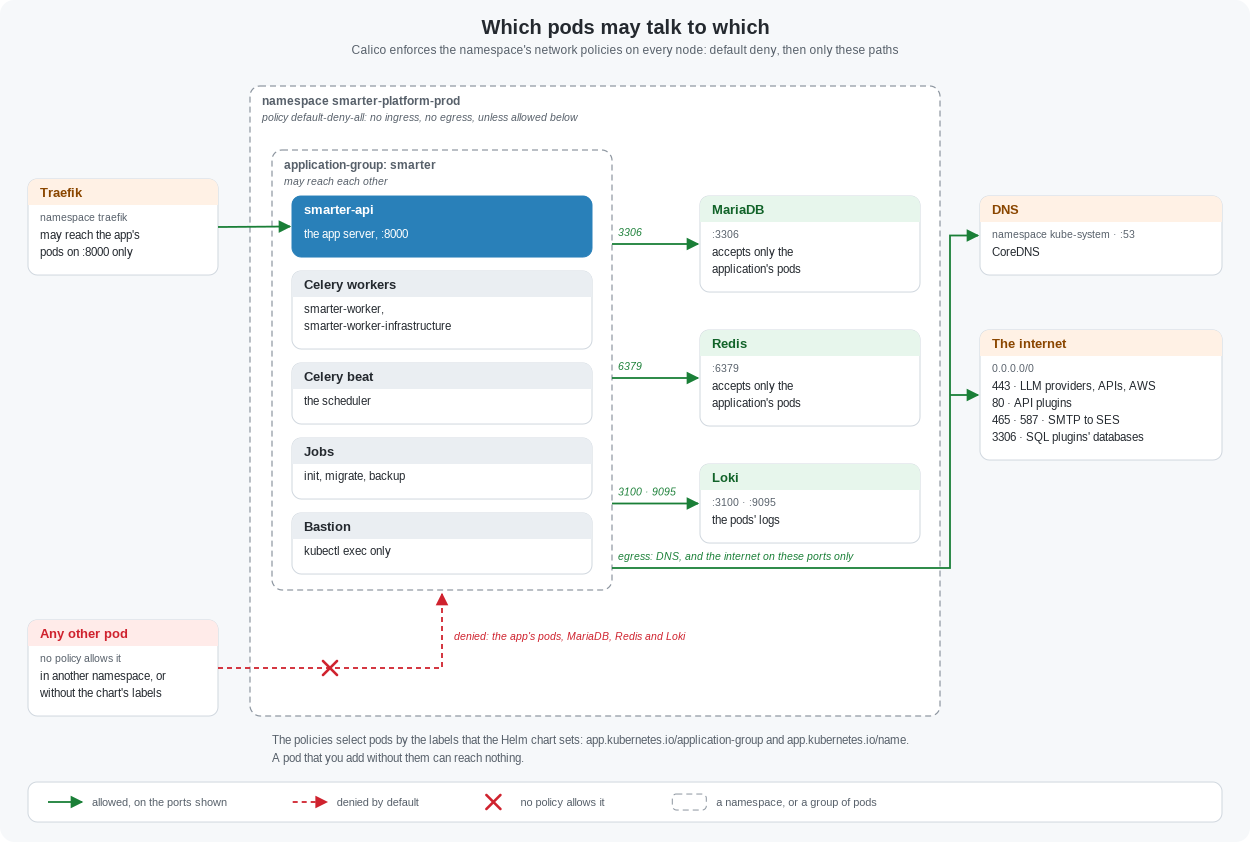
The policies select pods by their labels, app.kubernetes.io/application-group and
app.kubernetes.io/name, which the Helm chart sets. A pod without them can’t talk to anything,
so keep them on any pod that you add. The policies are created for the namespace named in
smarter-infrastructure’s stack.hcl (the prod environment’s); add the same policies to any
other environment’s namespace that needs them.
Identity and Access
AWS: roles, not access keys
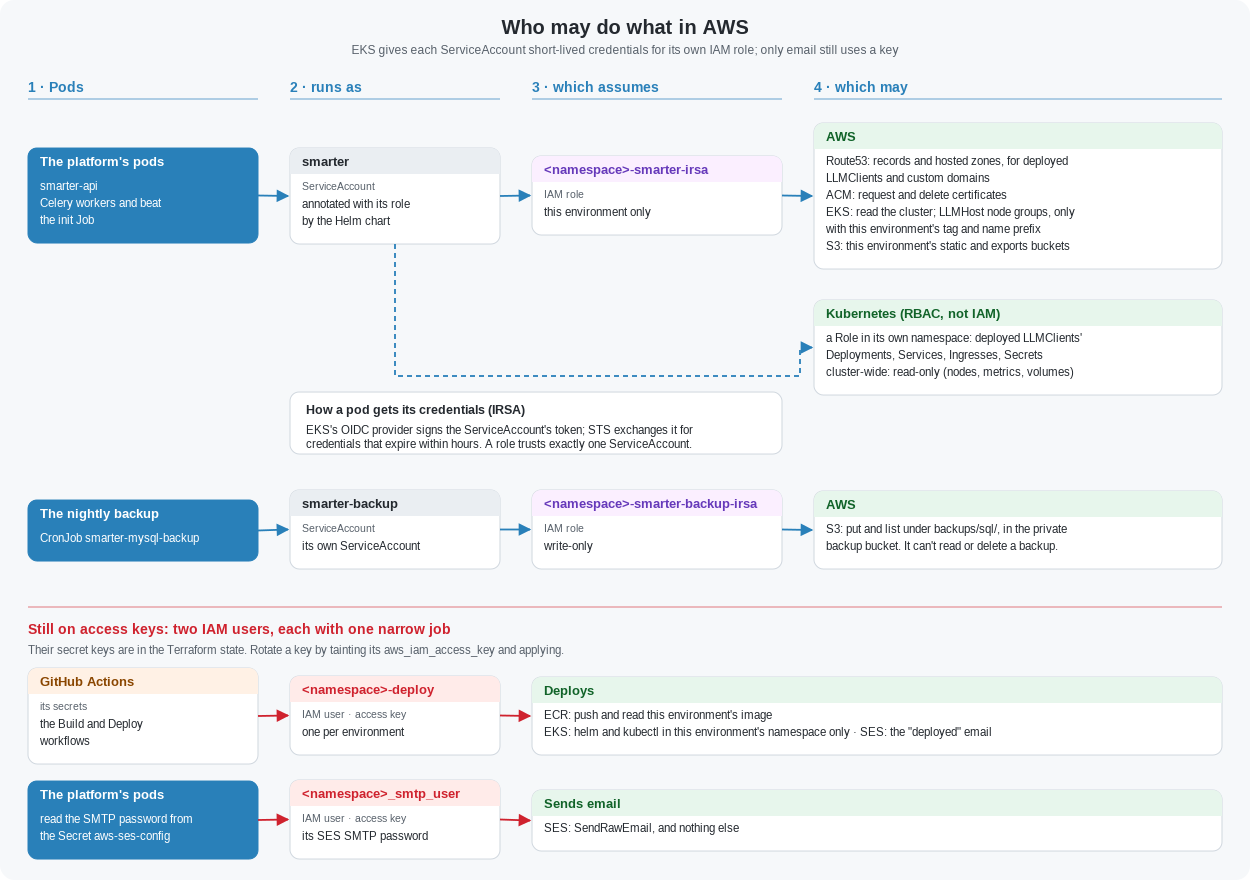
The platform’s pods call AWS’s APIs with no access keys. They get short-lived credentials from IAM roles,
with IAM Roles for Service Accounts
(IRSA): the chart annotates each ServiceAccount with its role, and EKS hands its pods credentials for
that role only. Each environment has its own roles, so alpha can’t touch prod’s buckets or
node groups.
<namespace>-smarter-irsa, the ServiceAccountsmarter(the app, the workers, beat and the init Job): Route53 and ACM for deployed LLMClients’ and custom domains’ DNS and certificates; read access to the cluster’s status; LLMHost node groups, which it may create only with the environment’s tag and change only by the environment’s name prefix; and read and write access to the environment’s own S3 buckets.<namespace>-smarter-backup-irsa, the ServiceAccountsmarter-backup(the nightly backup): write-only access tobackups/sql/in the backup bucket. It can’t read or delete a backup, so a compromised backup pod can’t destroy earlier ones.The cluster’s own components (the VPC CNI, the EBS CSI driver, cert-manager, the cluster autoscaler) each have their own IRSA role too.
Two IAM users with access keys remain, each with one narrow job: the environment’s deploy user,
whose key the GitHub Actions Deploy workflow uses to push the image to ECR and run helm in that
environment’s namespace only, and the SMTP user, which may only send email through SES. The pods
send the platform’s email with the SMTP user’s SES SMTP password, which smarter-infrastructure puts in
the Kubernetes Secret aws-ses-config; it is the one AWS credential that the pods hold. Both
users’ secret keys are in the Terraform state. Rotate them by tainting the access key resource and applying.
Kubernetes RBAC
The ServiceAccount smarter has a Role in its own namespace (the chart’s rbac.yaml), to
manage the resources of deployed LLMClients: Deployments, Services, Ingresses, Secrets and
certificates. Its only cluster-wide permissions are reads: its own namespace, nodes,
PersistentVolumes and node metrics, in a ClusterRole that smarter-infrastructure creates
(serviceAccount.createClusterRole: false in the chart’s values). The deploy user’s EKS access
entry is also limited to the environment’s namespace.
Pods and Containers
Non-root, read-only. Every pod that runs the Smarter image runs as
smarter_user(uid 1000), withrunAsNonRoot, a read-only root filesystem, every Linux capability dropped, no privilege escalation, and theRuntimeDefaultseccomp profile. The few directories that the processes write areemptyDirvolumes.Settings in a Secret. The chart stores the pods’ environment, API keys and passwords included, in a Kubernetes Secret that every pod reads with
envFrom, so they aren’t written into pod specs. The database, administrator and Django credentials come from Secrets that smarter-infrastructure generates in the namespace.Images. Each environment’s ECR repository scans every pushed image for vulnerabilities. The cluster pulls third-party images through an ECR pull-through cache. Each release’s Helm chart is signed with Cosign; Artifact Hub shows the signature and the public key.
The bastion pod is the one place for a shell with the platform’s environment, reached with
kubectl exec, which needs the cluster’s IAM credentials.The web console’s Terminal, a shell inside the app’s container for superusers, is off by default. Leave
SMARTER_APP_DASHBOARD_WEB_CONSOLE_TERMINAL_ENABLEunset in production unless you need it: the shell runs with the server’s credentials.
Data Protection
In transit: HTTPS for every request from outside the cluster; SMTP with TLS through SES; HTTPS for every call to an LLM provider.
Smarter Secrets (the API keys and passwords that resources use, see Smarter Secret) are encrypted with Fernet before they are saved, with
SMARTER_PLATFORM_FERNET_ENCRYPTION_KEY. Only the encrypted value is in the database, and in its backups. Keep the key: without it, a restored database’s Secrets can’t be read (see Backup and Restore).API keys are stored as a digest. The key itself is shown once, when it is created, and may be given an expiry. See API Keys.
Backups go to a private S3 bucket that blocks public access, refuses unencrypted connections, encrypts objects (AES-256) and keeps versions.
Users’ data exports go to a second private bucket, encrypted, downloaded with presigned links that expire after 24 hours, and deleted by a lifecycle rule.
The environment’s public bucket serves static files and media uploads through CloudFront, and is public-read by design. Don’t upload anything there that isn’t meant to be public.
Not encrypted by default: Kubernetes Secrets at rest with a KMS key (eks_create_kms_key in
smarter-infrastructure’s stack.hcl), and the MariaDB volume, whose gp3 storage class doesn’t
set encrypted, unless your AWS account enables EBS encryption by default. Turn both on if your
policies require encryption at rest.
The Web Console and the APIs
The web console
The web console is a single-page React application (ADR-035),
served by Django. It reads and writes through the web console API, under /api/web/, which is
internal to the console:
Session authentication and CSRF. The console calls the API with the browser’s Django session cookie and a CSRF token.
GET /api/web/session/describes the session and sets the CSRF cookie; every request that changes something must send the token inX-CSRFToken. The session cookie isSecure,HttpOnlyandSameSite=Lax, and sessions are stored in Redis, not in the cookie.Signed-in users only. Every page and every list endpoint requires a signed-in user, and its responses are never cached.
Ownership. A list endpoint returns only the resources that the user owns or that are shared with them, by the same ownership rules as the REST API.
The REST API and deployed LLMClients
API keys. The REST API (
/api/v1/), which thesmarterCLI and the SDKs use, authenticates with Smarter API keys, sent asAuthorization: Token <key>. Smarter’s authentication class, built on Django REST Knox, also checks that the key is active, journals each use, and warns about keys past their maximum lifetime. Every endpoint requires authentication unless it says otherwise.Rate limiting. Every API is rate limited, per user and, for anonymous clients, per IP address, including the APIs that a deployed LLMClient serves to the pages that embed it. A client over its limit gets HTTP 429 with a
Retry-Afterheader. The limits areSMARTER_APP_API_THROTTLE_RATE_USER(default600/minute) andSMARTER_APP_API_THROTTLE_RATE_ANON(default120/minute);nonedisables one. See throttling.py.JSON only. API errors are always JSON, never Django’s HTML error pages, and Pydantic
SecretStrkeeps secrets out of API responses.
Signing in
Users sign in with a password, or with Google or GitHub (social auth). The authentication backends are:
AUTHENTICATION_BACKENDS = [
    "social_core.backends.google.GoogleOAuth2",
    "social_core.backends.github.GithubOAuth2",
    "django.contrib.auth.backends.ModelBackend",
]
A deployment can replace them with DJANGO_AUTHENTICATION_BACKENDS, e.g. with the multitenant
backends in smarter.lib.social_core.backends.multitenant (see Overrides). Passwords must
pass Django’s four validators: similarity to the user’s attributes, minimum length, common
passwords, and all-numeric. See User Management.
Application Security
Smarter’s middleware
Smarter adds its own middleware where an AI platform, which serves many customer domains, needs more
than Django’s. The full chain is MIDDLEWARE in
settings/base.py.
Host validation and security headers.
SmarterSecurityMiddlewarereplaces Django’sSecurityMiddleware. It is first in the chain, and rejects with a 400 any request for a host that Smarter doesn’t serve (the platform’s own hosts, or a deployed LLMClient’s domain) before anything queries the database. See security.py.CORS.
SmarterCorsMiddlewarereplaces django-cors-headers’ middleware, and allows each deployed LLMClient’s own origins. See cors.py.Sensitive file blocking. Requests for
.env,.gitand similar files are refused. See sensitive_files.py.
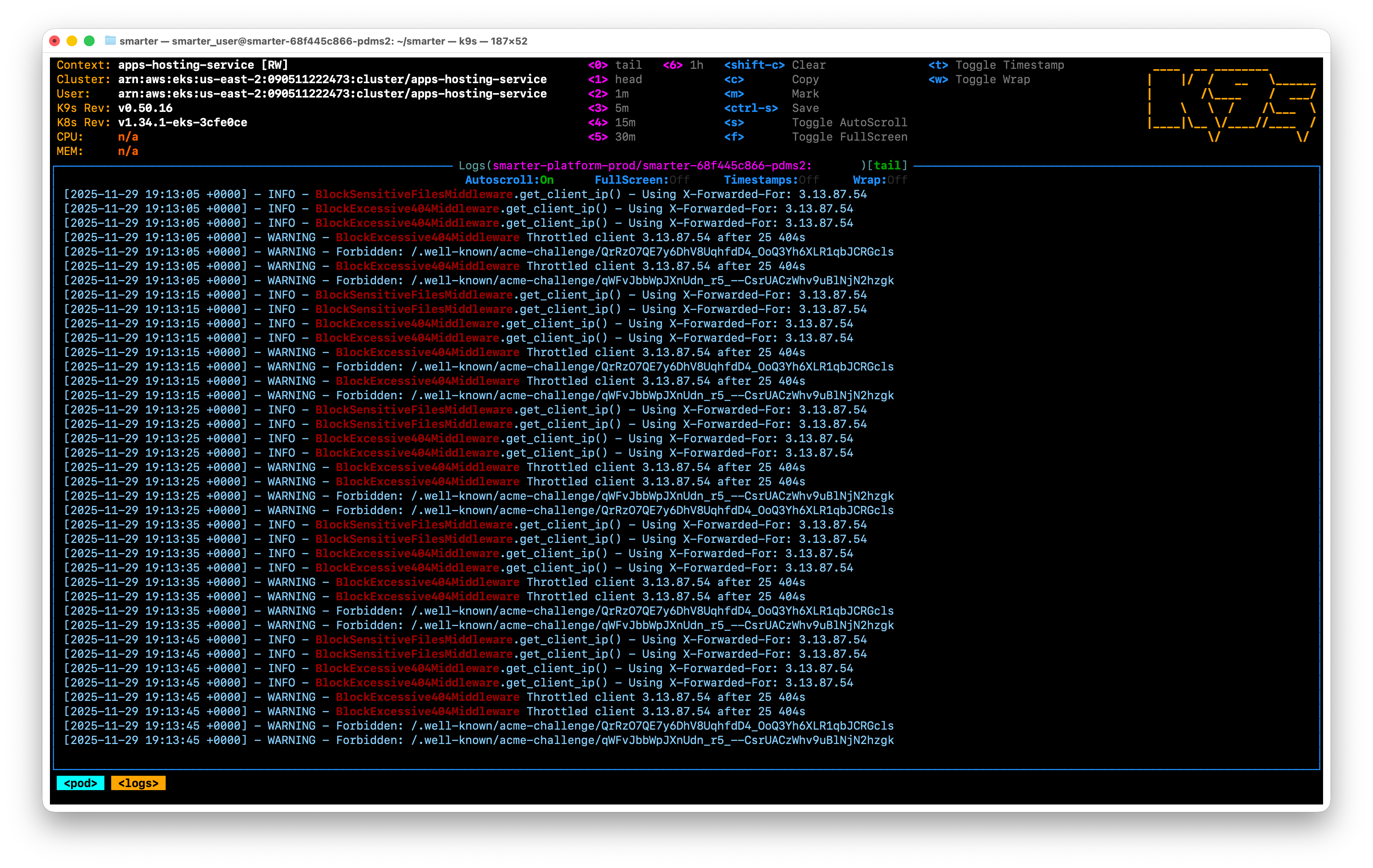
Excessive 404 protection. A client that requests many pages that don’t exist, as scanners do, is blocked. See excessive_404.py.
CSRF for deployed LLMClients.
SmarterCsrfViewMiddlewarecomputes the trusted origins for each request, so a deployed LLMClient’s own domains are trusted, then hands the check to Django’s CSRF middleware. It exempts a deployed LLMClient’s chat API and requests from inside the cluster’s network. See csrf.py.JSON errors.
SmarterJsonErrorMiddlewarereturns API errors as JSON. See json.py.
Django’s protections
HTTPS. Traefik redirects HTTP and sets HSTS (above), so
SECURE_SSL_REDIRECTandSECURE_HSTS_SECONDSstay unset in Django. Django learns that a request was HTTPS fromX-Forwarded-Proto(SECURE_PROXY_SSL_HEADER).Cookies. The session and CSRF cookies are
SecureandSameSite=Lax; the session cookie is alsoHttpOnly.Content Security Policy, in report-only mode: browsers block nothing yet, and report what the policy would block, which Smarter logs. Inline scripts carry a nonce. The policy will be enforced once the reports are clean. See
SECURE_CSP_REPORT_ONLYinsettings/base.py.Clickjacking protection with
X-Frame-Options.SQL injection: Smarter queries its own database through Django’s ORM.
XSS: Django’s templates escape their output, and React escapes what it renders.
The secret key.
DJANGO_SECRET_KEYsigns sessions and password reset tokens. Outside the local environment, Smarter refuses to start if it is missing or still aSET-MEplaceholder.
AI-specific protections
Guardrails inspect what passes between users and LLMs: they redact PII and secrets, and block prompt injection, jailbreaks and off-topic requests, before a message reaches the LLM or its tools, and before a reply reaches the user. See Smarter Guardrail.
Server-side request forgery. Tools that fetch URLs chosen by a manifest author or by the LLM (web search, skills, image search, MCP clients, the extension registry, …) go through one hardened client,
safe_http: HTTPS on port 443 only, only to public addresses, with every redirect validated, no credentials in URLs, bounded response sizes and timeouts. This keeps them away from the cluster’s own network and the cloud’s instance metadata. See safe_http.py.Signed extensions. The extension registry’s index is signed, and Smarter verifies its signature with
SMARTER_APP_LLMTOOL_EXTENSION_REGISTRY_PUBLIC_KEYon every read. See Managing Extensions.Cost accounting. The cost of every request to an external service, LLM providers included, is recorded per account. See Cost Accounting.
Audit Logging and Logs
The Smarter Journal keeps the platform’s API responses, with who made each request, for long-term audit. It is turned on at run time with its waffle switch. See Smarter Journal.
Application logs go to Loki in the cluster, with Alloy collecting them from every pod. Smarter never writes a secret, credential or PII to its log: it logs ids and masked values. In DEBUG mode the web console shows the log to users, which is one more reason to keep DEBUG off in production. See Configuration.
Traefik’s access log records every request that reaches the cluster.
Secure Development
Every change to Smarter passes bandit, mypy and the other pre-commit hooks, and GitHub’s CodeQL analysis. Dependabot opens pull requests for the console’s npm packages, the GitHub Actions and the Helm chart’s dependencies. Every Docker image is built with the operating system’s latest security updates. The repository is public, so its code, infrastructure and these settings are open to review.
What Smarter Doesn’t Provide
Smarter and smarter-infrastructure don’t set up the following. Add them with your own AWS account’s tools if your policies require them:
A web application firewall (AWS WAF, or Shield Advanced). The Network Load Balancer passes TCP; Traefik’s middlewares and Smarter’s rate limits are the application’s only filters.
Threat detection and account auditing: GuardDuty, CloudTrail, Security Hub.
Malware scanning of uploaded files.
Encryption at rest with your own KMS keys, for Kubernetes Secrets and the database’s volume (see Data Protection, above).
Security Updates
Each Smarter release is a new Docker image, built with the operating system’s latest security updates, and a new Helm chart version. Update regularly, as Software Updates describes. See also the Security FAQ.