Django-React Integration
Smarter integrates React applications directly into Django’s server-rendered architecture rather than treating React as a separate single-page application. This approach preserves Django’s strengths in authentication, session management, template rendering, routing, and deployment while enabling modern, highly interactive user interfaces. The core design principle is that React build artifacts are treated as ordinary Django static assets that leverage Django’s existing serving and management of authentication and session data.
React applications are compiled by Vite.js into versioned JavaScript and CSS bundles and emitted directly into Django’s static file hierarchy. At runtime, Django discovers and loads these assets through a manifest-driven integration layer that automatically resolves hashed filenames, shared chunks, vendor bundles, and code-split dependencies.
As a result, Django remains responsible for request routing, authentication, template rendering, runtime configuration, static asset management, and deployment orchestration, while React remains focused exclusively on frontend behavior and presentation logic. Frontend and backend development can therefore proceed largely independently while still participating in a unified deployment model.
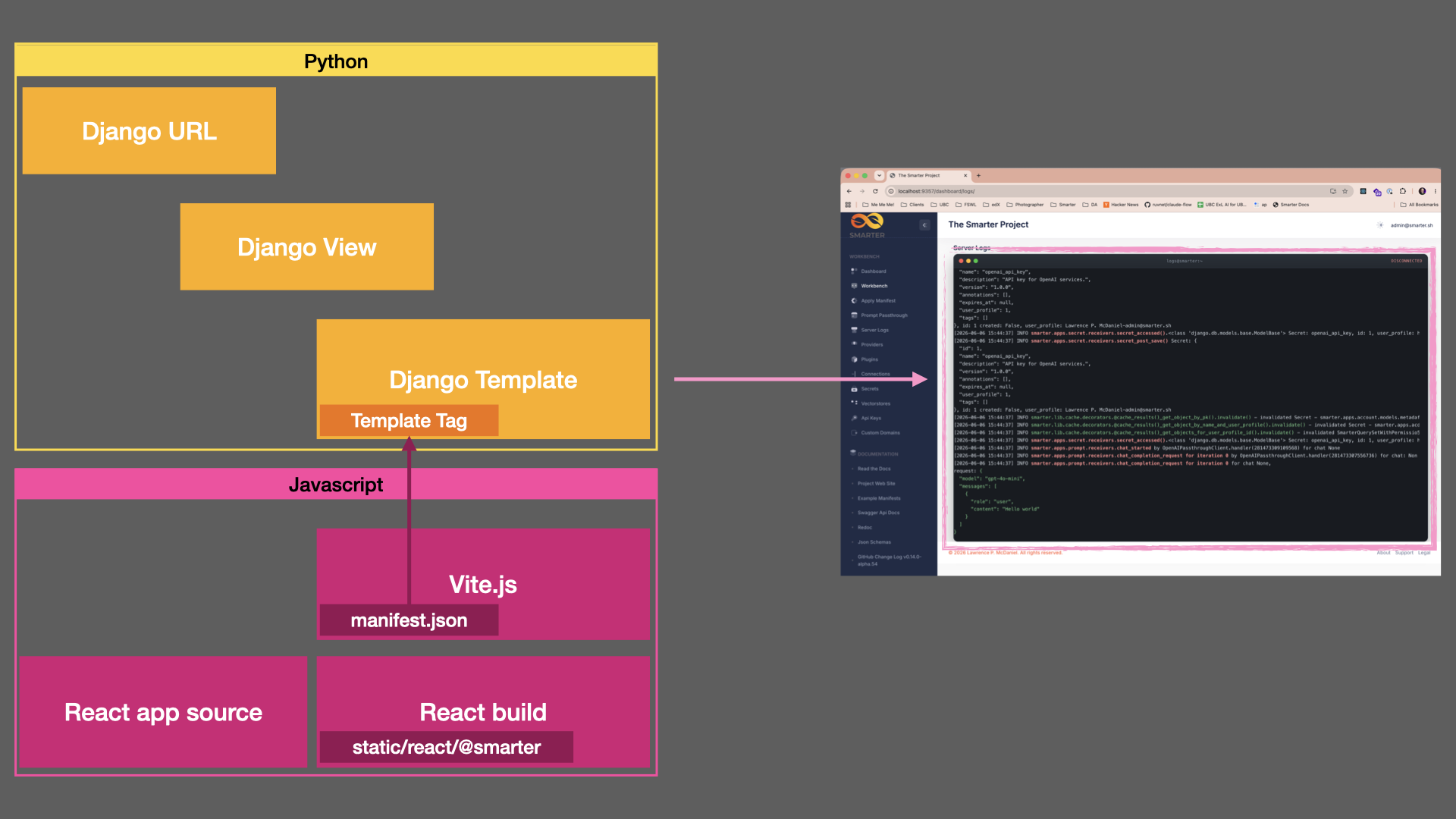
Request Lifecycle
The following sequence describes how a React application is rendered within the Django runtime:
A user requests a Django URL.
Django routes the request to a view.
The view generates runtime configuration and template context.
A custom template tag loads and analyzes the React build’s manifest.json file.
JavaScript and CSS dependencies are recursively discovered.
Django renders the template and injects the required asset references.
The browser downloads the React bundles.
React IIFE (Immediately Invoked Function Expression) mounts onto a designated DOM element.
React reads runtime configuration from HTML attributes.
React begins communicating with backend APIs.
This architecture creates a lightweight integration boundary between Django and React without requiring hardcoded asset references, inline bootstrap scripts, environment-specific templates, or additional initialization APIs.
The remainder of this guide follows a complete implementation example and then examines each integration layer in detail, including manifest analysis, template tags, Vite configuration, runtime context propagation, and deployment considerations.
An Example: The Terminal Application Component
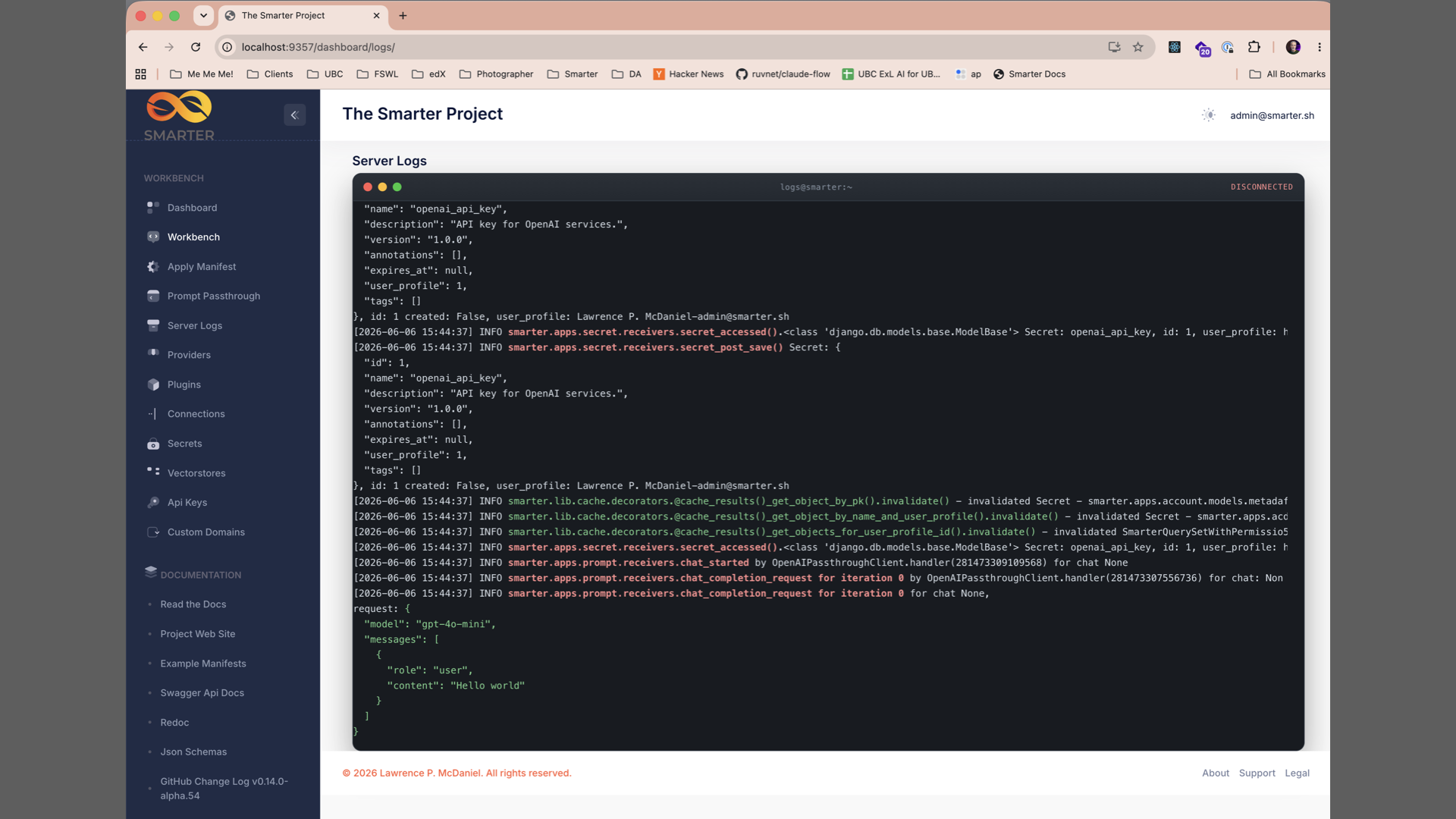
Smarter’s live view of server log activity is a great example, in that it is a highly interactive React component that involves live streaming data, complex state management, and tight integration with Django’s authentication and server-side context management. Functionality of this nature could only be implemented in a frontend framework like React.
Django Objects
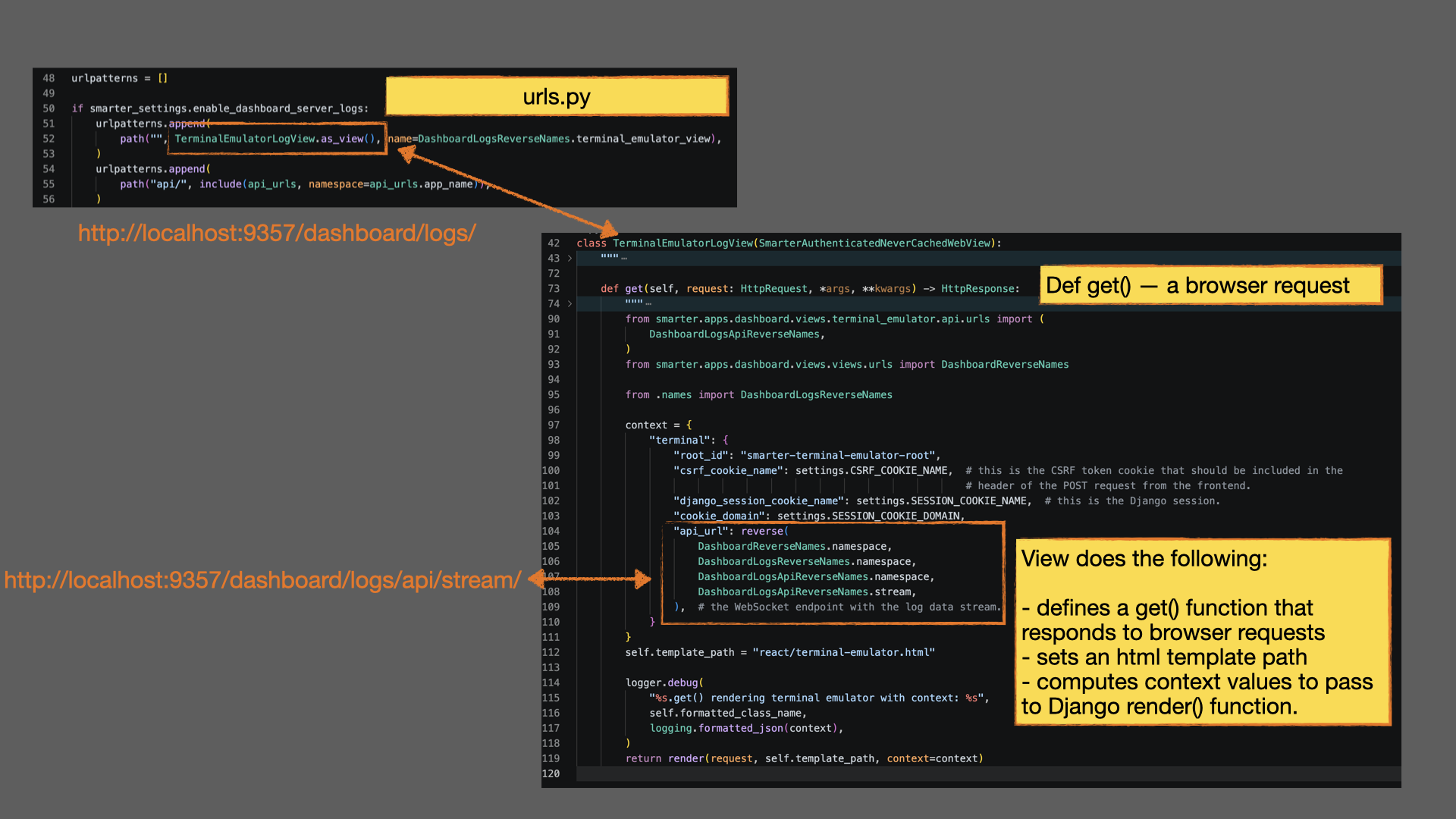
The Terminal Application begins with a standard Django request lifecycle.
A URL pattern routes incoming requests for the pattern /dashboard/logs/ to the Django view class
TerminalEmulatorLogView. The view is also responsible for generating
and providing the API endpoint that the React application will use to retrieve log data.
Rather than hardcoding endpoint URLs, the view uses Django’s reverse()
function and Django URL namespaces to generate the correct endpoint at runtime.
This ensures that routing remains centralized within Django, that it remains
future-proofed against code refactoring, and that it assists code contributors in
understanding how frontend and backend routing are connected without
duplicating URL definitions across templates and React components.
The view’s primary responsibilities are straightforward:
Select the template to render.
Generate runtime configuration required by the frontend.
Provide template context.
The template then renders the initial HTML response and provides a DOM mounting point for the React application.
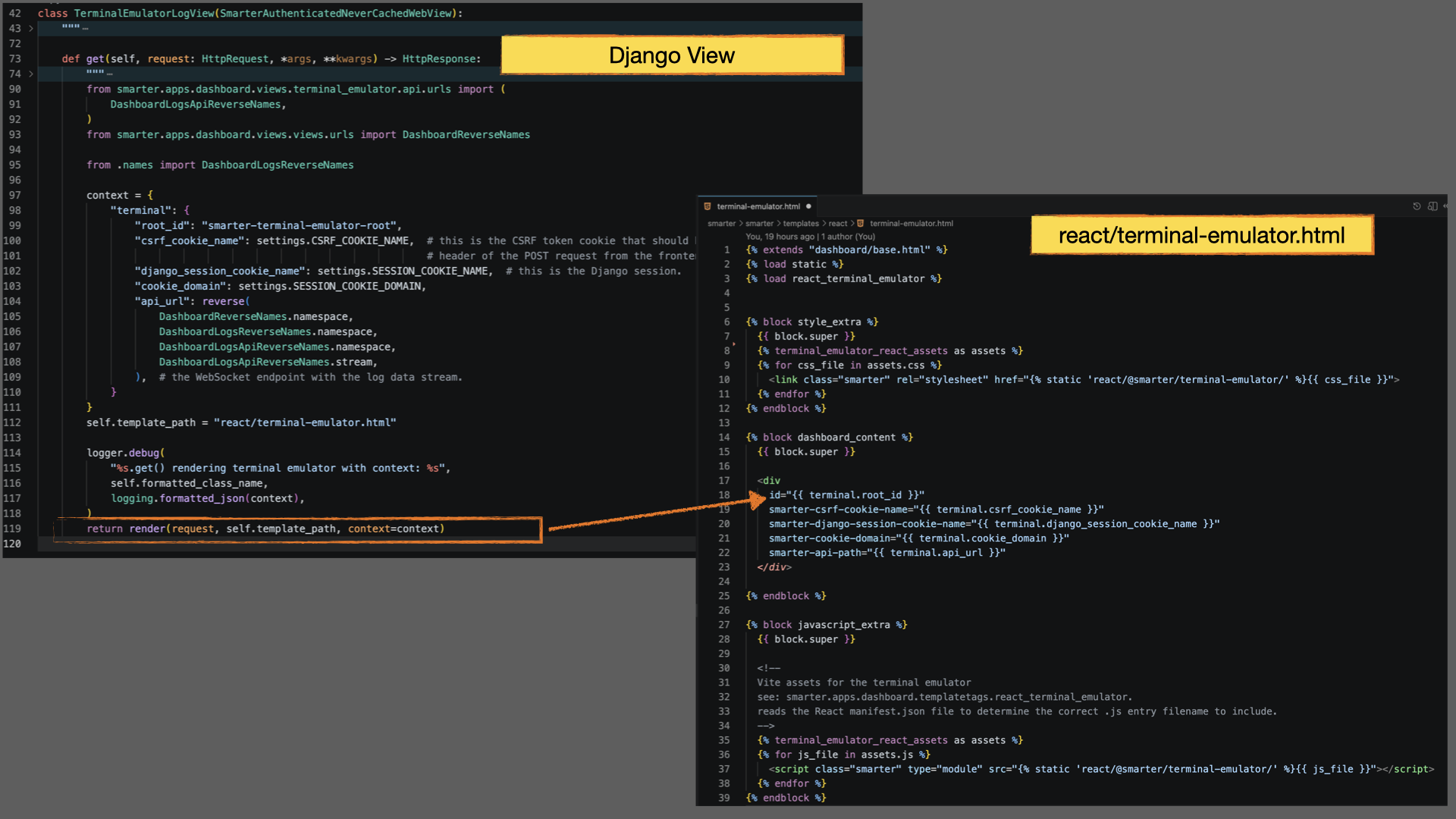
In addition to rendering the mounting element, the template performs two important integration tasks. First, it serializes runtime configuration generated by the view into custom HTML attributes attached to the mounting element (see example below). These attributes become the transport mechanism through which Django passes configuration data into React during application initialization.
<div
  id="smarter-terminal-emulator-root"
  smarter-api-path="/dashboard/logs/api/stream/"
  smarter-cookie-domain="alpha.platform.example.com"
  smarter-csrf-cookie-name="csrftoken"
  smarter-django-session-cookie-name="sessionid"
>
Note
In this integration scheme, React does not technically require session nor csrf data in order to function, since React is served by Django and therefore shares the same origin. However, we pass these values in the interest of future-proofing against the possibility of serving React from a different origin, which would require explicit handling of authentication and CSRF tokens in API requests.
Second, the template invokes a custom Django template tag that analyzes the React build’s manifest.json file and injects the required <script> and <link> elements for the application’s JavaScript and CSS assets (see annotations in bright green below). This process is explained in detail later in this article.
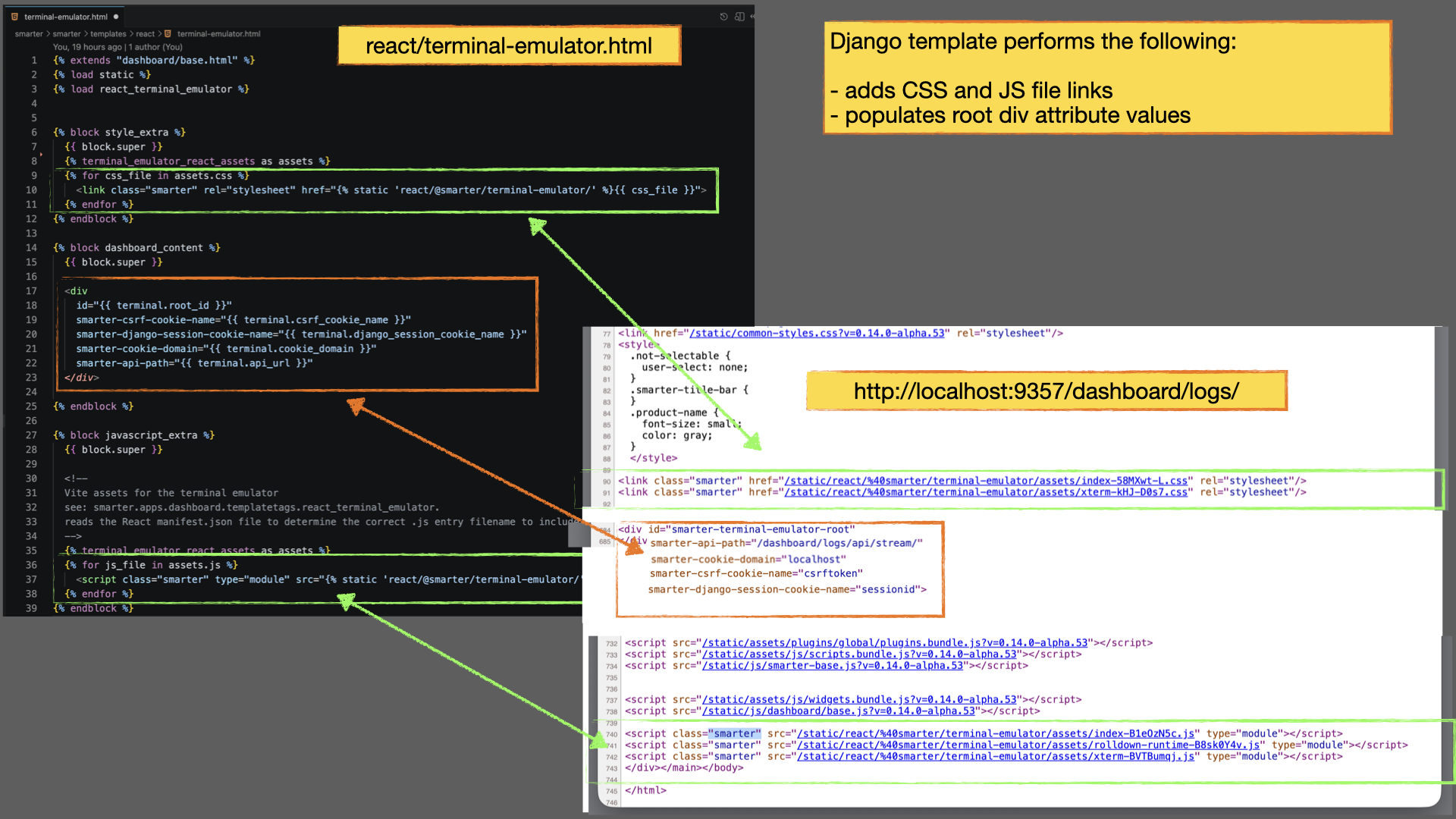
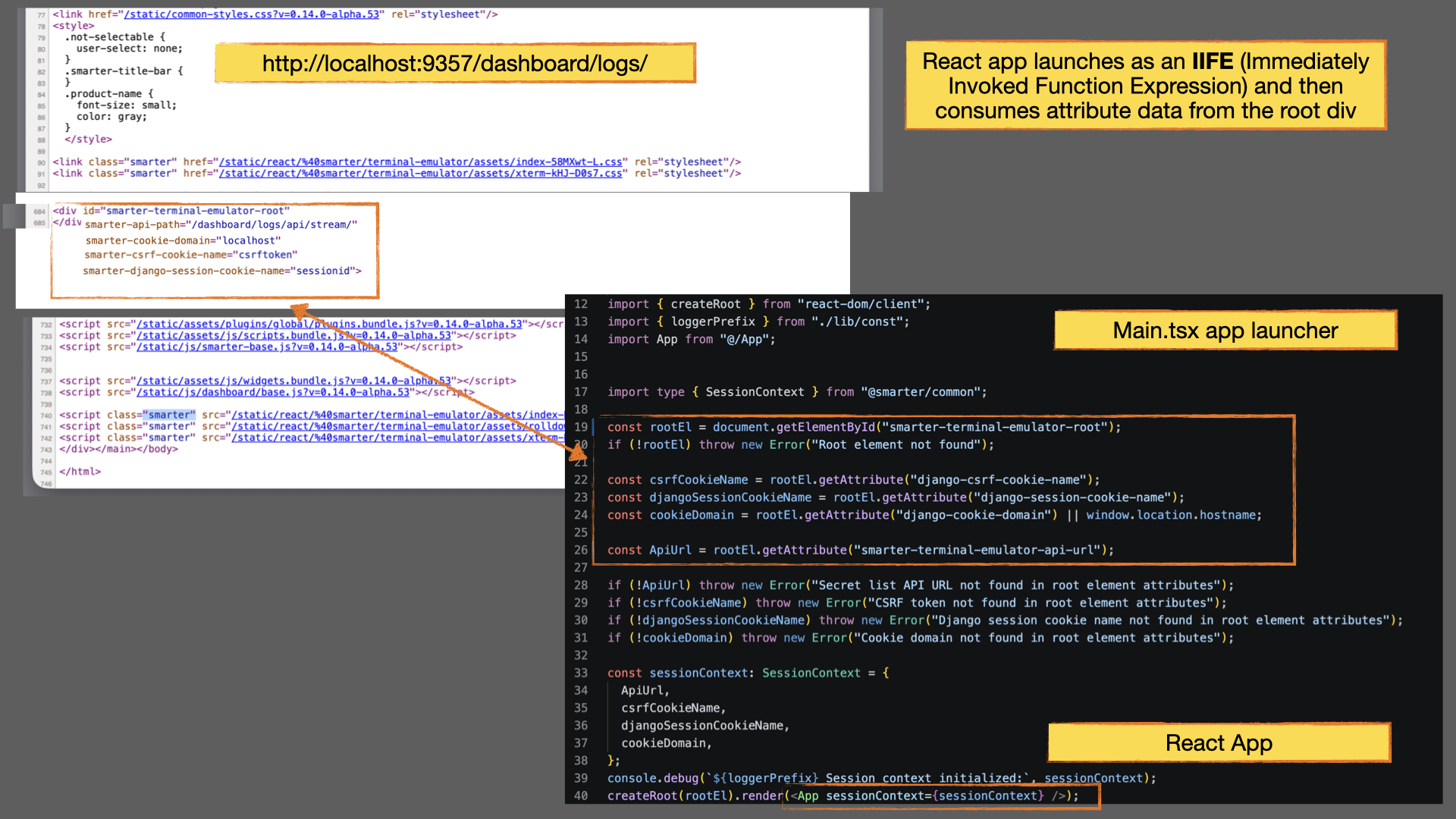
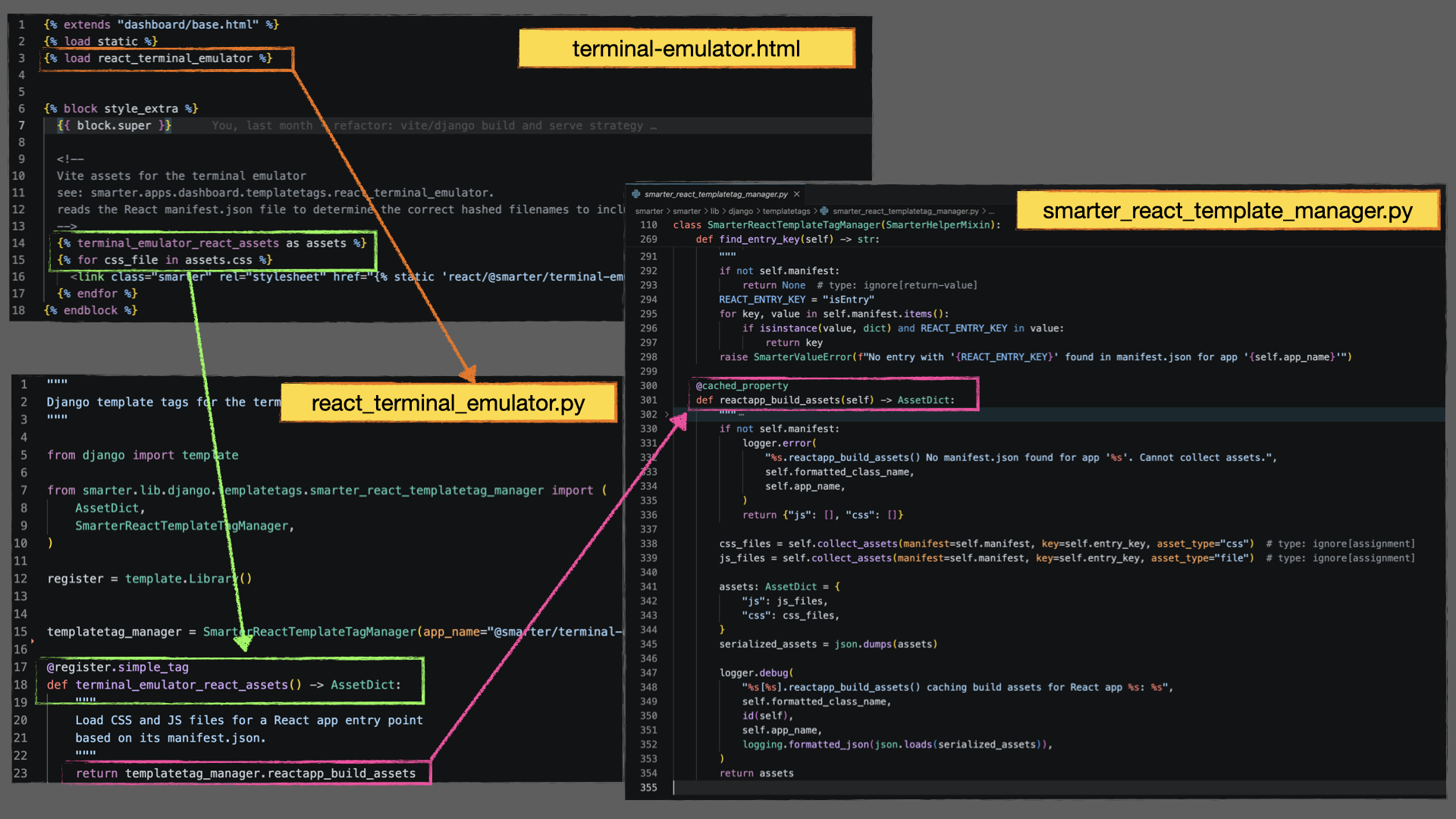
Once the page has loaded, React mounts onto the designated DOM element (see annotations in orange above) and, reads the runtime configuration exposed through the custom HTML attributes, and begins communicating with Django APIs. From React’s perspective, the integration boundary is intentionally simple. The component receives configuration values and API endpoints as props and remains completely unaware of how assets were built, how the manifest was analyzed, or how JavaScript and CSS bundles were injected into the page.
Note
The React application never references static asset filenames directly. Asset discovery is performed entirely by Django through manifest analysis.
This separation of responsibilities is central to the architecture. React focuses exclusively on frontend behavior, state management, and user interaction, while Django and the build pipeline handle routing, asset discovery, deployment, and runtime integration.
React Build Manifest
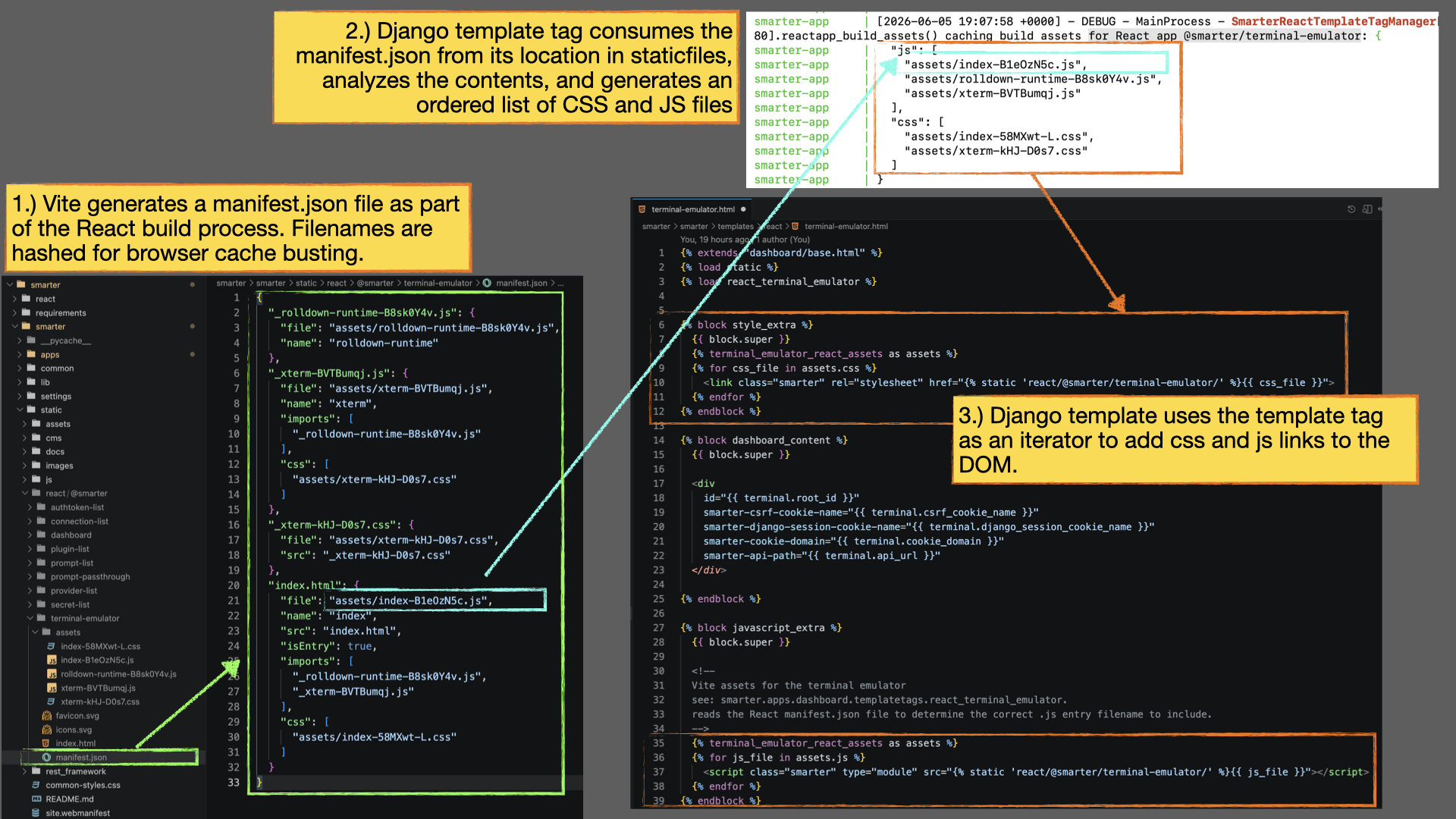
The React build’s manifest.json file for the Terminal Application is generated by Vite.js and serves as the authoritative source of truth for all JavaScript and CSS assets produced during the build process. The manifest is necessary because production asset filenames are generated with content-based hashes for browser cache invalidation. As a result, the names of the generated files cannot be known in advance and should never be hardcoded into Django templates. Instead, Django analyzes the manifest at runtime to determine which assets must be loaded for a given React application, including JavaScript bundles, stylesheets, shared chunks, and third-party dependencies. The exact contents of a manifest vary from application to application, depending on the number of dependencies, vendor libraries, code-split modules, and build optimizations included in the React project.
The following example shows the manifest generated for the Terminal Application:
{
  "_rolldown-runtime-B8sk0Y4v.js": {
    "file": "assets/rolldown-runtime-B8sk0Y4v.js",
    "name": "rolldown-runtime"
  },
  "_xterm-BVTBumqj.js": {
    "file": "assets/xterm-BVTBumqj.js",
    "name": "xterm",
    "imports": [
      "_rolldown-runtime-B8sk0Y4v.js"
    ],
    "css": [
      "assets/xterm-kHJ-D0s7.css"
    ]
  },
  "_xterm-kHJ-D0s7.css": {
    "file": "assets/xterm-kHJ-D0s7.css",
    "src": "_xterm-kHJ-D0s7.css"
  },
  "index.html": {
    "file": "assets/index-B1eOzN5c.js",
    "name": "index",
    "src": "index.html",
    "isEntry": true,
    "imports": [
      "_rolldown-runtime-B8sk0Y4v.js",
      "_xterm-BVTBumqj.js"
    ],
    "css": [
      "assets/index-58MXwt-L.css"
    ]
  },
  "_custom": {
    "buildTime": "2026-10-12T01:09:47.988Z",
    "version": "0.3.0",
    "buildEnv": "production"
  }
}
Every entry except _custom is a chunk generated by Vite. _custom is
build information that Smarter’s Vite configuration adds after the build
(see below).
Within Smarter’s React build conventions, a single manifest entry is designated as the application’s primary entry point and contains the “isEntry”: true property. This entry serves as the root of the dependency graph. Rather than injecting only the entry-point asset into the template, Django recursively traverses the manifest to discover all required dependencies. This includes imported JavaScript chunks, shared runtime modules, vendor bundles, and associated CSS assets. The resulting asset list represents the complete set of files required to initialize the React application correctly. This recursive dependency analysis is performed by custom Django template tags (see above), allowing templates to remain completely independent of the manifest’s internal structure and the dynamically generated asset filenames.
Django doesn’t read the manifest as loose JSON. When it loads a
manifest.json file, it validates the file against the Pydantic model
ViteManifest:
each chunk is a
ViteManifestChunk,
and _custom is a
ReactAppBuildInfo.
Chunks accept fields that Vite or Rolldown add in newer versions, so a Vite
upgrade doesn’t break page rendering. _custom is Smarter’s own shape and
accepts only its three fields. A manifest that is missing, isn’t JSON, or
doesn’t match the model is logged as an error and treated as absent, and the
page then renders without the React application’s assets.
Vite Configuration
A few more points about Vite.js are merited.
Vite is responsible for compiling React applications, generating production
assets, optimizing bundles, and producing the manifest.json file that
Django uses for runtime asset discovery. Because the manifest is derived
entirely from the build process, its structure and contents are determined by
the Vite configuration. Within Smarter, Vite serves as the bridge between React development and
Django deployment. Rather than requiring React applications to understand
deployment environments, static asset locations, or runtime
integration details, these concerns are centralized within the build
configuration itself.
To support Django integration, the Vite configuration addresses several requirements:
- Manifest Generation
Generates a
manifest.jsonfile that maps source entry points to versioned JavaScript, CSS, and dependency assets.
- Development Proxying
Proxies API requests and selected static resources from the Vite development server to the Django development server, allowing React applications to run locally while interacting with a live Django backend.
- Build Information
The
addCustomManifestDataplugin adds a_customentry tomanifest.jsonwith the build time, the package’s version, and the build’sNODE_ENV. Its fields must matchReactAppBuildInfo, or Django rejects the manifest.
- Static Asset Integration
Emits production build artifacts directly into Django’s static file hierarchy so that React assets participate naturally in the
collectstaticworkflow.
- Security Compatibility
Preserves compatibility with Django authentication, CSRF protection, session cookies, and same-origin security policies.
- Production Hardening
Removes console.debug() statements from production bundles to reduce unnecessary console output and prevent accidental disclosure of debugging information.
- Caching Optimization
Separates large third-party dependencies such as xterm.js into dedicated bundles so that vendor assets can remain cached independently from application-specific code.
- Developer Experience
Supports hot module replacement (HMR) and rapid incremental rebuilds while maintaining compatibility with Django’s runtime environment.
The following example illustrates the Vite configuration used by the Terminal Application component.
export default defineConfig(({ command }: ConfigEnv) => ({
  plugins: [
    react(),
    addCustomManifestData,
  ],
  // We use esbuild to remove console.debug statements in production builds
  // in order to avoid leaking potentially sensitive information in
  // production environments.
  esbuild: {
    pure: ["console.debug"],
  },
  // Builds are also saved into the Django static directory so that these
  // files can be included in the Django collectstatic process and served by
  // Django at runtime in local development environments. For development
  // we need to be able to support serving these files both from the Vite
  // dev server as well as the Django dev server. We set the base to '/'
  // so that Vite's dev server can serve these files. Separately, we persist
  // the actual build files to the Django static directory and set up a proxy
  // in the Vite dev server to forward requests to the Django dev server.
  base: command === "serve" ? "/" : `/static/react/${packageName}/`,
  resolve: {
    alias: {
      "@": path.resolve(__dirname, "./src"),
    },
  },
  build: {
    minify: "esbuild" as const,
    // ------------------------------------------------------------------------
    // The manifest is needed for hosting builds from Django (both dev and prod).
    // It is used by Django templatetags to determine the correct file names to include
    // in the HTML template. This is necessary because Vite includes a
    // hash in the file names for cache busting.
    // ------------------------------------------------------------------------
    manifest: "manifest.json",
    // ------------------------------------------------------------------------
    // we're placing our build output in the primary Django static directory so
    // that these files are automatically included in the Django collectstatic
    // process and served by Django at runtime.
    //
    // In development, we rely on Vite's dev server to serve these files, so we
    // set the outDir to a directory that is not used by the Django dev server.
    // ------------------------------------------------------------------------
    outDir: `../../../smarter/static/react/${packageName}`,
    emptyOutDir: true,
    // ------------------------------------------------------------------------
    // We want to bundle xterm.js and its addons separately from the rest of the
    // application code in order to optimize caching. This way, if we make changes
    // to our application code, the xterm.js bundle can still be cached by the
    // browser and won't need to be re-downloaded.
    // ------------------------------------------------------------------------
    rollupOptions: {
      output: {
        entryFileNames: "assets/[name]-[hash].js",
        chunkFileNames: "assets/[name]-[hash].js",
        assetFileNames: "assets/[name]-[hash][extname]",
        manualChunks(id: string) {
          if (id.includes("node_modules/xterm") || id.includes("node_modules/@xterm")) {
            return "xterm";
          }
          return undefined;
        },
      },
    },
  },
  // Django collects static files and serves them from /static/
  // We need to create proxy servers in React's dev environment
  // so that these requests are served from the Django dev server instead
  // of the React dev server.
  //
  // Most of these cases stem from <link> elements added to this index.html
  // containing platform-wide stylesheets and scripts that originate from
  // and are served by the Django dev server. These are added to index.html
  // in order to keep this React dev environment as close to the runtime
  // environment as possible.
  server: {
    proxy: {
      "/api": "http://localhost:9357",
      "/assets": {
        target: "http://localhost:9357", // Django dev server
        changeOrigin: true,
        rewrite: (path: string) => `/static${path}`,
      },
      "/common-styles.css": {
        target: "http://localhost:9357",
        changeOrigin: true,
        rewrite: (path: string) => `/static${path}`,
      },
      "/dashboard/": "http://localhost:9357",
      [`/static/react/${packageName}/`]: {
        target: "http://localhost:5173",
        changeOrigin: true,
        rewrite: (path: string) => path.replace(new RegExp(`^/static/react/${packageName}/`), "/"),
      },
      "/static": {
        target: "http://localhost:9357",
        changeOrigin: true,
      },
      "/workbench/": "http://localhost:9357",
    },
  },
}));
Django Template Tags
Custom Django template tags provide the integration layer between Django
templates and React build artifacts. As described in the previous section,
the Terminal Application’s React build process generates a manifest.json
file that contains the complete dependency graph for a React application,
including JavaScript bundles, stylesheets, shared chunks, and vendor
dependencies. Django templates should not need to understand the structure
of this manifest or the details of dependency traversal. Instead, Smarter
encapsulates this logic within reusable template tags.
At render time, a template tag loads the appropriate manifest.json file,
identifies the application’s entry point, recursively discovers all required
dependencies, and returns the resulting JavaScript and CSS asset lists to the
template, as a
ReactAppAssets
model with js and css attributes. The entry point’s own files come
first, followed by those of its imports. The template can then render the appropriate <script> and
<link> elements without any knowledge of how the assets were generated or
how the dependency graph is structured. This approach provides several advantages:
Eliminates hardcoded asset filenames.
Supports cache-safe hashed build artifacts.
Automatically resolves code-split dependencies.
Keeps manifest traversal logic out of templates.
Allows React applications to participate naturally in Django’s rendering process.
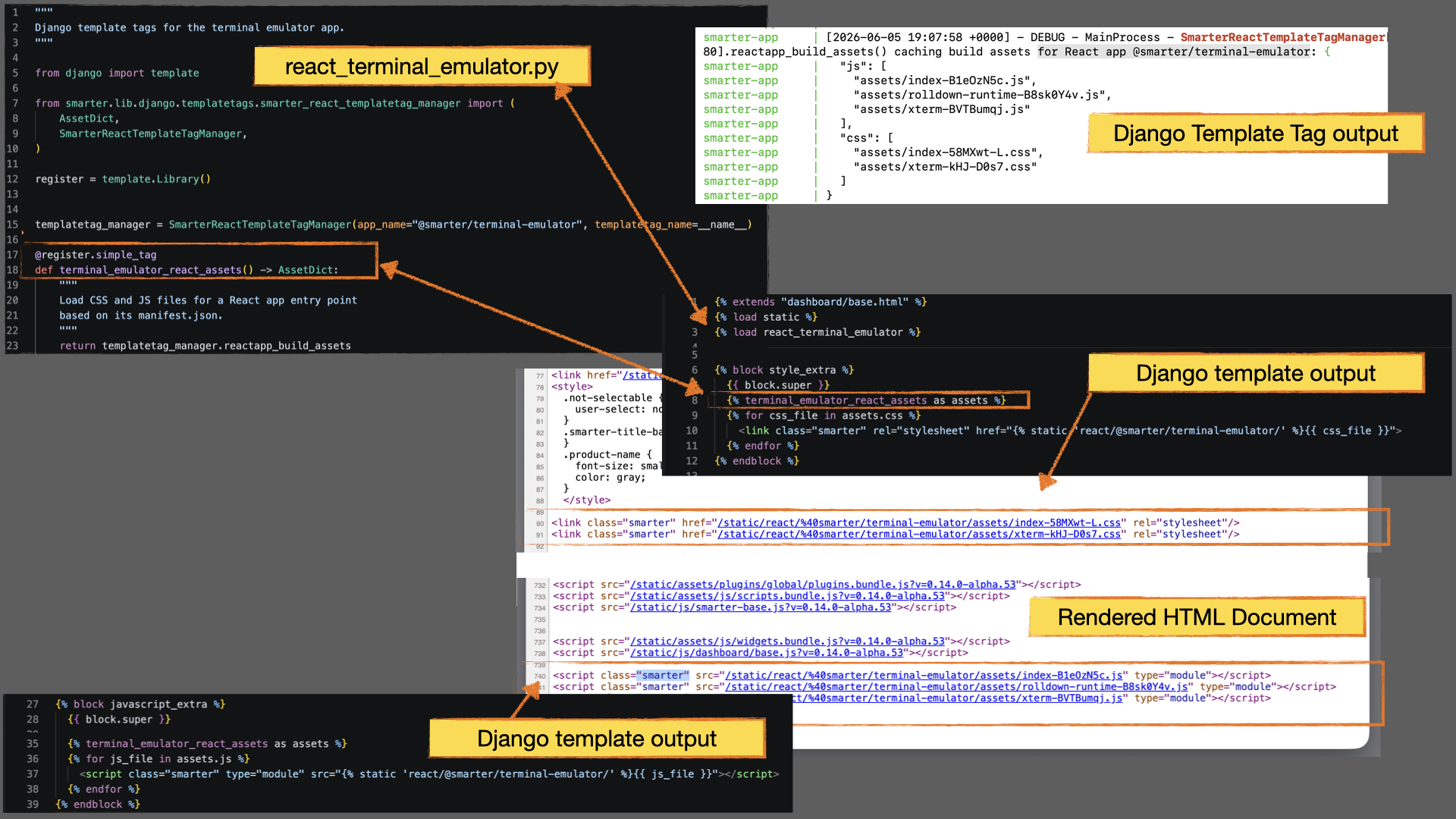
The following example illustrates how the Terminal Application template retrieves the CSS and JavaScript assets associated with its React build.
{% extends "dashboard/base.html" %}
{% load static %}
{% load react_terminal_emulator %}
{% block style_extra %}
  {{ block.super }}

  {% terminal_emulator_react_assets as assets %}
  {% for css_file in assets.css %}
    <link class="smarter" rel="stylesheet" href="{% static 'react/@smarter/terminal-emulator/' %}{{ css_file }}">
  {% endfor %}
{% endblock %}
{% block javascript_extra %}
  {{ block.super }}

  {% terminal_emulator_react_assets as assets %}
  {% for js_file in assets.js %}
    <script class="smarter" type="module" src="{% static 'react/@smarter/terminal-emulator/' %}{{ js_file }}"></script>
  {% endfor %}
{% endblock %}
From the template’s perspective, the interaction is intentionally simple. The template requests a collection of CSS and JavaScript assets and renders them. The details of manifest loading, dependency traversal, asset ordering, and filename resolution remain encapsulated within the template tag implementation.
See SmarterReactTemplateTagManager, which also documents the Pydantic models of the manifest and of the assets.
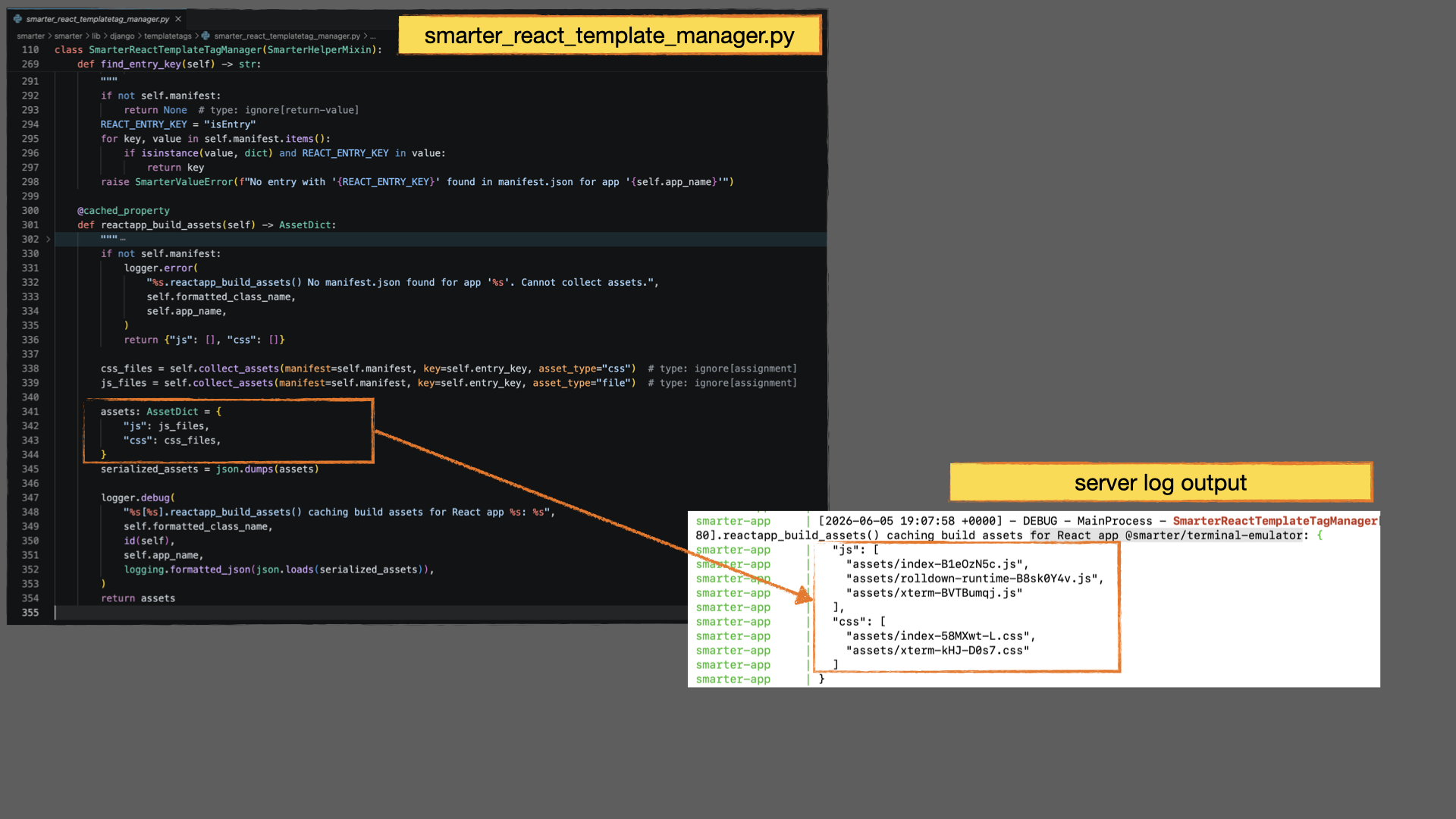
Django Template
The Django template for the Terminal Application serves as the final integration point between Django and React. It is responsible for assembling the HTML required to initialize the React application and making server-side configuration available to the frontend runtime. Specifically, the template performs three functions:
Provide a DOM mounting point for the React application.
Inject the JavaScript and CSS assets required by the React build.
Transport runtime configuration generated by the Django view into React.
The JavaScript and CSS assets are generated by the custom template tags
described in the previous section. These tags analyze the React build’s
manifest.json file and produce the <script> and <link> elements
required to load the application and all of its dependencies.
The template also renders a DOM element that serves as the mounting point for
the React application. In addition to providing a location where React can
attach itself to the page, this element exposes runtime configuration values
generated by the Django view through custom HTML attributes.
Typical configuration values include:
API endpoint URLs
Session and CSRF cookie names
Cookie domains
Feature flags
Environment-specific settings
Other application configuration required at runtime
The following example illustrates the mounting element used by the Terminal Application:
<div
  id="smarter-terminal-emulator-root"
  smarter-api-path="/dashboard/logs/api/stream/"
  smarter-cookie-domain="alpha.platform.example.com"
  smarter-csrf-cookie-name="csrftoken"
  smarter-django-session-cookie-name="sessionid"
>
During initialization, React locates the mounting element, reads the configuration values from its attributes, and converts them into component props supplied to the application’s root component. This pattern creates a clean separation between Django and React. Django remains responsible for generating runtime configuration, while React remains focused on application behavior and presentation. Neither side requires knowledge of the other’s internal implementation details.
The template is also responsible for invoking the custom template tags
described in the previous section. These tags analyze the React build’s
manifest.json file and generate the <script> and <link> elements
required to load the application’s JavaScript and CSS assets.
Build, Deployment, and CI/CD Considerations
React applications are organized as a single npm workspace containing multiple
independent packages. Each package produces its own manifest.json file and
associated build assets, which are emitted directly into a dedicated location
within Django’s static file hierarchy such as:
static/react/@smarter/terminal-emulator/
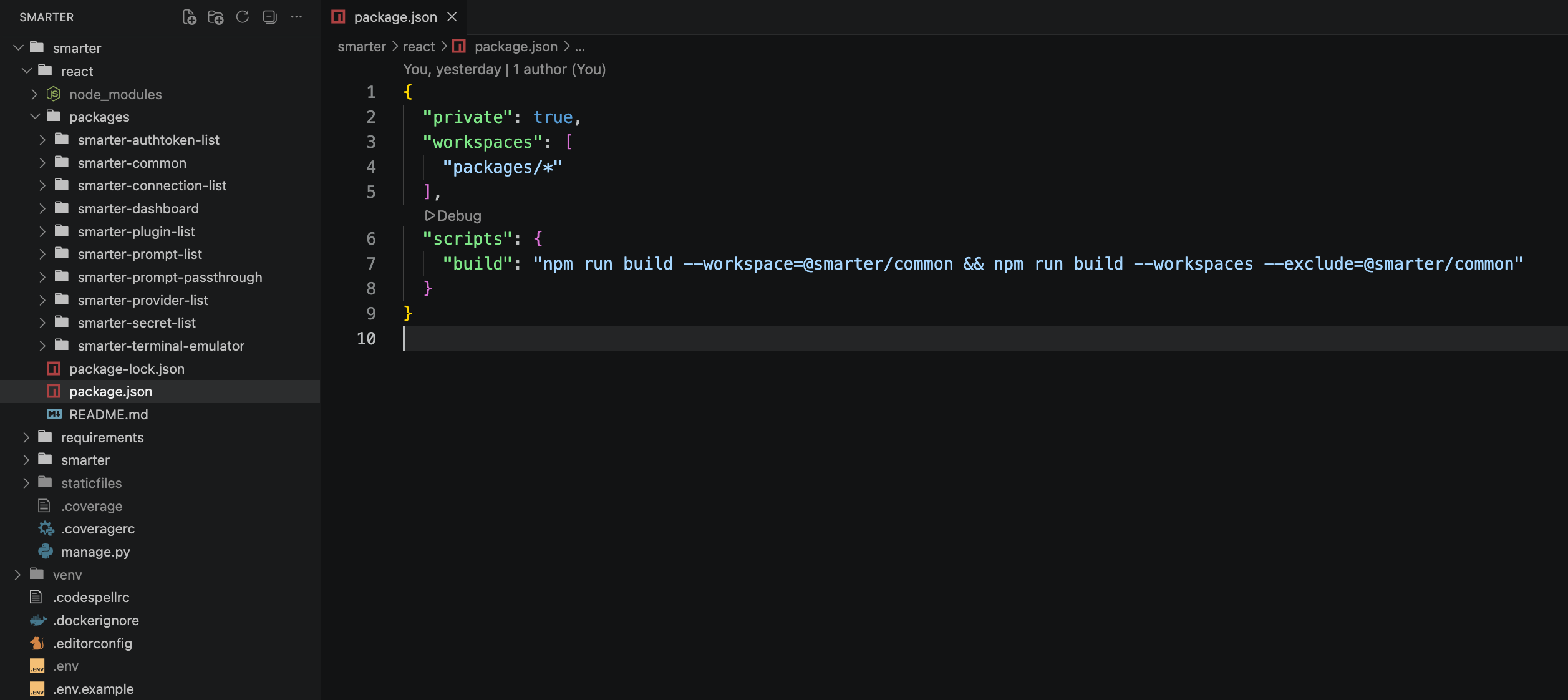
This build layout reflects a fundamental architectural principle described throughout this guide:
Note
React build artifacts are treated as ordinary Django static assets.
From Django’s perspective, compiled React bundles are no different from any other static resource such as CSS, images, or JavaScript files. Once generated, they participate in the standard Django static asset workflow, including collectstatic, static file serving, and cache management.
Because React assets are generated before Django is deployed, the frontend build process remains cleanly separated from the Django runtime. React applications can be developed, versioned, tested, and rebuilt independently while still integrating seamlessly into Django’s deployment pipeline.
CORS
@smarter/common includes a set of custom HTTP headers in all API requests. These are included in smarter.settings.base.py as part of the CORS_ALLOW_HEADERS list. Note that CORS is switch-enabled, meaning that this switch must be enabled in order for the any React component to be able to make API requests to the Django backend.
  const requestHeaders = {
  Accept: applicationJson,
  Authorization: `Bearer ${djangoSessionTokenValue}`,
  "Content-Type": applicationJson,
  "X-CSRFToken": csrftokenValue,
  "X-Smarter-Client": sessionContext.smarterClient,
  "X-Smarter-ClientVersion": sessionContext.smarterClientVersion,
  "X-Smarter-ClientType": "react",
  "X-Smarter-RequestId": sessionContext.smarterRequestId,
  "X-Smarter-Capabilities": capabilities,
};
Operational Considerations
- Source Control Exclusion
Compiled React build artifacts are intentionally excluded from the Git repository and are never committed to source control. Build outputs are considered ephemeral deployment artifacts and must therefore be regenerated as part of the build process.
- Build Prerequisites
Because Django templates and template tags depend on the existence of
manifest.jsonand its associated static assets, the React build process must execute successfully at least once before the Django application can correctly render React-integrated pages. Keep this in mind when for example, you are tinkering with versions inpackage.json.
- CI/CD Pipeline Initialization
GitHub Actions workflows begin with a clean repository checkout that does not contain compiled frontend assets. Accordingly, React build steps must run early in the workflow before Docker builds, collectstatic, integration tests, or deployment stages that depend on these assets.
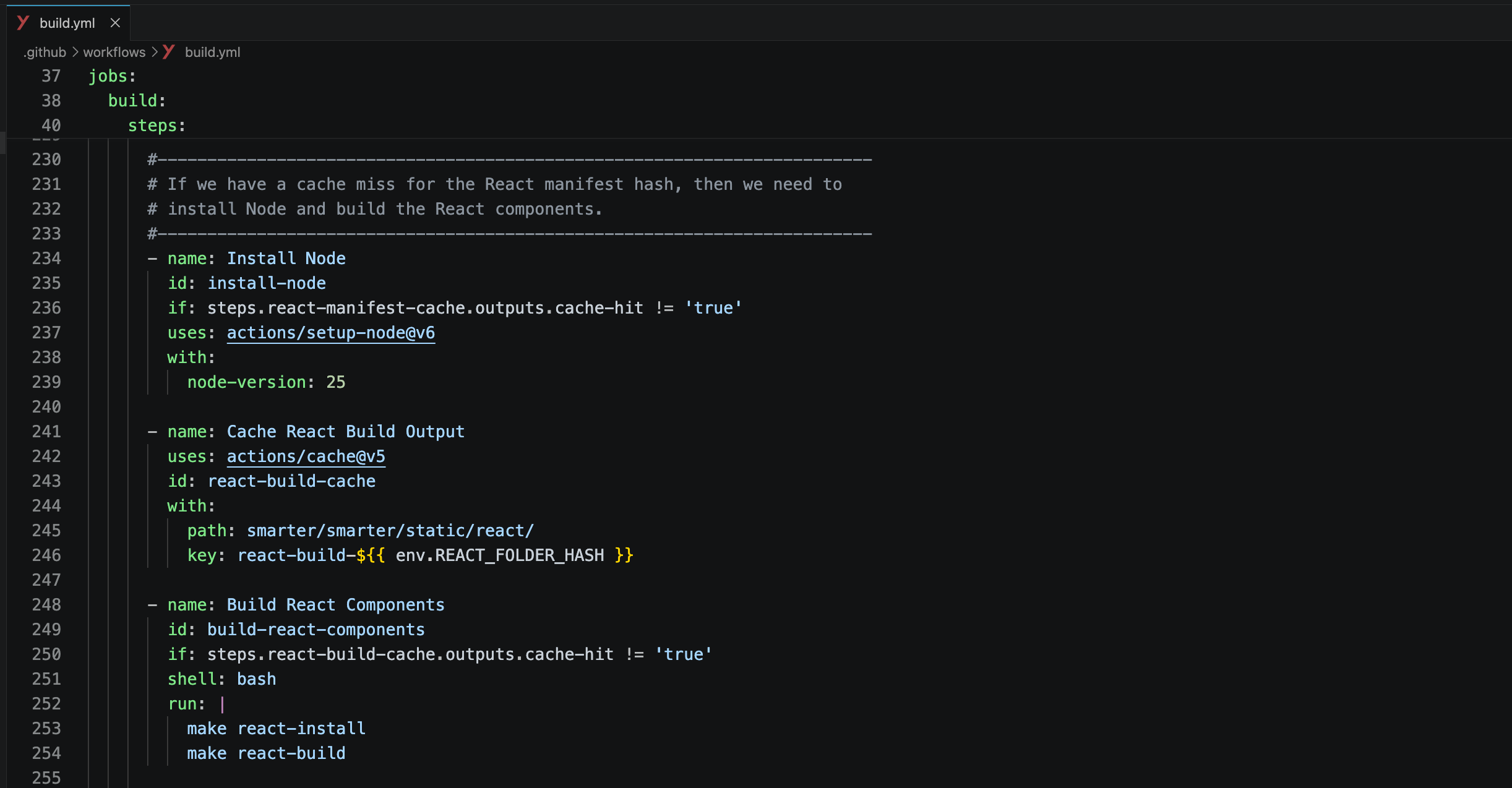
- Static File Synchronization
During local development, developers should remain aware of the distinction between Vite’s live development server, Django’s static asset directories, and the Django staticfiles runtime directory. Stale build artifacts can occasionally lead to confusing runtime behavior if these environments become out of sync.
- Container Build Dependencies
Docker images intended to serve React-enabled Django pages must be built only after the frontend asset pipeline has completed. This ensures that all compiled React bundles and
manifest.jsonmetadata are available inside the container image at runtime.
- Externally Managed Packages
Smarter Chat, the React app of the LLMClient prompt engineering workbench, is managed in its own repository and published to npm.
make react-installclones it intosmarter/react/packages/smarter-chat, and the GitHub Actions workflows do the same before they build or test, after which it is built, tested and served like every other package in the workspace.
- Convenience Tooling
Smarter provides helper commands such as make react-build and make react-build-ci to simplify common frontend integration workflows and to keep Django’s static directories aligned with current React build outputs.
Collectively, these conventions provide a predictable and highly reproducible deployment model that works consistently across local development environments, CI/CD workflows, Docker container builds, and production infrastructure. The result is a React integration architecture that preserves the operational simplicity of Django deployments while still enabling modern frontend build pipelines and advanced React development workflows.
Technical Reference