Configuration
Smarter is a Docker-based Django web application and REST API that is highly configurable via environment variables, configuration files, and infrastructure-as-code templates. This document outlines the various configuration options available for Smarter. The guidelines that follow assume that you are deploying Smarter using the recommended approach of AWS EKS with the provided Helm chart and Terraform modules.
1. AWS Infrastructure Configuration
See Cloud Infrastructure for details on configuring the necessary AWS resources using Smarter-supported Terraform modules. The official Smarter Terraform modules favor simplicity, paradoxically making them conducive to customization. You should be able to fork and modify these modules to suit your specific infrastructure requirements.
2. Django Settings
In certain cases, Smarter uses a superseding singleton settings module (hereon, smarter_settings) to establish configuration values. This module leverages Pydantic to implement enhanced validation and type checking for configuration settings. You are STRONGLY recommended to avoid modifying this module directly unless you are fully aware of the implications. Many of Smarter’s configuration settings are programmatically derived from environment variables set in the Docker container or Kubernetes pod. Modifying this logic can lead to unexpected behavior.
Note
The smarter_settings module also leverages Pydantics’ SecretStr type to securely handle sensitive configuration values such as API keys, tokens, and passwords. This ensures that sensitive information is not inadvertently exposed in logs or error messages.
Usage:
from smarter.apps.common.conf import settings as smarter_settings

print(smarter_settings.environment_cdn_domain)
smarter_settings.openai_api_key.get_secret_value()
smarter_settings.dump()
In all other cases, Smarter uses standard Django settings located in smarter/settings/. Django settings that can be overridden via environment variables are discoverable in smarter/settings/base.py and generally follow the form:
import os

CSRF_COOKIE_SECURE = os.environ.get("CSRF_COOKIE_SECURE", "False").lower() in ("true", "1", "t")
See Django Settings for a comprehensive list of Django settings that can be configured in Smarter.
To the extent that you find a given Django settings variable initialized in this manner, you’ll be able to override it by setting the corresponding environment variables in your deployment configuration.
3. Asynchronous Task Queue Configuration
Smarter uses Celery as its asynchronous task queue. Celery configuration settings can be found in smarter/settings/celery.py. Celery relies on a message broker and result backend, both of which can be configured via environment variables. By default, Smarter is configured to use Redis as both the message broker and result backend. This is known to work well for most use cases. However, you can configure Celery to use other brokers and backends as needed.
If you are not running at scale then the default Celery configuration should suffice.
See Celery configuration for more details on how Celery is configured in Smarter.
4. Beat Scheduler Configuration
Smarter uses Celery Beat to schedule periodic tasks. The Beat scheduler configuration can be found in smarter/settings/celery.py. Like asynchronous task queue configuration, the Beat scheduler relies on the same message broker and result backend as Celery.
See Celery Beat configuration for more details on how Celery Beat is configured in Smarter.
5. Helm Chart Configuration
The Smarter cloud platform is deployed using Smarter’s official Helm chart. Configuration options for this Helm chart can be found in the values.yaml file. Additional documentation on this Helm chart can be found in the Helm Chart Documentation.
Warning
Kubernetes is a complex topic with a substantial learning curve. The Helm chart, as published is known to work well for most use cases. That is, installations that are running in production, at scale, or otherwise mission critical. It is EXCEEDINGLY UNLIKELY that you will need to modify the Helm chart configuration to suit your needs. Therefore, you are STRONGLY recommended to avoid modifying the Helm chart itself, beyond providing the pre-programmed values.yml data, unless you know what you are doing, and you are fully aware of the implications.
6. Dockerfile Configuration
The official Docker container image for Smarter (hub.docker.com/r/mcdaniel0073/smarter) is built using the Dockerfile from the main branch of Smarter’s main code repository, https://github.com/smarter-sh/smarter.
This Docker image favors simplicity over configurability, hence, there are limited configuration options.
7. GitHub Actions Secrets Configuration
If you intend to use the provided GitHub Actions workflows for CI/CD, you will need to a.) fork the repository, and b.) configure several GitHub Secrets in your repository. See GitHub Actions CI/CD for details on the required secrets and their configuration.
See GitHub Secrets Configuration for the list of currently configured GitHub Secrets in the main Smarter repository.
Secret Name |
Description |
|---|---|
AWS_ACCESS_KEY_ID |
AWS access key for CI/CD and deployment automation |
AWS_REGION |
AWS region for resource provisioning |
AWS_SECRET_ACCESS_KEY |
AWS secret access key for CI/CD and deployment automation |
FERNET_ENCRYPTION_KEY |
Key for encrypting/decrypting Pydantic Secrets data in smarter_settings |
GEMINI_API_KEY |
API key for Gemini AI integrations |
GOOGLE_AI_STUDIO_KEY |
API key for Google AI Studio services |
GOOGLE_MAPS_API_KEY |
API key for Google Maps integrations (for getweather() LLM tool) |
TAVILY_API_KEY |
API key for Tavily web search, stored as the Secret tavily_api_key, which the built-in smarter_project_websearch plugin of the smarter LLMClient uses. See Tavily |
BRAVE_SEARCH_API_KEY |
API key for the Brave Search API, stored as the Secret brave_search_api_key, which ImageSearchPlugins and the Brave WebsearchPlugin samples use. See ImageSearchPlugin |
GOOGLE_SERVICE_ACCOUNT_B64 |
Base64-encoded Google service account credentials |
LLAMA_API_KEY |
API key for Llama AI integrations |
MAILCHIMP_API_KEY |
(optional) API key for Mailchimp email services |
MAILCHIMP_LIST_ID |
(optional) Mailchimp audience/list ID |
OPENAI_API_KEY |
API key for OpenAI integrations |
PAT |
Personal Access Token for GitHub or other services |
PINECONE_API_KEY |
(optional) API key for Pinecone vector database |
PINECONE_ENVIRONMENT |
(optional) Pinecone environment name |
SMARTER_MYSQL_TEST_DATABASE_PASSWORD |
Password for MariaDB test database |
SMTP_PASSWORD |
SMTP server password for outgoing email |
SMTP_USERNAME |
SMTP server username for outgoing email |
SOCIAL_AUTH_GITHUB_KEY |
OAuth client ID for GitHub social login |
SOCIAL_AUTH_GITHUB_SECRET |
OAuth client secret for GitHub social login |
SOCIAL_AUTH_GOOGLE_OAUTH2_KEY |
OAuth client ID for Google social login |
SOCIAL_AUTH_GOOGLE_OAUTH2_SECRET |
OAuth client secret for Google social login |
SOCIAL_AUTH_LINKEDIN_OAUTH2_KEY |
OAuth client ID for LinkedIn social login |
SOCIAL_AUTH_LINKEDIN_OAUTH2_SECRET |
OAuth client secret for LinkedIn social login |
8. Secrets Management
One of Smarter’s broader challenges is secure secrets management. Smarter uses many kinds of secrets, including API keys, database credentials, and encryption keys. These secrets obviously have to be stored somewhere, and securely passed around for purposes of normal CI/CD, deployment, and runtime operation of the application.
Smarter currently relies on four primary mechanisms for secrets management:
GitHub Actions Secrets: For CI/CD workflows, as described above.
Kubernetes Secrets: For storing secrets in the Kubernetes cluster where Smarter is deployed. See Kubernetes Secrets. These are excluvisively generated by Terraform during infrastructure provisioning, and, with modest effort can be made to rotate on demand. Kubernetes Secrets are used primarily for AWS cloud based deployments, using the following GitHub Actions workflow code pattern:
- name: Install kubectl
  id: kubectl-install
  shell: bash
  run: |-
    sudo snap install kubectl --classic

# setup kubeconfig using the aws eks helper command, 'update-kubeconfig'
- name: Configure kubectl
  id: kubectl-configure
  shell: bash
  run: |-
    aws eks --region ${{ inputs.aws-region }} update-kubeconfig --name ${{ env.EKS_CLUSTER_NAME }} --alias ${{ env.EKS_CLUSTER_NAME }}
    echo "kubectl version and diagnostic info:"
    echo "------------------------------------"
    kubectl version
  env:
    EKS_CLUSTER_NAME: apps-hosting-service

# install jq, which k8s-get-secret will use to parse the Kubernetes secret
# and set the environment variables
- name: Install jq
  shell: bash
  run: |
    sudo apt-get update
    sudo apt-get install -y jq

- name: Configure MariaDB from Kubernetes secret
  id: get-mysql-secret
  uses: ./.github/actions/k8s-get-secret
  with:
    eks-namespace: ${{ env.NAMESPACE }}
    eks-secret-name: mysql-smarter
See actions/k8s-get-secret for more details on this custom GitHub Action.
.env Files: For local development and testing environments. These are used for local Docker Compose deployments and local Kubernetes deployments using tools like Minikube or Kind. See example-dot-env file is provided in the repository for reference and can be automatically initialized for you by running make on the command line from the root of the repository.
Danger
.env files are intended for local development and testing purposes only. They should NEVER be used in production environments. Storing sensitive information in plain text files poses significant security risks. Always use secure secrets management mechanisms, such as Kubernetes Secrets, in production deployments.
These files should never be committed to source control!!!
Pydantic SecretStr: For securely handling sensitive configuration values within the application code. These are used within the Python source code, inside Smarter’s smarter_settings module described above for handling any data considered sensitive, such as API keys, tokens, and passwords.
Less is more, and simpler is better, so the fewer secrets management mechanisms you have to deal with, the better.
9. Logging Configuration
Smarter application logs are highly configurable. By default, Smarter uses Python’s built-in logging module to log messages to an application log file that resides inside the running Kubernetes pod at /var/log/??????????? (FIX NOTE: where in the heck are these???). This can be changed by modifying the logging configuration in smarter/settings/base.py (logging config). See Django Logging Documentation for more details on how logging is configured in Smarter.
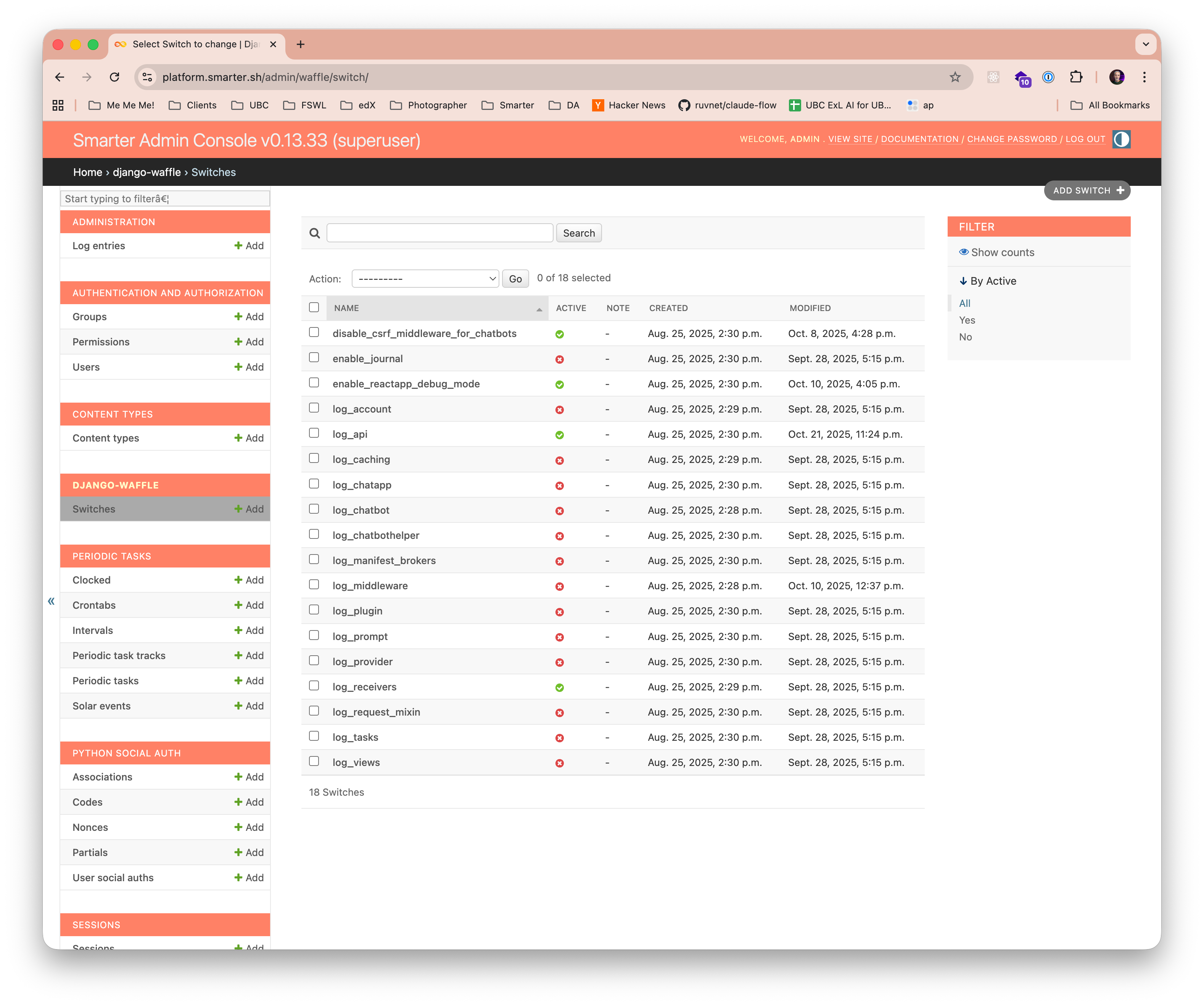
Smarter additionally provides more granular control over logging levels for specific application components via waffle switches. These are useful for real-time, in-flight debugging and trouble shooting without requiring application restarts or code changes.
10. Database Configuration
Database configuration settings are ultimately controlled by smarter/settings/base.py (database config) for local development and testing environments, and by Kubernetes Secrets for AWS cloud based deployments, as described above. In both cases, the following orders of precedence are observed:
Environment variables set in the Docker container or Kubernetes pod. These are consumed and validated by the smarter_settings module, internally encrypted by Pydantic SecretStr where applicable, and passed down to Django settings.
Kubernetes Secrets (for AWS cloud deployments) or .env files (for local development and testing). These in point of fact, are environment variables subject to the same treatment as #1 above, albeit these take a more colorful route to get there.
Default values hardcoded in smarter/settings/base.py (local database config) for local development and testing environments, and settings/base_aws.py for AWS cloud based deployments regardless of environment.
Regardless of how the configuration values were ingested, the final database configuration values are accessible via both Django settings and smarter_settings.
MYSQL_HOST: mysql.example.com
MYSQL_PORT: "3306"
MYSQL_DATABASE: smarter_platform_prod
MYSQL_PASSWORD: <A SECURE PASSWORD SET IN KUBERNETES SECRET OR .env FILE>
MYSQL_USERNAME: smarter_platform_prod
Note
Pydantic SecretStr and Kubernetes Secrets serve similar purposes in securely handling sensitive configuration values such as database and vendor api credentials. However, they operate at different layers of the application stack. Kubernetes Secrets are used for securely storing and managing secrets at the infrastructure level, while Pydantic SecretStr is used within the application code itself to ensure that sensitive information is not inadvertently exposed in logs or error messages.
11. Email/Notification Configuration
SMTP Email Services allow your system to send emails using an external SMTP server. Smarter uses AWS Simple Email Service (SES) by default, but you can configure it to use any SMTP server of your choice.
Tip
It is highly recommended to use AWS Simple Email Service (SES) for sending emails as this is known to be both cost effective and reliable. It is also recommended to use Smarter’s provided Terraform scripts to set up the necessary SES resources as this is a more complex operation than might be expected, and the Terraform scripts will automate all of this for you. See Cloud Infrastructure for more information.
To configure SMTP Email Services, follow one of these two steps:
(Recommended) Use the Smarter Terraform scripts to automatically create the necessary SES resources, including verified domains and SMTP credentials. This will also generate a Kubernetes Secret containing the SMTP credentials to be used by Smarter’s default GitHub Actions deployment workflow.
In your Smarter settings for deployment ensure that your .env files includes all six SMTP variables (see below) for your SMTP service of choice.
SMTP settings are ultimately controlled by smarter/settings/base.py (smtp config) for local development and testing environments, and by Kubernetes Secrets for AWS cloud based deployments, as described above. In both cases, the following orders of precedence are observed:
Environment variables set in the Docker container or Kubernetes pod. These are consumed and validated by the smarter_settings module, internally encrypted by Pydantic SecretStr where applicable, and passed down to Django settings.
Kubernetes Secrets (for AWS cloud deployments) or .env files (for local development and testing). These in point of fact, are environment variables subject to the same treatment as #1 above, albeit these take a more colorful route to get there.
Regardless of how the configuration values were ingested, the final smtp configuration values are accessible via both Django settings and smarter_settings.
SMTP_HOST: email-smtp.us-east-1.amazonaws.com
SMTP_PASSWORD: <A CREDENTIAL GENERATED IN AWS SES>
SMTP_PORT: "587"
SMTP_USE_SSL: "false"
SMTP_USE_TLS: "true"
SMTP_USERNAME: <A USERNAME GENERATED IN AWS SES>
You can test your SMTP configuration by sending a test email from the Django console:
python manage.py send_welcome_email --email john.doe@example.com
1. Static & Media Files Configuration
Smarter serves static and media files using Amazon S3 and CloudFront in AWS cloud deployments, and ‘whitenoise.storage.CompressedStaticFilesStorage’ for local development and testing environments. Static and media file settings can be found in smarter/settings/base.py (static files config). In both case, the configuration described is known to work well for most use cases, and is generally free of the many kinds of fiddly details that often accompany static and media file handling in web applications. You are highly recommended to avoid modifying these settings if at all possible, unless you have a specific need to do so.
Warning
When deploying Smarter in production environments, it is CRITICAL to ensure that static and media files are served securely using HTTPS. Failure to do so can lead to security vulnerabilities and data breaches. Always use Amazon CloudFront with SSL/TLS certificates for secure delivery of static and media files.
See Django Static Files Documentation for more details on how static and media files are configured in Smarter.
13. Smarter Settings Class Reference
The Smarter settings system is implemented as an immutable singleton object called smarter_settings.
This object contains all validated, derived, and superseding configuration values for the platform.
The smarter_settings class enforces a consistent set of rules for initializing configuration values from multiple sources,
including environment variables, .env files, TFVARS, and class-defined defaults. All configuration
values are strongly typed and validated. Where applicable, smarter_settings values take precedence over Django
settings. You should use smarter_settings in preference to Django settings wherever possible, as Django settings
are often initialized from values in smarter_settings.
Notes:
smarter_settingsvalues are immutable after instantiation.Every property or attribute in
smarter_settingsis guaranteed to have a value.Sensitive values are stored as Pydantic
SecretStrtypes to prevent accidental exposure.Configuration values are initialized in the following order of precedence:
Constructor (not recommended; prefer
.envor environment variables)SettingsDefaults.envfileEnvironment variables (if present and not already consumed by
SettingsDefaults, these are overridden by.envfile values)Default values defined in the class
The
dumpproperty returns a dictionary of all configuration values, which is useful for debugging and logging.Always access configuration values via the
smarter_settingssingleton instance when possible.