The Smarter Doodle: Celebrating Special Days, Without an Artist or an Arbiter
A famous search engine decorates its home page on days worth celebrating, and has artists and an editorial team to do it. The Smarter Project wanted the same for its sign-in page, but on a shoestring budget with no paid staff. It combined two Smarter AI applications and a Guardrail with ordinary Django code: the AI decides and draws, the code plans, checks and publishes, and a person needs to do no more than approve new drawings.
At a glance
Organization |
The Smarter Project, the community of open source contributors that builds Smarter, and every platform that runs it. The sign-in page of each platform’s web console is the first thing that its users see. |
Problem |
Show a decorated sign-in page on the days that are worth celebrating, in each region of the world, at local midnight, every year, with no human artists involved in drawing the decorations and no editorial person to decide which days are special. |
Solution |
|
Smarter features |
LLMClient (staff-only, prompted in-process by the platform’s own code); Guardrail ( |
Outcome |
Over the first 18 days, the editor was asked 24 times and never failed. It chose a celebration for 34 region-days and the plain scene for 179; the tone judge refused four of its choices; the artist drew 26 new doodles, with no artist and no editorial meeting. The solution consists of three manifests and about 3,800 lines of Python. |
Executive summary
On a few days each year, a famous search engine replaces its logo with a drawing: a holiday, an anniversary, a sporting event. It is a small thing that makes a page feel alive and brings delight to its users, but it takes a team: someone to decide which days matter, and to whom, and someone to draw it. The Smarter Project wanted its web console’s sign-in page to celebrate days in the same way, for users all over the world. But the project is a community of volunteers and we have no budget for this. It has no paid professional illustrators, and no one whose job it is to read the calendar of every country and decide, every day, what is worth celebrating where.
Both jobs look like work for AI, and both are risky to give it. A model left to choose what to celebrate may pick an anniversary of a disaster, a controversial politician, or the news of the day. A model left to draw may produce markup that runs scripts in a visitor’s browser, or a drawing that offends someone. And a sign-in page is public: every user, on every platform, sees it before they do anything else.
The solution divides the work by what each side does best. Python code does what must be exact: it computes the calendar, gathers each region’s candidates for a day, and re-checks every answer that an AI gives. Smarter AI resources, declared in YAML manifests, do what needs judgment: the Doodle Editor chooses each region’s doodle from a menu that the code built, a Guardrail judges whether the occasion is plainly cheerful, and the Doodle Artist draws the decorations as SVG. A sanitizer keeps only the shapes of a flat drawing, and a superuser may approve each new drawing in the Django admin before visitors see it.
Every refusal and every failure has the same, safe outcome: the doodle that the calendar planned stays. So the system can never show something worse than the plain scene, and on most days, as the results show, the plain scene is what the editor itself chooses.
Background
Smarter is a platform for building and running AI applications, used mostly by students, teachers and developers. Each platform’s web console starts at a sign-in page. It includes the doodle: a small, flat illustration of a Smarter LLMClient’s chat window, with the plugin, guardrail, vectorstore and secret that it uses around it, and its manifest below. On a day worth celebrating, the scene is decorated: lanterns for the Lunar New Year, diyas for Diwali, gears for Ada Lovelace Day. On other days it is the plain scene.

Exhibit 1a. Diwali, from the catalog: reviewed before it was merged. |

Exhibit 1b. Japan’s Culture Day, November 3, 2026: chosen by the editor and drawn by the artist. |
Visitors in different regions may see different doodles on the same day. The browser sends its time zone, e.g.
Asia/Kolkata, which gives the visitor’s local date, so that a holiday starts at local midnight, and, through the
time zone database, their country, which gives one of 12 regions: global, us, ca, mx, latam,
europe, africa, middle-east, south-asia, east-asia, southeast-asia and oceania. No IP
address is looked up, and nothing about the visitor is stored. So every day is 12 decisions, not one.
The roles
Role |
Their part in this case |
|---|---|
The project’s maintainers |
Own the code, the theme catalog and the manifests; review changes to each as pull requests |
A platform’s superuser |
Runs a Smarter platform; may approve or reject each new drawing, or override any day’s doodle, in the Django admin |
The Smarter Doodle Editor |
An LLMClient, |
The Smarter Doodle Artist |
An LLMClient, |
The tone judge |
A Guardrail, |
Visitors |
Anyone who opens a platform’s sign-in page, anywhere in the world |
The challenge
The problem is to decorate the sign-in page on days worth celebrating, so that it is:
Timely and local. The right occasion, in the right region, from local midnight: Diwali in South Asia, Thanksgiving on different days in Canada and the United States, a national day in the one country that observes it.
Never inappropriate. Not a day of mourning, a war, an election, a disaster, a person, or a single religion’s holy day presented as everyone’s. On a page that every user sees, one bad choice costs more than many good ones earn.
Safe to render. The page is public and loads before anyone signs in. Nothing on it may run a script, load a resource from elsewhere, or link to an arbitrary site.
And three constraints apply to any solution:
No artists. No one is paid, nor any volunteers, for drawing the artwork.
No arbiter. No person is involved in deciding, day by day, which days are special and where.
Self-hosted. Every Smarter platform runs the same code, from its own database. Whatever is built must work on a platform with no network access to a design team, and degrade to something harmless on one where its AI resources aren’t loaded.
Options considered
Option |
For |
Against |
|---|---|---|
A static logo (the status quo) |
Nothing to decide, nothing to go wrong |
Nothing to celebrate, either |
A team that curates and draws, as the search engine does |
The best judgment, and the best art |
The project has neither the people nor the budget; and there are 12 regions, every day |
A fixed calendar of reviewed themes |
Exact, predictable and safe; holidays are computed, not guessed |
Knows only the occasions someone thought of in advance; most days in most regions are blank, and nothing that happens this week can appear. It was built first, and kept as the foundation |
Ask a model “what should we celebrate today?”, and generate an image |
Covers every day and every region, with no curation |
The model may choose anything, including the news; a raster image can’t be inspected or sanitized, and an image model may draw people, flags and text |
A calendar, and an AI editor and artist that choose from a menu, with every answer checked (chosen) |
The calendar’s safety, with the AI’s reach; each AI step is a manifest, and each check is code with tests |
More moving parts; a person still approves new drawings, unless auto-approve is on |
The chosen design keeps the fixed calendar as its floor. The AI can only improve on the calendar’s choice, and when it fails, or is refused, or isn’t installed, the calendar’s choice is what visitors see.
The solution
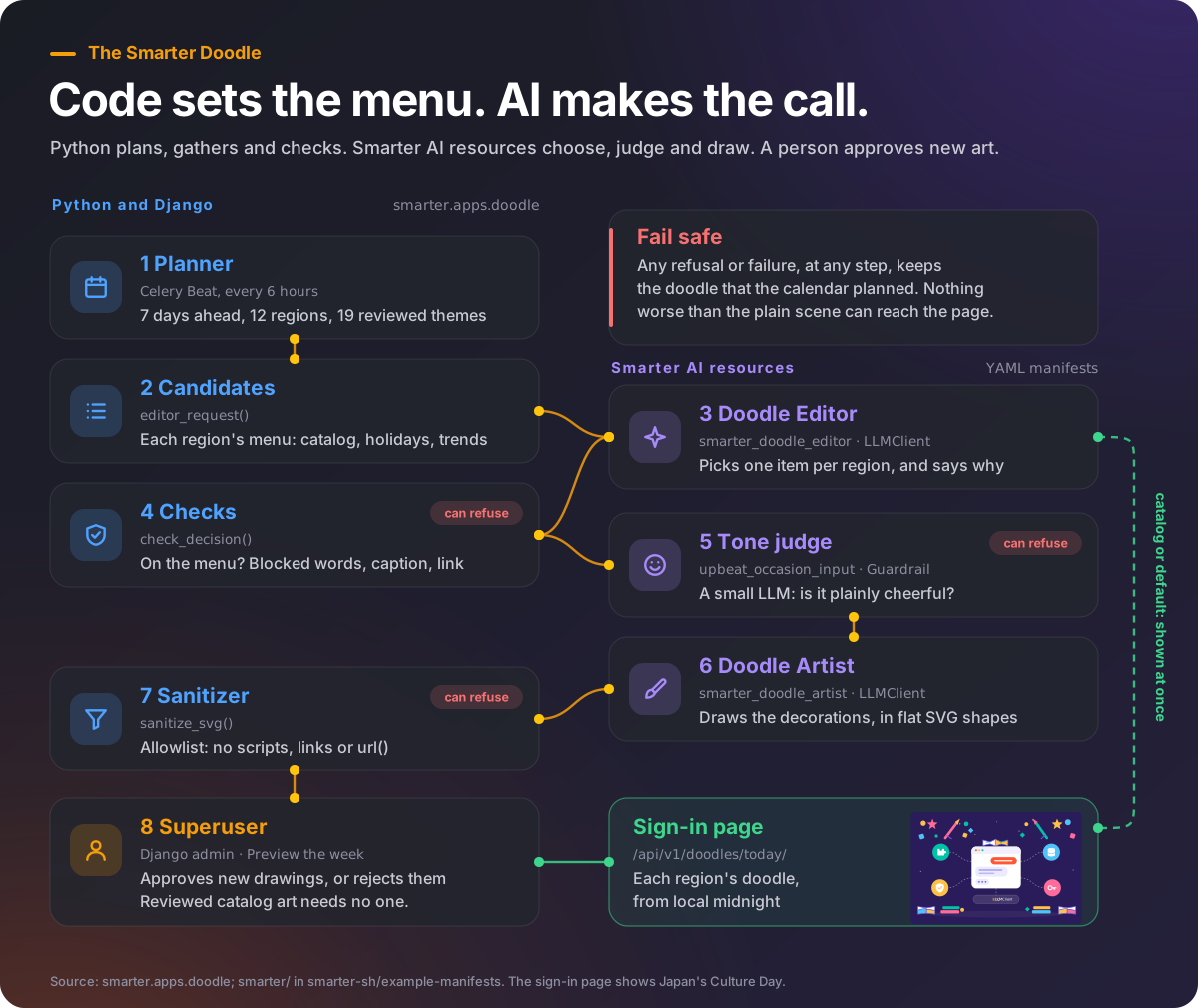
Exhibit 2. How a day’s doodle is chosen and drawn.
The work is a pipeline of eight steps, which alternate between code and AI. The Python steps are exact and
tested; the AI steps are Smarter resources, declared in YAML in the public repository
smarter-sh/example-manifests, under smarter/, which every
platform loads into its Smarter account when it is first installed.
1. The calendar: a catalog, and a planner
The catalog is 19 reviewed themes, plus the plain default, each a YAML file and an SVG of its props, the decorations drawn on the base scene. A theme’s schedule is a fixed date, the nth weekday of a month, or a country’s holiday by name, which the holidays package dates, including the moving ones:
# smarter/smarter/apps/doodle/data/themes/diwali.yaml
slug: diwali
name: Diwali
category: celebration
caption: Happy Diwali!
link_url: https://en.wikipedia.org/wiki/Diwali
priority: 70        # when several themes are due, the highest wins
regions: [south-asia, southeast-asia, us, ca, europe, oceania, africa, global]
schedule:
  kind: holiday
  country: IN
  holiday: Diwali
A Celery Beat task, plan_doodles, runs every six hours. For each of the next seven days and each region, the
due theme of the highest priority wins, and a region’s own theme wins over one of every region; when nothing is due,
the default wins. So a week of doodles is always ready, before any AI is asked anything.
2. The candidates: what the editor may choose from
The planner then builds the editor’s request: for each region, a menu, and nothing else.
catalog: the region’s catalog themes that are due that day. Their artwork exists and was reviewed.
observances: the region’s other public holidays that day, from the
holidayspackage, for each of the region’s countries, without any whose name has a blocked word.trends: what the region is reading about, from the most viewed articles of its languages’ Wikipedia editions the day before. Each article is judged by its Wikidata item’s English description, and kept only if it names an occasion (a tournament, a festival, an eclipse), isn’t about a person, and has no blocked word. Trends are news, so they are offered only on the editor’s second look at a day, the day before.
default: the plain scene. It is always on the menu.
3. The editor: a Smarter LLMClient
smarter_doodle_editor is an ordinary LLMClient, declared in a manifest. It is staff-only, never deployed, and
attached to two built-in guardrails: one that strips a code fence from its answer, and a moderation check. Its
system prompt explains the job, the menu and the answer’s format, and draws the line twice:
Never choose anything that is not in the request: no other topic, event or news. Never
choose an observance or a trend that is about mourning, remembrance of the dead, war, a
massacre, a disaster, an accident, a crime, an anniversary of a death, politics, an election,
a referendum, a political party or leader, a person, a company, a brand, a product, a film,
a show, or a single religion's holy day. When you are unsure, choose "default".
The platform prompts it in-process, as its owner, with prompt_in_process(): through the same provider handler as
the chat api, so its system prompt, guardrails and budget apply as they would to anyone’s prompt, with no api key and
no http request. Here is a real exchange, for Latin America on November 9, 2026, abridged:
{"date": "2026-11-09", "artwork_allowed": true, "regions": [
  {"region": "latam", "name": "Latin America and the Caribbean", "catalog": [], "trends": [],
   "observances": [
     {"id": "DO:constitution-day", "name": "Constitution Day", "countries": ["DO"]},
     {"id": "AR:visit-of-his-holiness-pope-leo-xiv", "name": "Visit of His Holiness Pope Leo XIV", "countries": ["AR"]}
   ]}]}
{"decisions": [{
  "region": "latam", "choice": "observance", "id": "DO:constitution-day",
  "reason": "Dominican Republic Constitution Day is a suitable national occasion, while the other listed observance is about a person.",
  "category": "national", "caption": "Happy Constitution Day!",
  "alt_text": "Colorful confetti and festive ribbons decorate a Smarter LLMClient for Constitution Day.",
  "link_url": "",
  "subject": "Decorate the illustration with cheerful red, white, and blue confetti and simple festive ribbons; use no flags, people, or text."}]}
Two things happened. The word list let the papal visit through, because none of its words is blocked; the editor declined it, as its instructions say, because it is about a person. And the editor chose the other observance, then wrote everything that the next steps need: a category, a caption, alt text for screen readers, and a brief for the artist. As the next sections show, that choice was refused anyway.
4. The checks: Python, whatever the prompt says
The editor’s answer is parsed into a Pydantic model, and each decision is checked again in code. The editor can’t invent a topic, because a decision that isn’t on its region’s menu is refused:
# smarter/smarter/apps/doodle/editor.py, check_decision(), abridged
if decision.choice == "catalog":
    catalog_ids = [theme.id for theme in candidates_of_region.catalog]
    if decision.id not in catalog_ids:
        return f"{decision.id} is not a catalog theme of {decision.region} that day"
    return None
if candidates_of_region.catalog:
    return "the region has catalog themes, which come first"
subject = drawable_subject(decision, request)
if subject is None:
    return f"{decision.id} is not a {decision.choice} of {decision.region} that day"
if not decision.caption or len(decision.caption) > 60:
    return "the caption is missing, or longer than 60 characters"
if subject.link_url and not WIKIPEDIA.match(subject.link_url):
    return f"the link {subject.link_url} isn't a Wikipedia article"
for text in (subject.name, decision.caption, decision.subject, decision.alt_text):
    if has_blocked_word(text):
        return f"{text!r} is about a topic that a doodle never celebrates"
The blocked words, 51 of them, from mourning to riot, are matched with the same language matching that Smarter’s plugin selectors use: a whole word or its plural, a typo of a longer word (genocde), or a synonym from the WordNet thesaurus (bereavement for mourning), but never a word inside another (war in Award).
5. The tone judge: a Guardrail, called by code
A word list can’t tell a solemn anniversary from a festival, and moderation models look for harm, not sadness. So,
for an occasion that would be drawn, the code evaluates a Guardrail that is attached to no LLMClient at all. Its
strategy is llm_judge, a small model with a prompt:
# smarter/guardrails/upbeat-occasion-input.yaml, in smarter-sh/example-manifests (abridged)
apiVersion: smarter.sh/v1
kind: Guardrail
metadata:
  name: upbeat_occasion_input
spec:
  config:
    strategy: llm_judge
    stage: input
    mode: enforce
    judgePrompt: |-
      The occasion must be plainly fun, upbeat and celebratory: a festival, a sports event, a
      national day of celebration, a sky event, a science milestone, a season. It is NOT right if it
      is solemn, sad, or divisive in any way: mourning or remembrance, a death or its anniversary,
      war, conflict, a disaster or an accident, crime, illness, politics or an election, a protest,
      religious devotion, or a person. When in doubt, it is not right.
    threshold: 0.5
    action: block
It fails closed: if the Guardrail is missing, or its evaluation fails, nothing is drawn. It judged the Dominican Republic’s Constitution Day, above, not upbeat enough, so Latin America kept the calendar’s doodle that day.
6. The artist: a second LLMClient
smarter_doodle_artist receives the occasion’s name, the editor’s brief and a two-letter prefix for its css
names. Its system prompt describes the base scene to the coordinate: where the chat window and the four resource
circles are, and where decorations may go (the sky, the ground beside the manifest, a hat on the chat window). It
answers with one SVG of at most about 40 flat shapes, in the scene’s colors, with no text, people, flags or
religious symbols, and its built-in guardrail removes scripts.
Separating the editor from the artist keeps each prompt about one job. The editor writes in words, and is judged on its choices; the artist writes markup, and is judged on its drawing.
7. The sanitizer: Python, by allowlist
The artist’s SVG is untrusted, whatever its prompt says. smarter.apps.doodle.sanitize parses it with
defusedxml and keeps only what a flat drawing needs: ten elements (svg, g, path, rect,
circle, ellipse, line, polyline, polygon and style), geometry and paint attributes, and css
rules and keyframes whose names start with the given prefix. Every on* handler, href, id, url(,
javascript: and data: goes, and an answer longer than 40,000 characters, or with nothing left to draw, is
refused. It is the third layer: the page shows the artwork with <img>, in which an SVG can run no scripts and
load nothing, and serves it with a sandboxing Content-Security-Policy.
The result is composed onto the base scene, stored once under its SHA-256, and saved as a theme of that day only, inactive, so that the calendar never chooses it again.
8. The superuser: approval, not arbitration
A drawn doodle is proposed. Until a superuser approves it, visitors see the calendar’s doodle. The Django admin’s Preview the week shows every region’s doodle of every planned day as a grid, with its caption, whether an AI chose or drew it, the editor’s reason, and an Approve and a Reject button. A superuser who disagrees with any day can also choose another theme, and neither the planner nor the editor changes that day again.
The person doesn’t decide what is special; they review a drawing that the AI has already chosen, checked and drawn.
The enable_doodle_auto_approve switch removes even that step. It is the only one of the doodle’s switches that
is off by default.
Credit, and a record
When an AI chose or drew the day’s doodle, the sign-in page says so, below it: Chosen by a Smarter AI application, or Drawn by a Smarter AI application, with a link to how it works. Every prompt of the editor is recorded as a Doodle Editor Run in the admin: what it was asked, what it answered, and which choices were refused, and why. A day is asked once a week ahead, and once more with trends the day before; a run that fails is retried at most three times, then the calendar’s doodle stays.
Implementation
The app was built in three phases, each its own commit, each usable on its own:
Phase 1, the calendar (
7999f0baf): the regions, schedules, catalog, planner, api, admin and the React panel. A platform with only this phase shows reviewed doodles on the catalog’s days.Phase 2, the editor and the artist (
a746f7a94): the two LLMClients, the checks, the sanitizer, proposals and approvals, and the Doodle Editor Runs.Phase 3, trends and tone (
85e2e1cb2): Wikipedia’s most read articles as candidates, and theupbeat_occasion_inputjudge.
Later, 1806c86e3 moved prompt_in_process() into smarter.apps.llmclient.prompting, so that the doodle and
the Orchestrator share one way for platform code to prompt an LLMClient.
Every phase is behind waffle switches: enable_doodle_llm_editor, enable_doodle_llm_artwork,
enable_doodle_trends and enable_doodle_auto_approve, among others. initialize_platform loads the
catalog and plans the first week, and load_from_github applies the three manifests to the Smarter account. On a
platform without them, the editor’s lookup finds nothing, and the calendar alone chooses.
Results
The figures are from a development platform with every switch but auto-approve on, from November 3 to November 20, 2026: 18 days, in 12 regions.
Measure |
Before → after |
|---|---|
Who decides which days are special, and where |
No one, and nothing was decorated → the editor, from a menu that code built, with every choice checked |
Who draws |
No one → 19 catalog themes, reviewed once; 26 new doodles drawn by the artist in 18 days |
Editor runs |
24, 8 of them with trends; none failed |
Region-days the editor chose for |
213: a celebration on 34 (8 from the catalog, 26 drawn), the plain scene on 179 |
Choices refused |
4, all by the tone judge: Diwali as a trend in South Asia, the Dominican Republic’s Constitution Day, a National Peace Day in Africa, and a Day of Children’s Rights in Europe; none by the Python checks |
Occasions found that the catalog doesn’t have |
Japan’s Culture Day, Poland’s and Angola’s independence days, Latvia’s Proclamation Day, Oman’s National Day, Garifuna Settlement Day in Belize, Matāri’i in French Polynesia, the Japan Masters badminton tournament, the Formula One season |
A person’s work |
Approve or reject the drawings: 2 approved, 24 waiting, in the period; none with auto-approve |
What it took |
Three manifests (two LLMClients and a Guardrail); about 3,800 lines of Python and 139 tests in
|
AI calls a day |
At most two editor prompts per day planned, one tone judgment per drawn choice, and one artist prompt per drawing |
Three things stand out. First, restraint: given a menu with a safe default, the editor chose the plain scene for 84% of the region-days it was asked about, which is roughly how often a person would decorate a page. Second, the layers fired at different places: the editor declined the papal visit that the word list missed, the judge refused four choices that the editor and the word list both accepted, and the Python checks, which refused nothing, are the backstop that makes the prompts’ rules true whatever a model does. Third, the judge is strict, and not consistent: it refused Diwali in South Asia on November 4, and let it through on November 5 and November 7. A missed festival costs little; it is the error the design prefers.
Lessons for practitioners
Give the model a menu, not a blank page. Code can compute the candidates exactly. The model’s job is the part code can’t do: judgment among them.
Always offer a safe default, and make every failure fall back to it. When refusing costs nothing, you can refuse whenever in doubt.
Re-check every answer in code. A system prompt is a request. A check in Python, with tests, is a guarantee.
Use a second model for what code can’t check. Tone, taste and appropriateness need a judge; a Guardrail with an
llm_judgestrategy is one, and it can be evaluated by any code, not only on a chat.Treat generated markup as untrusted input. An allowlist sanitizer, a renderer that can’t run scripts, and a restrictive Content-Security-Policy: three layers, so that no single one has to be perfect.
Ask for a reason. The editor’s one-sentence reason for each choice is what makes its decisions reviewable, by a superuser today and by a maintainer tuning the prompt tomorrow.
Keep a person on the new, not the routine. The catalog’s reviewed art goes out on its own; only what the AI drew waits for approval.
Keep the AI as configuration. The editor, the artist and the judge are manifests. Their prompts, models and guardrails change in a pull request, without a release of the code.
Sources
The app,
smarter/smarter/apps/doodlein https://github.com/smarter-sh/smarter:planner.py,editor.py,trends.py,sanitize.py,artwork.py,regions.py,schedule.py,admin.py, and the catalog indata/themes/, with itsREADME.mdThe manifests, in https://github.com/smarter-sh/example-manifests:
smarter/llm-clients/llmclient-smarter-doodle-editor.yaml,smarter/llm-clients/llmclient-smarter-doodle-artist.yamlandsmarter/guardrails/upbeat-occasion-input.yamlSmarter commits
7999f0baf,a746f7a94,85e2e1cb2and1806c86e3The Doodle Editor Runs and doodles of a development platform, November 3 to 20, 2026, from which the results and the exchange above are taken
An LLM Editor and an SVG Artist, on blog.smarter.sh