Infrastructure Security
How the cloud infrastructure that smarter-infrastructure builds with Terraform on AWS controls who and what can reach the cluster, its pods and its data: the network, identities and permissions, and the containers. It describes a platform installed as Production Deployment describes.
Network
The VPC
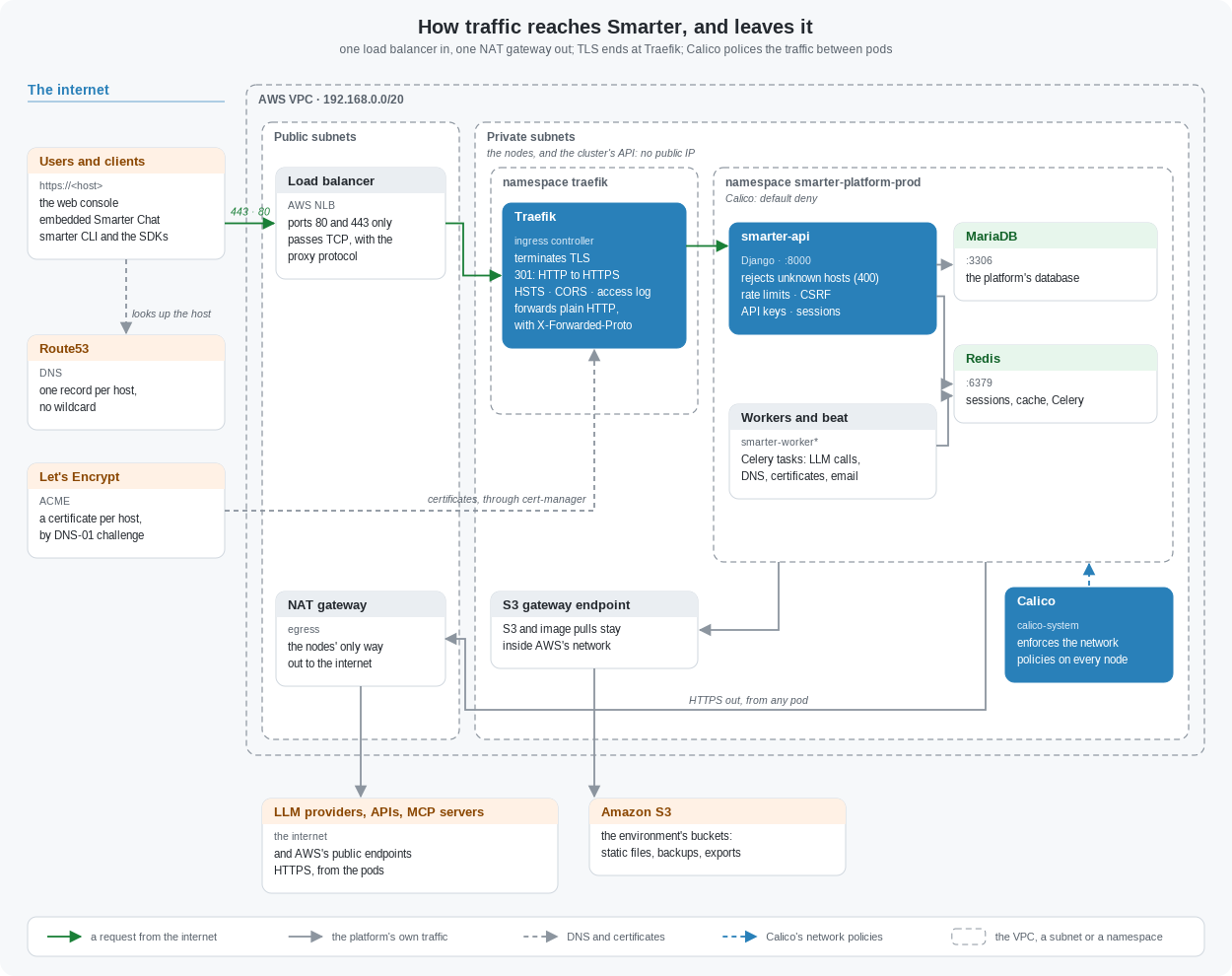
smarter-infrastructure creates the VPC, 192.168.0.0/20, with public, private, database and intra
subnets in each availability zone. The EKS control plane and every node are in the private
subnets, with no public IP address, and reach the internet through a NAT gateway. Only the load
balancer is in the public subnets. An S3 gateway endpoint keeps the pods’ S3 traffic, including
image pulls, inside AWS’s network.
The cluster’s API endpoint is reachable both from inside the VPC and publicly, authenticated by
AWS IAM. Restrict its public access to your own addresses (endpoint_public_access_cidrs of the
EKS module) if your policies require it.
Ingress: one load balancer, Traefik and TLS
Every request from the internet arrives through one AWS Network Load Balancer, on ports 80 and
443 only, and goes to the Traefik ingress controller, in its own traefik namespace:
TLS terminates at Traefik, with a certificate per host that cert-manager obtains from Let’s Encrypt, by DNS-01 challenge against Route53. Traefik forwards the request to the app as plain HTTP inside the cluster, with
X-Forwarded-Proto. Traefik trusts the forwarded and proxy protocol headers only from the VPC’s addresses, so a client can’t forge them.HTTP is redirected to HTTPS (301), and HSTS is set, by Traefik middlewares, for every host in one place, deployed LLMClients and custom domains included.
includeSubDomainsandpreloadstay off, because deployed LLMClients live under the platform’s domains.CORS headers are set by a Traefik middleware for the platform’s and the API’s domains, and by Smarter’s own middleware (see Application Security).
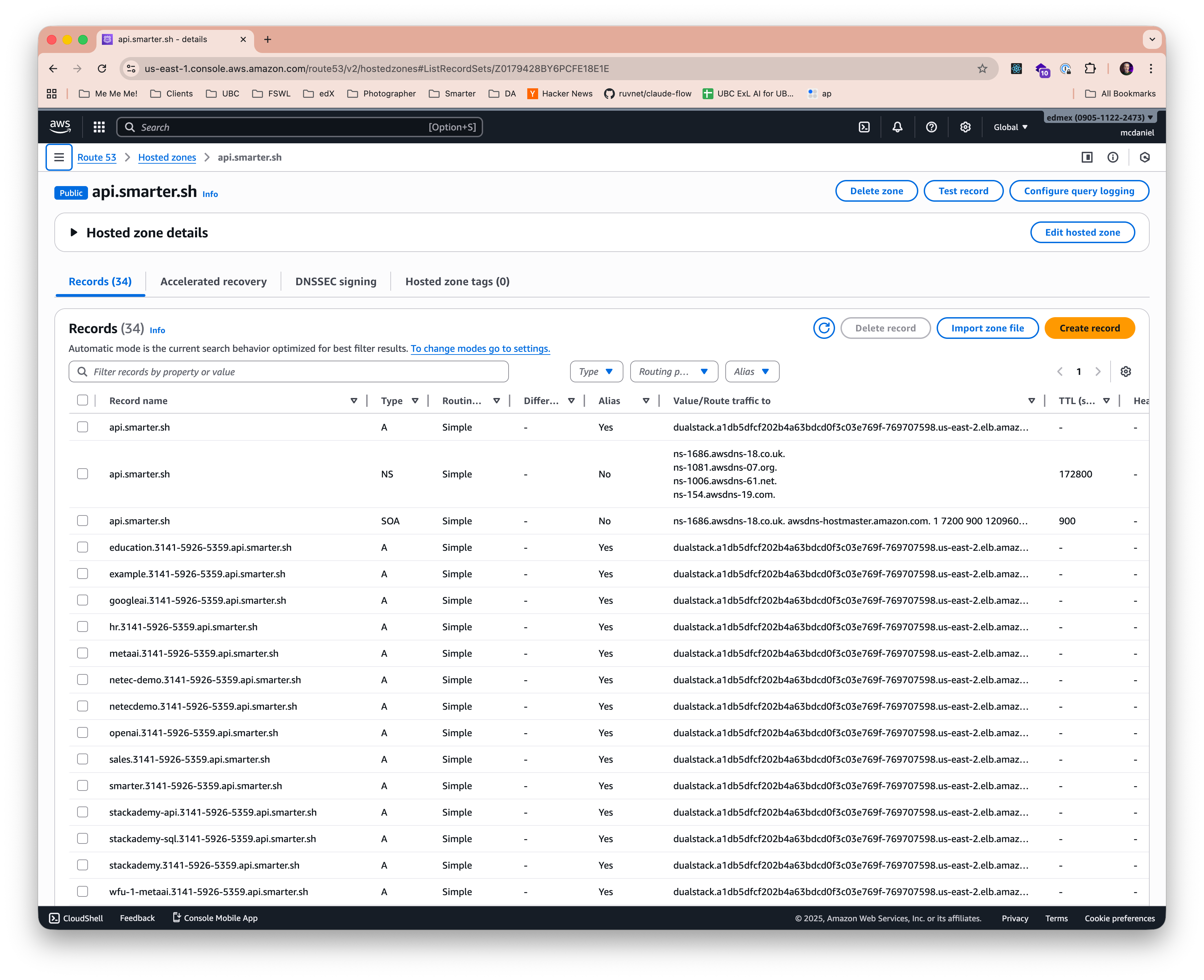
No wildcard DNS. Each deployed LLMClient gets its own DNS record in a Route53 hosted zone, its own Ingress that answers only for its own host name, and its own certificate. A request for an undefined subdomain reaches nothing, which prevents subdomain takeover.
Node security groups
With enable_enhanced_security (on, in smarter-infrastructure’s aws/stack/stack.hcl), the
nodes’ security group replaces the EKS module’s recommended rules with a narrower set:
Ingress: traffic from inside the VPC (the load balancer, the control plane’s kubelet calls on 10250, DNS), the NodePort range from the load balancer, and ICMP “fragmentation needed”, for path MTU discovery.
Egress: node-to-node traffic, HTTP and HTTPS, DNS, NTP, SMTP (25 and 587), and replies on ephemeral ports.
There is no SSH access to the nodes. Administrators reach the cluster with kubectl, authenticated
by IAM, and reach a shell with the bastion pod (below).
Pod network policies: Calico
Security groups apply to whole nodes. To control traffic between pods, smarter-infrastructure installs Calico (the Tigera operator) in policy-only mode: the AWS VPC CNI still gives every pod its VPC address, and Calico’s agent on each node enforces Kubernetes NetworkPolicies with iptables rules. It then creates these policies in the platform’s namespace:
Default deny, for ingress and egress, for every pod in the namespace. Traffic flows only where a policy below allows it.
Ingress to the application’s pods (the app, the Celery workers, beat, the init Job and the bastion) from pods in the same namespace, and from the Traefik namespace on the app’s port only.
MariaDB accepts connections on 3306, and Redis on 6379, only from the application’s pods.
Egress from the application’s pods only to MariaDB, Redis and Loki in the namespace, DNS in
kube-system, and to the internet on HTTPS (443), HTTP (80, for API plugins), SMTP (587, to SES) and MySQL (3306, for SQL plugins’ remote databases).The bastion pod may also reach the internet on 80 and 443, for package updates.
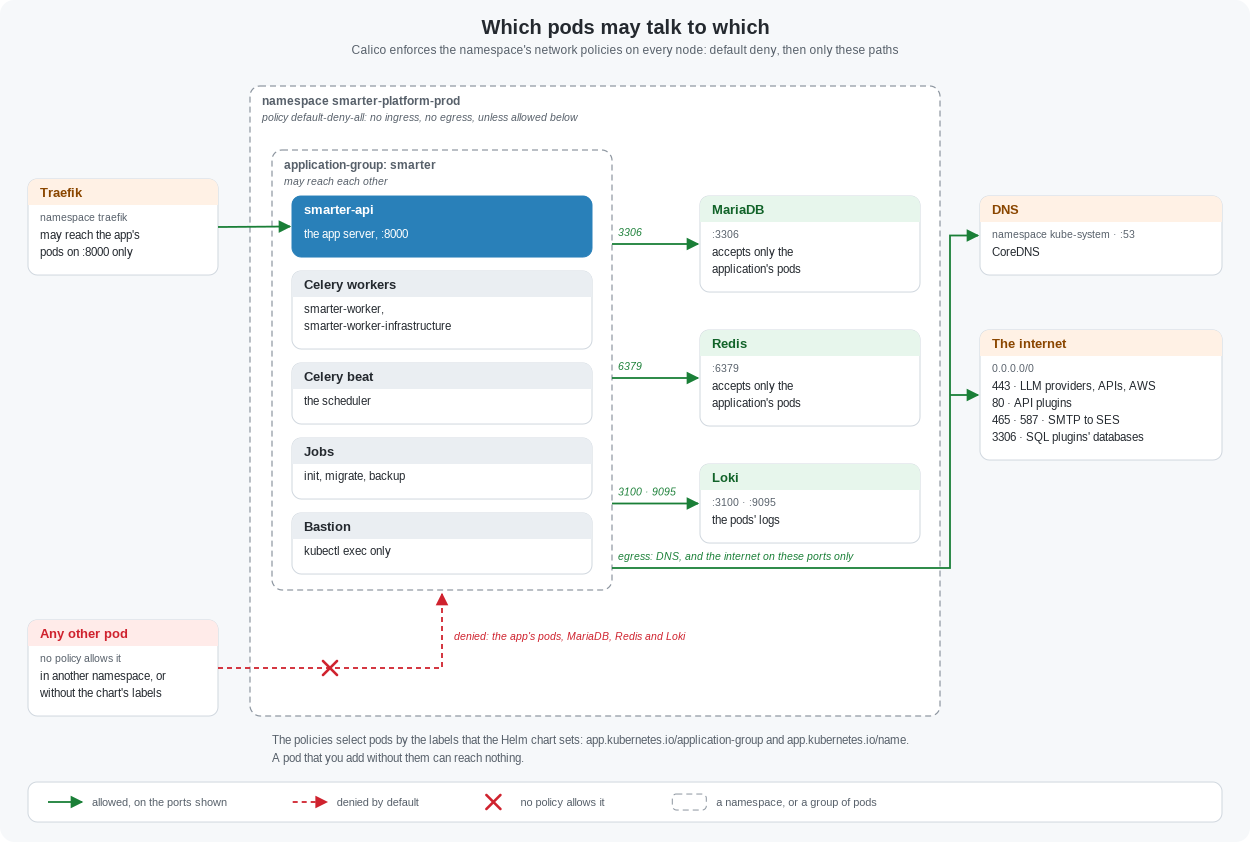
The policies select pods by their labels, app.kubernetes.io/application-group and
app.kubernetes.io/name, which the Helm chart sets. A pod without them can’t talk to anything,
so keep them on any pod that you add. The policies are created for the namespace named in
smarter-infrastructure’s stack.hcl (the prod environment’s); add the same policies to any
other environment’s namespace that needs them.
Because the application’s pods may reach any address on port 443, the policies limit movement inside the cluster, but they don’t stop code from sending data out over HTTPS. See Supply-Chain Security.
Identity and Access
AWS: roles, not access keys
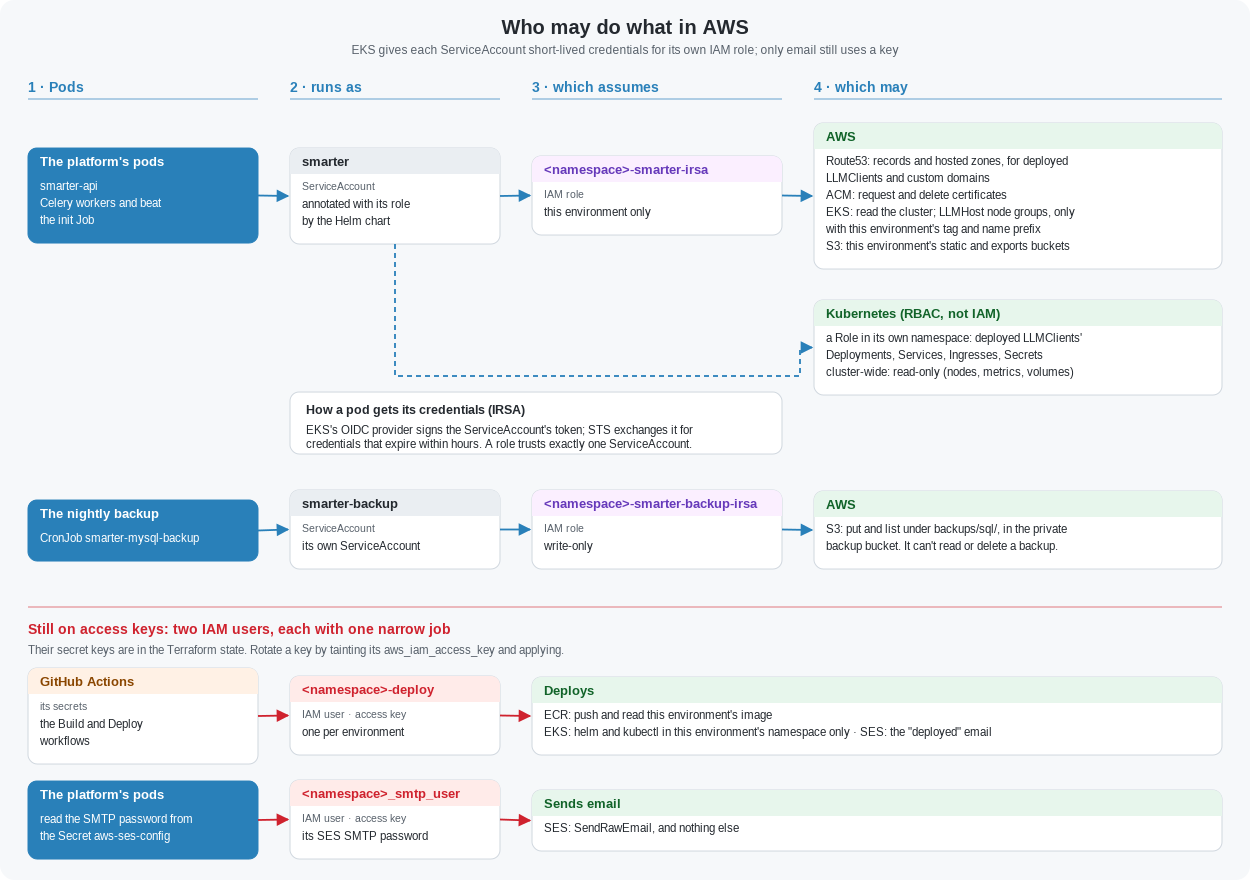
The platform’s pods call AWS’s APIs with no access keys. They get short-lived credentials from IAM roles,
with IAM Roles for Service Accounts
(IRSA): the chart annotates each ServiceAccount with its role, and EKS hands its pods credentials for
that role only. Each environment has its own roles, so alpha can’t touch prod’s buckets or
node groups.
<namespace>-smarter-irsa, the ServiceAccountsmarter(the app, the workers, beat and the init Job): Route53 and ACM for deployed LLMClients’ and custom domains’ DNS and certificates; read access to the cluster’s status; LLMHost node groups, which it may create only with the environment’s tag and change only by the environment’s name prefix; and read and write access to the environment’s own S3 buckets.<namespace>-smarter-backup-irsa, the ServiceAccountsmarter-backup(the nightly backup): write-only access tobackups/sql/in the backup bucket. It can’t read or delete a backup, so a compromised backup pod can’t destroy earlier ones.The cluster’s own components (the VPC CNI, the EBS CSI driver, cert-manager, the cluster autoscaler) each have their own IRSA role too.
Two IAM users with access keys remain, each with one narrow job: the environment’s deploy user,
whose key the GitHub Actions Deploy workflow uses to push the image to ECR and run helm in that
environment’s namespace only, and the SMTP user, which may only send email through SES. The pods
send the platform’s email with the SMTP user’s SES SMTP password, which smarter-infrastructure puts in
the Kubernetes Secret aws-ses-config; it is the one AWS credential that the pods hold. Both
users’ secret keys are in the Terraform state. Rotate them by tainting the access key resource and applying.
Kubernetes RBAC
The ServiceAccount smarter has a Role in its own namespace (the chart’s rbac.yaml), to
manage the resources of deployed LLMClients: Deployments, Services, Ingresses, Secrets and
certificates. Its only cluster-wide permissions are reads: its own namespace, nodes,
PersistentVolumes and node metrics, in a ClusterRole that smarter-infrastructure creates
(serviceAccount.createClusterRole: false in the chart’s values). The deploy user’s EKS access
entry is also limited to the environment’s namespace.
Pods and Containers
Non-root, read-only. Every pod that runs the Smarter image runs as
smarter_user(uid 1000), withrunAsNonRoot, a read-only root filesystem, every Linux capability dropped, no privilege escalation, and theRuntimeDefaultseccomp profile. The few directories that the processes write areemptyDirvolumes.Settings in a Secret. The chart stores the pods’ environment, API keys and passwords included, in a Kubernetes Secret that every pod reads with
envFrom, so they aren’t written into pod specs. The database, administrator and Django credentials come from Secrets that smarter-infrastructure generates in the namespace.Images. Each environment’s ECR repository scans every pushed image for vulnerabilities. The cluster pulls third-party images through an ECR pull-through cache. Each release’s Smarter image and Helm chart are signed with Cosign, and the image carries a software bill of materials. See “Verifying a release” in Supply-Chain Security.
The bastion pod is the one place for a shell with the platform’s environment, reached with
kubectl exec, which needs the cluster’s IAM credentials.The web console’s Terminal, a shell inside the app’s container for superusers, is off by default. Leave
SMARTER_APP_DASHBOARD_WEB_CONSOLE_TERMINAL_ENABLEunset in production unless you need it: the shell runs with the server’s credentials.
What Smarter Doesn’t Provide
Smarter and smarter-infrastructure don’t set up the following. Add them with your own AWS account’s tools if your policies require them:
A web application firewall (AWS WAF, or Shield Advanced). The Network Load Balancer passes TCP; Traefik’s middlewares and Smarter’s rate limits are the application’s only filters.
Threat detection and account auditing: GuardDuty, CloudTrail, Security Hub.
Malware scanning of uploaded files.
Encryption at rest with your own KMS keys, for Kubernetes Secrets and the database’s volume (see Data Protection, in Application Security).