Security
Security is a critical aspect of system management. This section covers best practices, tools, and techniques to ensure the security of your systems.
Firewall
Smarter does not provide a built-in firewall solution. However, many of the items that follow are directly or indirectly related to firewall configuration and management, including for example, limitations on hosts and remote access, ports, ingress design, DNS configuration, and so forth.
The Smarter project production environment is designed to be installed on an existing AWS Virtual Private Cloud (VPC). AWS VPC provides robust firewall capabilities that allow you to control inbound and outbound traffic to your instances. It is recommended to configure security groups and network ACLs to restrict access to only necessary ports and IP addresses.
Please note the following recommendations for a network design that we would consider secure:
Use private subnets for instances that do not require direct internet access. Namely, database server, and compute.
Use public subnets only for instances that require direct internet access, such as web servers or bastion hosts.
Implement AWS security groups to control traffic at the instance level.
Limit inbound traffic to only necessary ports (e.g., HTTP, HTTPS, SSH) and trusted IP addresses. SSH (port 22) access should be restricted to known IP addresses only.
Application Security
Smarter implements the following application security measures:
Proprietary Security Features
No DNS Wildcards. Prevents wildcard DNS entries to avoid subdomain takeover attacks. Smarter maintains strict DNS records for each deployed LLMClient/Agent using AWS Route53 Hosted Zones. Kubernetes Ingress resources are configured to only respond to specific domain names associated with each LLMClient/Agent, and Kubernetes cert-manager manages dedicated TLS certificates for these domains. This ensures that requests to undefined subdomains are not inadvertently routed to the application, thereby mitigating the risk of subdomain takeover attacks.
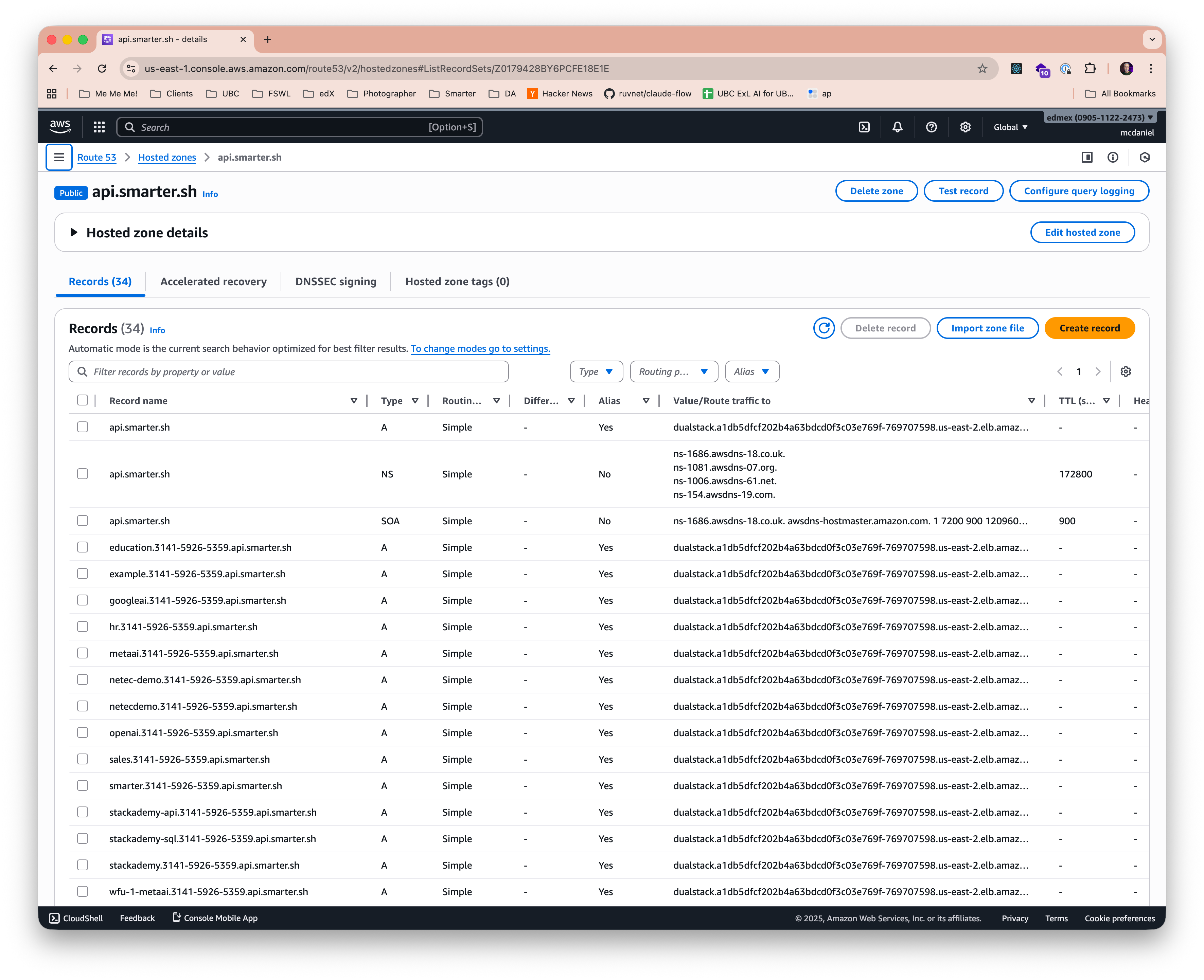
Sensitive File Blocking. Custom middleware blocks access to sensitive files access attempts such as .env, .git, and others. See smarter/lib/django/middleware/sensitive_files.py
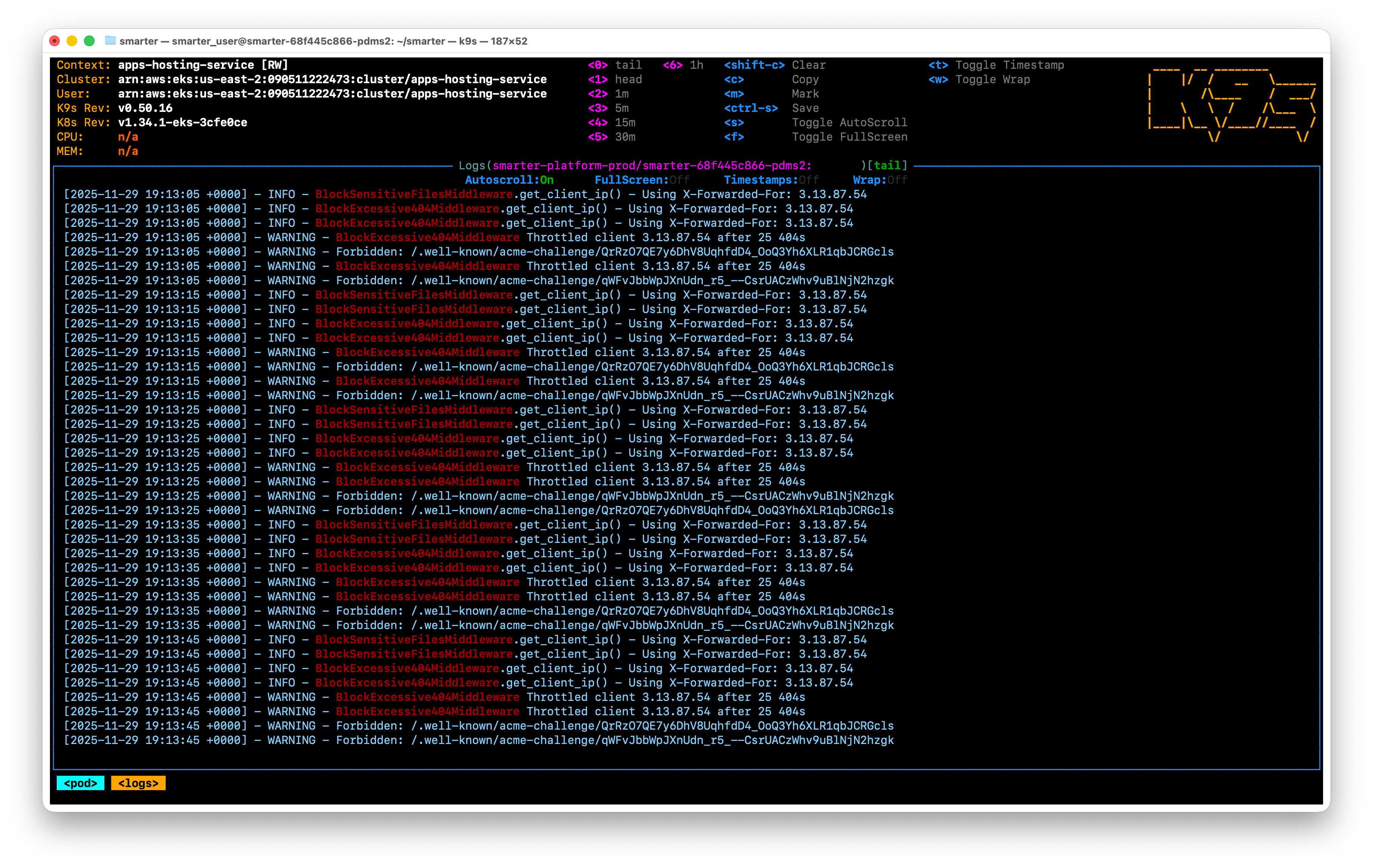
Excessive 404 Protection. Custom middleware (above DRF’s rate-limiting) to protect against blind/random file access attempts. See smarter/lib/django/middleware/excessive_404.py
Enhanced CSRF Protection. Custom middleware to enhance CSRF protection for Smarter LLMClient/Agent API endpoints. See smarter/lib/django/middleware/csrf.py
Enhanced CORS Protection. Custom middleware to enhance CORS protection for Smarter LLMClient/Agent API endpoints. See smarter/lib/django/middleware/cors.py
Enhanced Json HTTP Response Protection. Custom middleware to ensure that REST API responses exclusively return Json in the http response body. See smarter/lib/django/middleware/json.py
Audit Logging. See Smarter Journal for details on logging security-related events.
Configurable Application Logs. See Configuration Management for details on logging configuration changes.
Django Security Features
Host and Domain Validation. Smarter accepts http requests only from allowed hosts/domains. See Host and Domain Validation
HTTPS Enforcement (via settings and middleware). All traffic is redirected to HTTPS. See SECURE_SSL_REDIRECT
HSTS (HTTP Strict Transport Security). Enforces secure connections to the server. See SECURE_HSTS_SECONDS
SSL/TLS Configuration (via settings). Ensures secure data transmission. See SSL/HTTPS
Content Security Policy (CSP). Helps prevent XSS attacks by specifying allowed content sources. See Content Security Policy
Cross-Origin Resource Sharing (CORS). Controls resource sharing between different origins. For example, cdn.smarter.sh is allowed to access resources from smarter.sh. See CORS
Cross-Site Request Forgery (CSRF) Protection. Prevents CSRF attacks using tokens that validate requests and expire after a certain period. See CSRF Protection
XSS Protection. Mitigates Cross-Site Scripting attacks through input sanitization and output encoding. See XSS Protection
Clickjacking Protection. Uses X-Frame-Options header to prevent clickjacking attacks. See Clickjacking Protection
No DNS Prefetching. Disabled to prevent information leakage. See SECURE_REFERRER_POLICY
Secure Headers. Implements various HTTP security headers to enhance security. See Security Middleware
Secure File Uploads. Validates and sanitizes file uploads to prevent malicious files from being uploaded. See Managing Files
SQL Injection Prevention. Utilizes Django’s ORM to prevent SQL injection attacks. See SQL Injection Protection
Security Middleware (custom and built-in). Implements various security measures through middleware components. See Security Middleware
Session Security. Manages user session expiration and secure cookie settings. See Session Security
Secure Cookie Settings. Ensures cookies are transmitted securely and are protected from cross-site scripting. See Cookie Security
Secret Key Management. Handles the secure generation and storage of secret keys used for cryptographic signing. See SECRET_KEY
Password Validation. Enforces strong password policies to enhance account security. See Password Validation. The default password policy configuration is as follows:
AUTH_PASSWORD_VALIDATORS = [
    {
        "NAME": "django.contrib.auth.password_validation.UserAttributeSimilarityValidator",
    },
    {
        "NAME": "django.contrib.auth.password_validation.MinimumLengthValidator",
    },
    {
        "NAME": "django.contrib.auth.password_validation.CommonPasswordValidator",
    },
    {
        "NAME": "django.contrib.auth.password_validation.NumericPasswordValidator",
    },
]
Authentication Backends and Social Auth. Supports multiple authentication methods including social authentication. See Authentication Backends. Smarter uses only two authentication backends (plus social auth), with the principal one being Smarter Token-based authentication, see smarter/lib/drf/token_authentication.py. In aggregate the following authentication backends are used:
AUTHENTICATION_BACKENDS = (
    "social_core.backends.google.GoogleOAuth2",
    "social_core.backends.github.GithubOAuth2",
    "smarter.lib.social_core.backends.linkedin.LinkedinOAuth2",
    "django.contrib.auth.backends.ModelBackend",
)
Middleware for Security (custom and built-in). Applies additional security measures through middleware layers. See Middleware. Smarter uses the following:
MIDDLEWARE = [
    "django_hosts.middleware.HostsRequestMiddleware",
    "smarter.lib.django.middleware.cors.SmarterCorsMiddleware",
    "smarter.lib.django.middleware.sensitive_files.SmarterBlockSensitiveFilesMiddleware",
    "smarter.lib.django.middleware.excessive_404.SmarterBlockExcessive404Middleware",
    "django.contrib.sessions.middleware.SessionMiddleware",
    "smarter.lib.drf.middleware.SmarterTokenAuthenticationMiddleware",
    "smarter.lib.django.middleware.csrf.SmarterCsrfViewMiddleware",
    "django.contrib.auth.middleware.AuthenticationMiddleware",
    "smarter.apps.llmclient.middleware.security.SmarterSecurityMiddleware",
    "smarter.lib.django.middleware.json.SmarterJsonErrorMiddleware",
    "django.middleware.clickjacking.XFrameOptionsMiddleware",
    "django_hosts.middleware.HostsResponseMiddleware",
]
Sensitive File Access Blocking. Prevents unauthorized access to sensitive files. See Serving files. Also note Smarter’s enhanced protection described above.
Logging of Security Events. Records security-related events for monitoring and auditing. See Logging. Also see Smarter Journal for details on logging security-related events.
Allowed File Extensions for Uploads. Restricts file uploads to safe and approved types. See File Uploads
SMTP Security (SSL/TLS). Ensures secure email transmission using SSL/TLS. See Email Security
Resource Limit Logging (for container hardening). Monitors and logs resource usage to enhance container security. See Logging
Static and Media File Storage Security (S3, FileSystem). Ensures secure storage and access controls for static and media files. See Managing Files
JSON Error Handling (to avoid leaking sensitive info). Handles JSON errors securely to prevent information leakage. See Error Reporting. Also note that Smarter uses Pydantic SecretStr to further avoid leaking sensitive information in API responses.
Internal IP/Host Restrictions. Limits access based on internal IP addresses and hostnames. See INTERNAL_IPS
Security Headers (e.g., X-Frame-Options via middleware). See Security Middleware
Secure Remote Access
Smarter is designed as an API-first application, even though it also includes a web-based Prompt Engineer Workbench and Django Admin interface. This affords the Smarter platform the luxury of minimizing its attack surface primarily to http and https traffic only, and at that, to a limited set of URL endpoints.
If you follow Smarter’s recommended deployment architecture on AWS Elastic Kubernetes Service (EKS), you can further limit remote access to the Smarter platform in that this will/can prevent remote ssh access to the underlying host instances altogether. Instead, all remote access to the Smarter platform is performed securely over https using strong authentication mechanisms such as OAuth2 and Smarter’s token-based authentication for API access.
Additionally, a Kubernetes-based deployment will lead to all domain traffic being routed through a secure AWS Classic Load Balancer (ALB) which can be further configured via Kubernetes Nginx Ingress Controller to provide additional layers of security such as Web Application Firewall (WAF), DDoS protection, SSL/TLS termination, and more. AWS Load balancers inherently behave as reverse proxies / firewalls, in that they only allow traffic to reach the underlying host instances on specific ports (e.g., 80, 443) and only for specific domain names. Think of this as a “belt & suspenders” additional layer of firewall protection.
Less is more. Simpler is better.
Smarter Authentication
Smarter implements a proprietary token-based authentication mechanism for its API endpoints which is based on Django knox. This enables enhanced Journal support as well as log warnings for API keys that have exceeded their maximum lifetime. See smarter/lib/drf/token_authentication.py and smarter/lib/drf/middleware.py for details.
Audit Logging
See Smarter Journal for details on logging security-related events. See Configuration Management for details on logging configuration changes.
Malware Protection
Smarter does not provide built-in malware protection.
User management
See User Management for details on managing user access and permissions.
Data Encryption
Smarter does not provide built-in data encryption features.
Security Updates
Smarter is a Docker-based application that follows best practices for applying security updates to its dependencies and underlying systems. It is recommended to regularly update the Docker images and dependencies used by deploying the Smarter DockerHub ‘latest’ image, which includes the latest security patches and updates. The DockerHub images are regularly maintained – typically at least once per month – to ensure they include the latest security fixes.
See Installation for further details.