Cost Accounting
Smarter’s asynchronous workers persist detailed cost accounting information for all external service requests and responses. This information can be used for billing, cost analysis, and budgeting purposes. Specifically, Smarter tracks the following cost metrics:
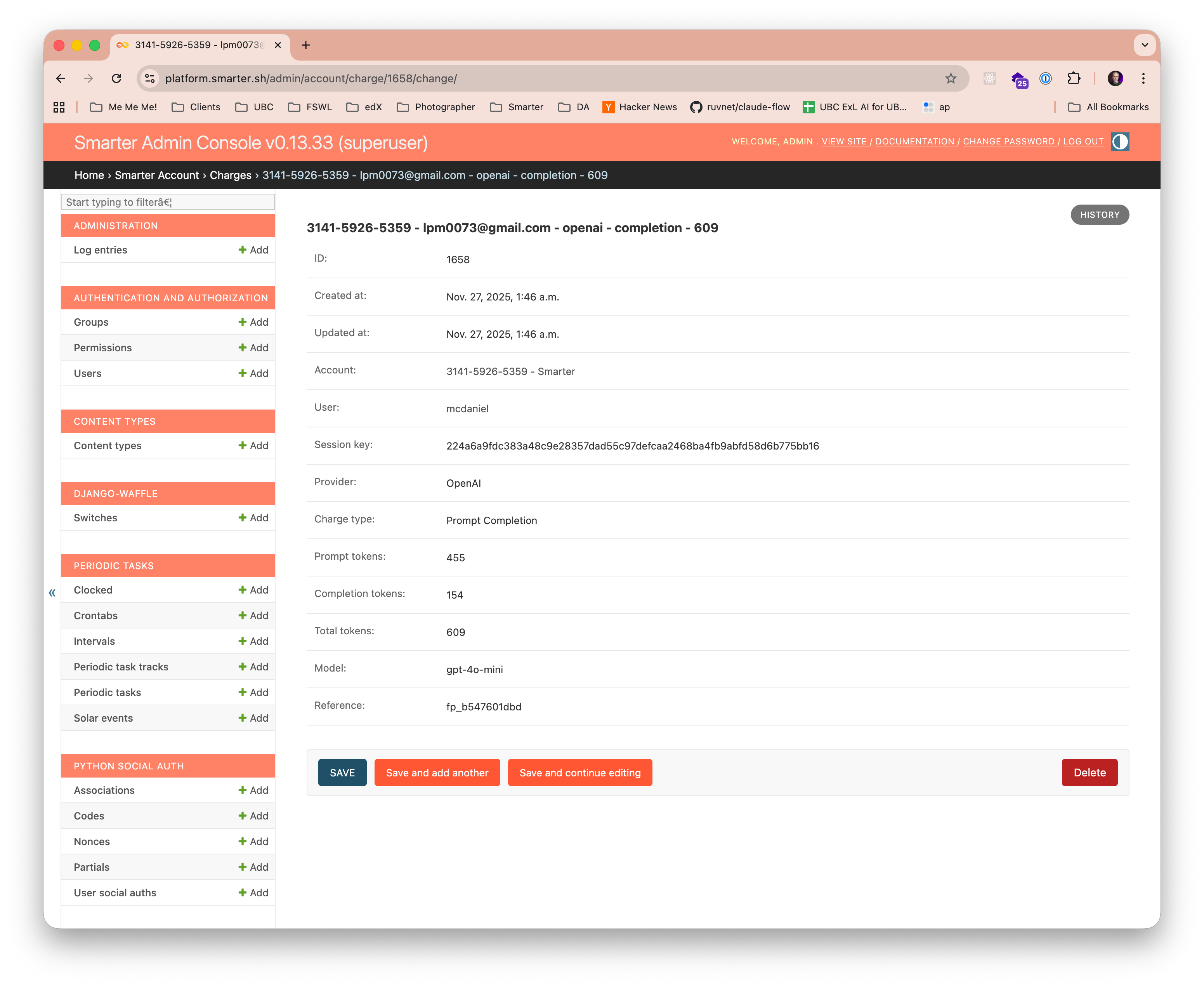
Field |
Value |
|---|---|
ID |
Smarter record identifier. ex 1658 |
Created at |
Smarter record create data. eg Nov. 27, 2025, 1:46 a.m. |
Updated at |
Smarter record update date. eg Nov. 27, 2025, 1:46 a.m. |
Account |
The Smarter account number. eg 3141-5926-5359 - Smarter |
User |
The Smarter user identifier. eg mcdaniel |
Session key |
The Smarter session key for the chat session. Use this to aggregate charges for a single chat session (conversation) eg 224a6a9fdc383a48c9e28357dad55c97defcaa2468ba4fb9abfd58d6b775bb16 |
Provider |
The LLM Provider. eg OpenAI |
Charge type |
Smarter internal charge category. Values: Prompt Completion, Plugin, Tool |
Prompt tokens |
The number of tokens in the prompt, for external billing purposes. eg 455 |
Completion tokens |
The number of tokens in the completion, for external billing purposes. eg 154 |
Total tokens |
The total number of tokens, for external billing purposes. eg 609 |
Model |
The Provider LLM model used for the request. eg gpt-6-luna |
Reference |
External provider billing reference. eg fp_b547601dbd |
An example of a custom SQL query to aggregate token usage by session for a given month is shown below. Other Django models associated with cost accounting include: LLMClientRequests, PluginSelectorHistory, and Chat.
USE smarter_platform_prod;

SELECT  session_key,
        SUM(prompt_tokens) as prompt_tokens,
        SUM(completion_tokens) as completion_tokens,
        SUM(total_tokens) as total_tokens
FROM    account_charge
WHERE   MONTH(created_at) = 11 AND
        YEAR(created_at) = 2025
GROUP BY session_key
Pricing
Each charge has a total_cost, in USD, that budgets which measure cost compare to their limits.
LLM tokens are priced with the LLMPrices model. A price is the cost in USD per million tokens, markup included, of a combination of charge type (
completion,pluginortool), provider and model:from decimal import Decimal from smarter.apps.account.models import ChargeTypes, LLMPrices LLMPrices.objects.create( charge_type=ChargeTypes.PROMPT_COMPLETION.value, provider="openai", model="gpt-6-luna", price=Decimal("0.60"), # USD per million tokens ) LLMPrices.cost_of(ChargeTypes.PROMPT_COMPLETION.value, "openai", "gpt-6-luna", total_tokens=200_000) # Decimal('0.12')
The provider is matched without regard to case. A charge whose charge type, provider and model have no price costs nothing, so budgets that measure cost do not see it until a price is added. Prices are not applied retroactively.
LLMHost compute is charged hourly, by Celery Beat, at the compute’s
price_per_hourfor each of its ready nodes. A compute without a price is not charged.
Budgets
A Budget is a set of spending limits, which is enforced on each of the resources that it is attached to. A budget can be attached to anything that has a record locator, for example a user, an account, an LLMClient, a Provider, a Proxy, an LLMHostCompute, a plugin, a connection or an MCPClient. A charge is created for each resource that took part in a request, so a budget sees its resource’s share of the spending.
Setting |
Meaning |
|---|---|
unit |
What the limits measure: |
period |
The billing period of the periodic limit: |
periodicLimit |
The most that may be spent in a billing period. 0 means no limit. |
absoluteLimit |
The most that may be spent in total, from when the budget was attached. 0 means no limit. |
duration |
The number of billing periods, from when the budget was attached, after which the budget no longer applies to the resource. 0 means it always applies. |
action |
|
warningThreshold |
The percentage of a limit at which the |
message |
What people are told when the budget blocks their request. Defaults to a description of the limit. |
Budgets are managed by superusers, with a Budget manifest. spec.resources lists the resources that
the budget is enforced on, by kind and name, or by record locator. It is declarative: applying the
manifest again detaches the budget from the resources that are no longer listed.
apiVersion: smarter.sh/v1
kind: Budget
metadata:
  name: student_monthly_allowance
  description: Each student may spend $10 a month on AI, and $100 in total.
  version: 1.0.0
  tags:
    - education
  annotations:
    - smarter.sh/budget/purpose: example
spec:
  config:
    unit: cost # cost, in USD, or tokens
    period: month # hour, day, week or month
    periodicLimit: 10.00 # the most that may be spent in a billing period. 0 means no limit.
    absoluteLimit: 100.00 # the most that may be spent in total. 0 means no limit.
    duration: 0 # billing periods after which the budget no longer applies. 0 means never.
    action: block # block further charges, or warn only
    warningThreshold: 80 # the percentage of a limit at which a warning is sent. 0 means never.
    message: You have used this month's AI allowance. It renews on the 1st of next month.
  resources:
    - kind: User
      name: student1
    - kind: User
      name: student2
    - kind: LLMClient
      name: stackademy_sql
      accountNumber: "3141-5926-5359" # optional. Defaults to your own account.
    - recordLocator: provider-rc2x # any resource, by its record locator
smarter apply -f budget.yaml
smarter describe budget student_monthly_allowance
smarter get budgets
Enforcement
A budget is evaluated each time a charge is created for one of its resources, and hourly by Celery Beat. When spending reaches a limit, the resource is locked: further requests that would be charged to it are refused.
A lock for the periodic limit ends with the billing period. A lock for the absolute limit lasts until the budget is raised, detached or deleted. A budget whose duration has ended no longer applies, and removes its lock.
An LLMClient’s chat answers a refused prompt with the budget’s message, without calling the LLM. A plugin or MCP server that is over budget is not called, and the LLM is told why. The Proxy, the prompt passthrough, vectorsearch and orchestrator APIs answer
402 Payment Required. An LLMHost is not launched while its compute, owner or account is over budget; nodes that are already running are not removed.Charges are created asynchronously, by Celery, so a request may go slightly over a limit before the lock takes effect.
The
budget_warning,budget_exceededandbudget_releasedsignals of smarter.apps.account.signals can be used for notifications.
Budget versus actual
The web console’s dashboard has a Budget vs Actual chart of the budgets that apply to the user, or to the resources they may see.
The Budgets page of the web console lists the budgets, with each resource’s spending this billing period and in total, and a chart of its last 12 billing periods.
The dashboard API returns the same data, as JSON:
POST /dashboard/api/budgets/for the status of each budget, andPOST /dashboard/api/budgets/<record locator>/series/?periods=12for a resource’s budget versus actual spending of each billing period.
Users see the budgets attached to themselves and to the resources they own. Staff also see those of their account, its members and their resources. Superusers see every budget.