Organizing for AI: Modeling a Company as a Tree of Accounts
How Stackademy gave five departments shared services, private records and administrators of their own, on a platform whose accounts had no relation to one another, and declared the whole organization in a git repository.
At a glance
Organization |
Stackademy, an online code academy: a company of seven departments, five of which use AI assistants. |
Challenge |
Each department needs its own resources, private to its members, and its own administrator. IT must share some services with the whole company. Smarter’s accounts were independent of one another, and the only way to share was to publish to every account on the platform. |
Solution |
Accounts that form a tree, each choosing who may read its resources; an administrator role per account; and the organization, its people and its owners declared as manifests in one repository. |
Smarter features |
|
Outcome |
Six accounts, ten people and 66 manifests that every platform loads the same way; each department’s credentials in its own account; one rule for who may read, one for who may administer. |
Executive summary
Stackademy wanted each of its departments to run AI assistants over its own records. That is an organizational problem before it is a technical one: HR’s records must stay in HR, the IT department runs services that everyone uses, each department needs someone who manages its resources without managing everyone else’s, and the executives belong to several departments at once.
Smarter could not express it. An account, Smarter’s unit of membership, billing and ownership, was independent of every other, and the platform’s read rule named one account in code, the platform’s own, as the only one whose resources others could read. So a company could either put all its departments in one account, where every member could read every department’s resources, or put them in separate accounts that could share nothing, short of publishing a service to every customer of the platform.
The solution makes accounts form a tree, as an organization does, and lets each account decide separately who may read its resources: its own members, or the members of any subtree above it. A new role, the account administrator, manages one account and nothing else, and a person may hold it in some accounts and be a plain member of others. The organization itself, its accounts, people, memberships and the owner of each folder of resources, is declared in YAML manifests in a git repository, which the platform applies in dependency order.
Stackademy’s organization now loads identically on every platform, from one repository. A member of HR can use the company’s shared guardrail but not Accounting’s database connection; the Head of IT manages every department’s credentials without being a platform superuser; and adding a department is a pull request.
Background
A Smarter account is a customer: it has members, each through a user profile that joins a user to the
account, and every resource, a Secret, a database connection, an assistant, is owned by one profile. Until this
work, a user could read the resources of their own account and of one other, the Smarter platform’s account,
3141-5926-5359, whose number the read rule named in code. That is how the platform’s built-in resources, such as
its example assistants and guardrails, reached every customer.
That model fits a customer that is one team. Stackademy is several, in one company:
HR keeps salaries, time off and hiring; only HR’s members may see them.
Accounting keeps the general ledger, budgets and invoices.
Course Content and Admissions keep the production schedule and the students’ enrollments.
IT runs what everyone uses: a guardrail that redacts personal data from prompts, and the database credentials of every department.
The chief executive belongs to every department; the chief financial officer to the company and to Accounting.
Exhibit 0, in the introduction, shows the result.
The challenge
Four requirements pulled against each other:
Private by department. A department’s resources must be invisible to other departments, so that, for example, a connection whose database user may read salaries can’t be used outside HR.
Shared services. IT’s guardrail must be usable by every department, without being published to every customer of the platform.
Administrators per department. Each department’s head must manage its resources, and its people, without gaining any power over other departments, and without the platform-wide flag
is_staff, which administered every account a user belonged to and opened the Django administration site.Reproducible. The organization must be declared, reviewed and versioned like code, and load the same way on every platform, a laptop as much as production, rather than clicked together in a web console.
A fifth constraint came from the platform itself: nothing could change for existing customers. Every account that already read the platform’s built-in resources had to keep reading exactly what it read before.
Options considered
Option |
For |
Against |
|---|---|---|
One account for the whole company |
No change to the platform |
Every member reads every department’s resources: requirement 1 fails |
A flag that marks an account “system-wide” |
Removes the hard-coded account number |
A flagged account is visible to every account on the platform, so a company can’t share with its own departments only |
A parent account, plus a boolean “shareable” |
Models the organization |
The boolean must mean one audience; an IT department that is a sibling of HR couldn’t share with it |
Teams or groups inside an account |
Familiar from other products |
A second hierarchy, with its own membership, permissions and pages, beside accounts that already carry membership, billing, budgets and language |
A tree of accounts, and a share scope per account (chosen) |
The tree describes the organization, the share scope describes sharing, independently |
The read rule depends on the tree, so it must be cached, and the cache invalidated on every change |
The chosen design separates two questions that the other options conflate: where an account sits in the organization, and who may read its resources.
The solution
A tree, and a share scope. Each account has an optional parent. The platform’s account is the root, and any
account without a parent sits directly under it, so existing accounts needed no change. Each account also has an
optional share_scope: itself, or one of its ancestors. A member reads an account’s resources when their own
account is that account, or descends from its share scope. The platform’s account shares with itself, the root,
so every account still reads its built-in resources, as before.
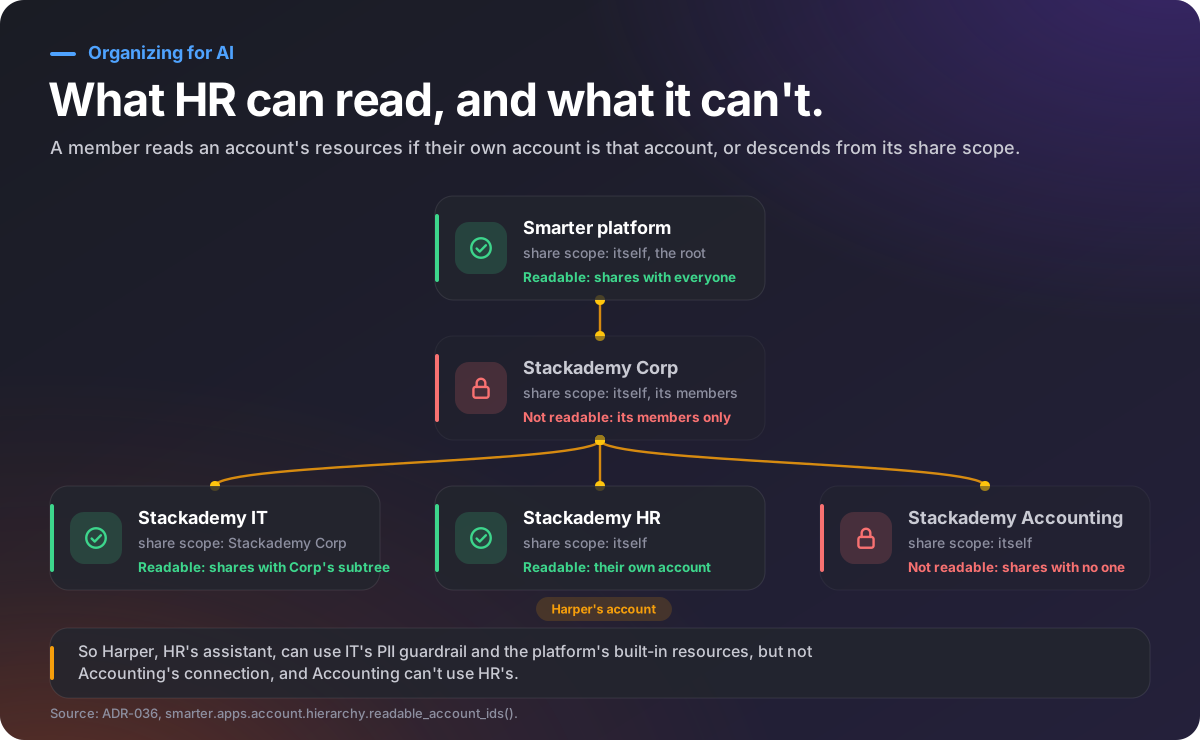
Exhibit 1. What a member of Stackademy HR may read.
Stackademy’s IT account shares with Stackademy Corp, so every account below the company reads it. HR,
Accounting, Course Content and Admissions share with no one. The company’s own account is private to its members,
the executives.
Nearest first. When a resource names another by name, e.g. an assistant naming the guardrail
stackademy_pii_redaction, the platform looks for the nearest: the owner’s own, else their account’s, else that
of the nearest account that shares with theirs. So a department can override a shared resource by naming its own
the same. The search uses only the owning profile’s account tree, never everything its user may read: a resource
written by the chief executive, who reads every department, must not let HR’s members read through it whatever the
chief executive can.
An administrator role per account. UserProfile.is_account_admin makes a user the administrator of that one
account: they manage every resource in it, apply its manifests and its users, and may have api keys for it. One
function, user_administers_account(), decides it everywhere: a superuser administers every account; a staff
user, each account they belong to; and anyone else, the accounts whose profile carries the role. The Head of IT
holds it in every department, which is how one person manages every department’s credentials without being a
platform superuser.
The organization as code. The organization is declared in the repository
smarter-sh/stackademy:
org/accounts/: an Account manifest per account, with its fixedaccountNumber, itsparentand itsshareScope.org/users/: a User manifest per person, with theiraccounts(the memberships, and whether they administer each) and apasswordSecretthat names the Secret holding the published demonstration password.owners.yaml: for each folder of resources, the user who applies, and so owns, its manifests, and in which account.
# org/accounts/01-stackademy-it.yaml
apiVersion: smarter.sh/v1
kind: Account
metadata:
  name: stackademy_it
  accountNumber: "2718-2818-0001"
spec:
  config:
    companyName: Stackademy IT
    parent: "2718-2818-0000"       # Stackademy Corp
    shareScope: "2718-2818-0000"   # every account under Stackademy Corp may read IT's resources
# org/users/odette-hartigan.yaml: the CFO, a member of the company, and Accounting's administrator
apiVersion: smarter.sh/v1
kind: User
metadata:
  name: odette_hartigan
  username: odette_hartigan
spec:
  config:
    firstName: Odette
    lastName: Hartigan
    email: odette.hartigan@stackademy.example
    isStaff: false
    passwordSecret: stackademy_demo_password
  accounts:
    - accountNumber: "2718-2818-0000"
      isAccountAdmin: false
    - accountNumber: "2718-2818-0003"
      isAccountAdmin: true
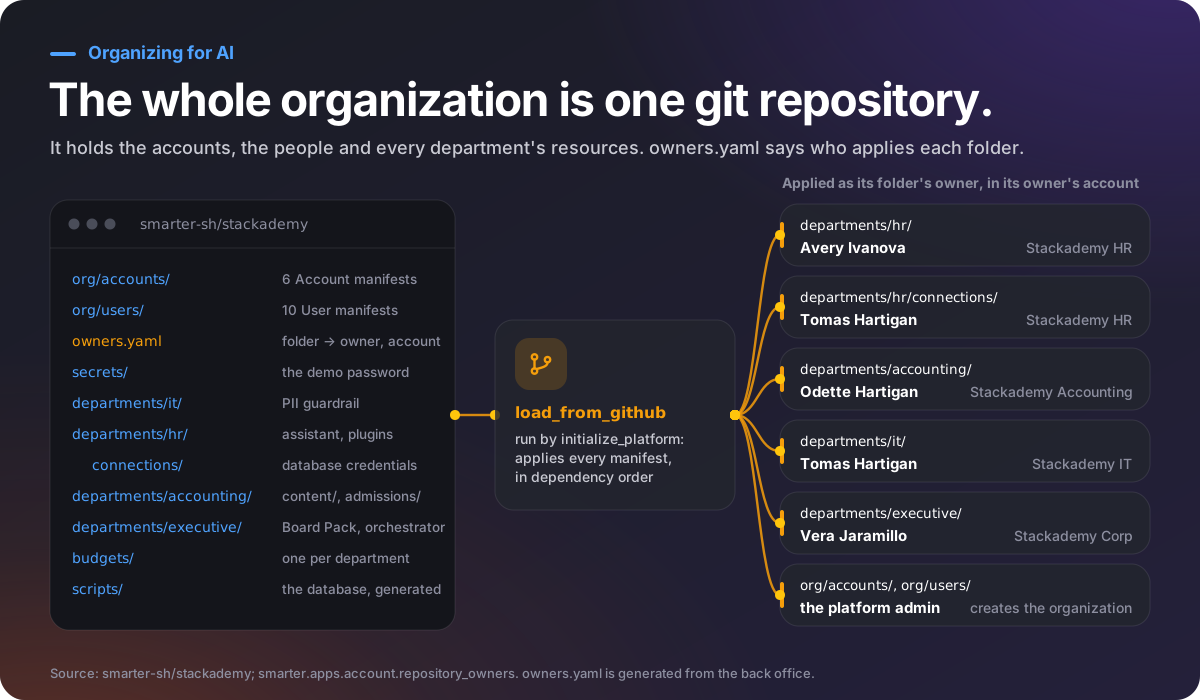
Exhibit 2. The organization, declared in a git repository.
When a platform is set up, initialize_platform runs load_from_github on the repository. It applies the
Account and User manifests first, as the platform’s administrator, because they declare the organization that owns
everything else; then each folder’s manifests as that folder’s owner, in that owner’s account. A subfolder may have
an owner of its own, and the deepest one wins: departments/hr/ belongs to the HR Director, in Stackademy HR, and
departments/hr/connections/, HR’s database credentials, to the Head of IT, in the same account.
Implementation
The work was done in eleven commits to Smarter and four to the Stackademy repository, over one release cycle, each with its tests, in this order:
The tree (
feat(account): add an account hierarchy with resource sharing): the two fields, their validation (no cycles, a share scope that is an ancestor), migrations that leave every existing account reading what it read, the cached read rule and nearest-first resolution, and the Account manifest’s new fields.The role (
feat(account): add an account administrator role to user profiles): the field, the one rule, and every broker’s “only an account’s admins may” check changed fromis_staffto the rule, twenty places.Memberships and passwords in the User manifest, with their authority checks: only a superuser sets a password, and only an administrator of an account may add members to it.
Owners (
owners.yaml), and three fixes that loading a real organization exposed: a new account took its manifest’s account number, so that the organization’s references by number work on every platform; creating an account no longer added the platform’s administrator to it; and an owned folder’s Secrets are applied after the Users that own them.
A subtle point decided the placement of credentials. The first draft put every department’s database connection in IT’s account, since IT manages them. But sharing is by account, not by resource: IT shares with the whole company, so every department could then have used HR’s connection, and read salaries through it. Each department’s credentials now live in the department’s own account, administered there by the Head of IT.
Results
Measure |
Result |
|---|---|
Manifests that declare the organization and its resources |
66, in one repository, applied in dependency order by every platform |
Accounts, people |
6 accounts, 10 people; each department’s head administers their department, the Head of IT every account |
Who may read a department’s database credentials |
Only its members, verified by loading the organization: a member of HR may use HR’s connection, but not Accounting’s |
Shared services |
IT’s PII guardrail, used by all four departments’ assistants, invisible to every other customer |
Existing customers |
No change: the platform’s account shares with itself, so every account reads what it read before |
Platform superusers created for customer administrators |
None (see Governance Review: What a Real Organization Revealed About Who May Administer What) |
Lessons for practitioners
Separate structure from visibility. Where an account sits and who may read it are different questions. A design that answers both with one field, a parent or a flag, can’t model an IT department that serves its siblings.
Share by container, and know what that means. Sharing an account shares everything in it. Put a resource in the account whose audience it may have, not in the account of the team that manages it.
One rule, applied everywhere. Twenty copies of “is this user staff?” became one function. The governance review that followed found its flaws in the places that didn’t call it yet.
Resolve names in the owner’s world, not the reader’s. A resource found by name on behalf of a powerful user becomes a way for others to borrow that user’s reach.
Declare the organization. Accounts, people and owners in a repository make an organization reviewable, reproducible and testable, and every change to it a pull request.
Teaching notes
Discussion questions
The design lets a department override a shared resource by naming its own the same. When is that a feature, and when is it a risk? How would you detect an override that wasn’t intended?
The Head of IT administers every department’s account, to manage credentials. What could they do that the organization might not want? What would you change, and what would it cost?
Memberships listed in a User manifest are added and updated, but never removed, because removing one deletes everything that the user owns in that account. Is that the right default? What should happen when someone leaves a department?
Compare the chosen design with “teams inside an account”. Which would you choose for a company of 5,000 people and 200 teams, and why?
Exercises
On a platform with Stackademy loaded, sign in as
quinn_sandoval(HR) and askofi_sandoval(Accounting). List the SqlConnections each one sees in the web console. Explain the difference with Exhibit 1.Add a sixth department, Instruction, to a fork of
smarter-sh/stackademy: its account, its head and an instructor, and its folder inowners.yaml. Load it withmanage.py load_from_githuband show that its members can use IT’s guardrail.Write a test, in the style of
smarter/smarter/apps/account/tests/test_hierarchy.py, proving that a resource of a department that shares with no one is invisible to a sibling department, and visible to its own members.
Sources
smarter/smarter/apps/account/hierarchy.py,models/user_profile.py(user_administers_account()),repository_owners.py,management/commands/load_from_github.pyThe Stackademy repository,
org/,owners.yamlanddepartments/: https://github.com/smarter-sh/stackademySmarter 0.46.0’s changelog:
feat(account)commits 4727aa1, 8f41e9b, 637105e, 79c81b6 and ce36b37, and the fixes 29491e1 and 3b31966