Published but Not Shipped: Anatomy of a Release Incident
How the release of Smarter 0.46.0 created its version, tag and release notes, then failed in its last step, so that nothing it should have shipped was built, and why re-running it could never have helped.
At a glance
Organization |
The Smarter project’s release pipeline, on GitHub Actions: semantic-release, then a Docker image, a Helm chart, a production deployment and a notification. |
Challenge |
The release of 0.46.0, the release that delivered the work of the other cases, reported failure after it had already published its tag and GitHub release. Every job that ships a release was skipped, and re-running the workflow released nothing. |
Solution |
Recover by building the existing release by hand, from its tag. Fix the cause, a plugin version that the release action bundled, by pinning the semantic-release version that brings the fixed plugin. Prove the fix on the next pre-release. |
Smarter features |
None: this is the project’s own engineering, in |
Outcome |
Production ran 0.46.0 35 minutes after its release was published. The next pre-release, 0.46.0-alpha.18, completed the step that had failed. |
Executive summary
Release automation is usually described as a pipeline: decide the version, tag it, publish it, build it, deploy it. Most of its failure modes are benign: a step fails, nothing after it happens, someone fixes the step and runs it again. The dangerous failures are the ones that happen after the point of no return, when something irreversible, here a published version tag, has already happened, and the pipeline reports failure as though nothing had.
That is what happened to Smarter 0.46.0. Its release job analyzed the commits, chose the version, committed the
changelog, pushed the tag v0.46.0 and published the GitHub release. Then, in its last step, which comments on
the issues that a release fixes, it tried to look up #1003 as an issue. It is a pull request, mentioned in a
merge commit’s title. The lookup failed, the step failed, and so the job failed. Every job after it, the Docker
image, the Helm chart, the deployment and the notification, was skipped.
Re-running the workflow couldn’t help: the release was already published, so semantic-release found nothing new to release, and skipped everything again. The project’s users could see a release, 0.46.0, that no environment ran and no image existed for.
Recovery took one manual step: start the Build workflow by hand with the existing tag, which builds and deploys a release without releasing it again. The cause was a version mismatch: the release action ran its own bundled semantic-release, with an older GitHub plugin than the one the repository declared. Pinning semantic-release 25, which brings the fixed plugin, removed the cause, and the next pre-release proved it.
Background
Smarter releases from two branches. Commits merged to alpha produce pre-releases, e.g. 0.46.0-alpha.18;
a pull request from alpha to main produces a release, e.g. 0.46.0. The workflow build.yml runs on
every push to either branch:
Release: semantic-release reads the commits since the last tag, and their conventional types (
feat,fix) decide the next version. It commits the changelog, tags the version, publishes a GitHub release, and, in its success step, comments on each issue and pull request that the release resolves.Ship: when a version was released, later jobs build the Docker image, publish the Helm chart, hand off to the deployment repository, which deploys to production, and notify.
The release step runs in cycjimmy/semantic-release-action, a GitHub Action that installs and runs
semantic-release and its plugins.
The challenge
At 23:03 UTC, pull request #1005 merged alpha into main, with the work of the other cases: the account
hierarchy, the account administrator role, the governance fixes and the orchestration runtime. At 23:04:06 the
release job published v0.46.0. Then it failed:
Could not resolve to an Issue with the number of 1003.
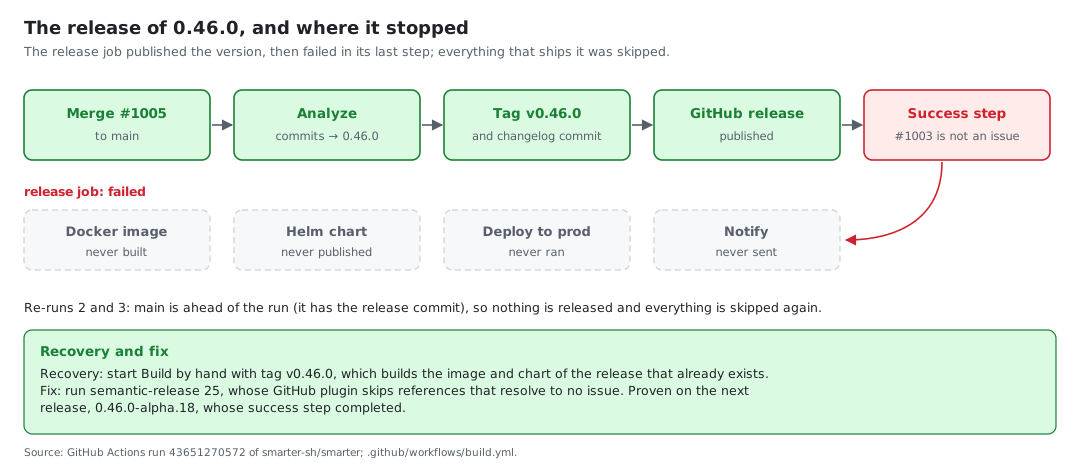
Exhibit 1. The release of 0.46.0, and where it stopped.
The situation had three properties that made it worse than an ordinary failure:
The irreversible part had succeeded. A version tag and a GitHub release are public. Deleting them to start again would rewrite history that users, and the changelog, already referred to.
The failure blocked everything that mattered. The jobs that ship a release depend on the release job’s success, not on whether a version was published.
The obvious remedy was a no-op. Attempts 2 and 3 of the workflow ran on a
mainthat now contained the release’s own changelog commit, found no unreleased commits, released nothing, and skipped the shipping jobs again.
Production meanwhile still ran 0.45.2.
Diagnosis
The failed job’s log gave the symptom. Three facts gave the cause:
Where #1003 came from. semantic-release’s GitHub plugin collects every
#Nin the released commits and treats it as an issue to comment on. #1003 appeared in the title of the merge commit of #1004, which superseded it:(supersedes #1003). It is a pull request, not an issue, so GitHub’s lookup of an issue by that number doesn’t resolve it.Which plugin ran. The repository’s
package.jsondeclared@semantic-release/github^12, whose success step logs and skips a reference that resolves to no issue (12.0.11). But the action runs the semantic-release that it bundles, 24.2.9, and semantic-release loads its plugins from its own dependencies first. So the bundled 11.x plugin ran, and its success step treats a missing issue as fatal.
The repository’s declared dependency had been fixed all along; it was simply never the one that ran.
Options considered
Option |
For |
Against |
|---|---|---|
Delete the tag and release, and release again |
The pipeline would run from the start |
Rewrites published history; would fail again on the same commit |
Rewrite the merge commit’s title |
Removes the trigger |
Rewrites |
Turn off the success step’s comments |
Removes the step that failed |
Loses the comments on resolved issues, which users rely on |
Recover by building the existing tag; fix by running the semantic-release that brings the fixed plugin (chosen) |
No history rewritten; the cause, not the trigger, removed |
The fix could be proven only by a later release |
The solution
Recovery. The Build workflow accepts a tag when started by hand, and then builds, publishes and deploys that
existing release without releasing again. A maintainer started it with v0.46.0. At 23:38 UTC production ran
0.46.0, 35 minutes after its release was published.
Fix. The release step names the semantic-release version for the action to run:
# .github/workflows/build.yml, the release step (abridged)
- uses: cycjimmy/semantic-release-action@ba330626c4750c19d8299de843f05c7aa5574f62 # v5.0.2
  with:
    semantic_version: 25.0.9
semantic-release 25 depends on @semantic-release/github ^12, whose success step skips references that
resolve to no issue. semantic-release 25 requires Node 22.14 or 24.10, and the action runs on Node 24.
Proof. The fix could not be tested without a release. The next push to alpha published 0.46.0-alpha.18,
whose success step completed. The plugin’s handling of a reference that is a pull request was confirmed by reading
its published source, not by reproducing the failure.
Implementation
Time (UTC) |
Event |
|---|---|
23:03 |
Pull request #1005 merges |
23:04:06 |
semantic-release tags |
Shortly after |
The success step fails on #1003; the release job fails; image, Helm, handoff and notify are skipped. |
Later |
Attempts 2 and 3 find nothing to release and skip the same jobs. |
23:15 |
Diagnosis done; the fix, |
Before 23:38 |
Build started by hand with tag |
23:38 |
Production runs 0.46.0. |
00:36, the next day |
0.46.0-alpha.18 is published, and its success step completes. |
Results
Measure |
Result |
|---|---|
Time from published release to production |
35 minutes, with one manual step |
History rewritten |
None: the tag, the release and |
Cause removed |
The release action runs the semantic-release, and the GitHub plugin, that tolerate references to pull requests |
Verified |
On the next pre-release, 0.46.0-alpha.18 |
Lessons for practitioners
Know your point of no return. In a release pipeline, publishing a version is irreversible. Everything after it must either be unable to fail the release, or be recoverable without releasing again.
Make shipping depend on what was published, not on the job’s exit code. If a version exists, the image for it should be built, even when a later, cosmetic step fails.
Keep a manual path that builds an existing release. It turned a stuck release into a 35-minute delay.
Pin the tools that actually run. A dependency declared in
package.jsonis not the one that runs if the action bundles its own. Check what the action loads, and pin that.Re-running is not recovery. Know what a re-run does in your pipeline’s state before you rely on it.
Fix the cause, not the trigger. Rewording a commit title would have made this release pass and the next one fail.
Teaching notes
Discussion questions
Draw your own organization’s release pipeline, and mark its point of no return. Which steps after it can fail the release, and what happens to the shipping jobs when they do?
Should the shipping jobs depend on the release job’s success, or on its output, the version it published? What are the risks of each?
The fix was proven by the next pre-release, not by a test. How could the pipeline’s release step be tested before it runs for real?
A maintainer rebuilt the release by hand. What controls should apply to that manual path, so that it can’t ship something that was never released?
Exercises
Read
.github/workflows/build.yml. List each job, what it depends on, and what it does when it is started by hand with a tag.In a scratch repository with semantic-release, reproduce the failure: a commit whose message mentions another pull request, e.g.
(supersedes #2), with@semantic-release/github11. Then show that version 12 completes.Write the runbook entry for “a release was published but not shipped”: how to recognize it, how to recover, and how to confirm that production runs the release.
Sources
GitHub Actions run 43651270572 of smarter-sh/smarter, attempts 1 to 3
.github/workflows/build.yml; Smarter commit24a164628semantic-release’s GitHub plugin,
@semantic-release/github12.0.11, its success step