How LLM Tool Calling Works
This page explains the technology on which Smarter Plugins are built. This is what happens “under the hood” when your create a Smarter Plugin and add this to any LLMClient (aka Agent or Workflow unit).
From the official OpenAI documentation on Tool Calling, we should start off by defining a few key terms about tool calling. After we have a shared vocabulary for tool calling, we’ll look at a real-world example for getting real-time weather forecasts. Weather is a great example, since LLM’s definitely do not know anything about weather, beyond any historical weather data on which they might have been trained.
Tools - functionality we give the model
A function or tool refers in the abstract to a piece of functionality that we tell the model it has access to. As a model generates a response to a prompt, it may decide that it needs data or functionality provided by a tool to follow the prompt’s instructions.
You could give the model access to tools that:
Get today’s weather for a location Access account details for a given user ID Issue refunds for a lost order Or anything else you’d like the model to be able to know or do as it responds to a prompt.
When we make an API request to the model with a prompt, we can include a list of tools the model could
consider using. For example, if we wanted the model to be able to answer questions about the current
weather somewhere in the world, we might give it access to a get_current_weather tool that takes location as an argument.
Tool calls - requests from the model to use tools
A function call or tool call refers to a special kind of response we can get from the model if it examines a prompt, and then determines that in order to follow the instructions in the prompt, it needs to call one of the tools we made available to it.
If the model receives a prompt like “what is the weather in Paris?” in an API request,
it could respond to that prompt with a tool call for the get_current_weather tool, with Paris as the location argument.
{
  "model": "gpt-4o",
  "messages": [
    {"role": "user", "content": "what is the weather in Paris?"}
  ],
  "tools": [
    {
      "name": "get_current_weather",
      "description": "Get the current weather for a given location",
      "parameters": {
          "type": "object",
          "properties": {
              "location": {
                  "type": "string",
                  "description": "The city and state, e.g. San Francisco, CA",
              },
              "unit": {"type": "string", "enum": ["METRIC", "USCS"]},
          },
          "required": ["location"],
      }
    }
  ],
  "tool_call": "auto"
}
Tool call outputs - output we generate for the model
A function call output or tool call output refers to the response a tool generates using the input from a model’s tool call. The tool call output can either be structured JSON or plain text, and it should contain a reference to a specific model tool call (referenced by call_id in the examples to come). To complete our weather example:
The model has access to a
get_current_weathertool that takeslocationas an argument.In response to a prompt like “what’s the weather in Paris?” the model returns a tool call that contains a
locationargument with a value ofParisThe tool call output might return a JSON object (e.g.,
{"temperature": "25", "unit": "C"}, indicating a current temperature of 25 degrees), Image contents, or File contents.
We then send all of the tool definition, the original prompt, the model’s tool call, and the tool call output back to the model to finally receive a text response like:
The weather in Paris today is 25C.
Functions versus tools
A function is a specific kind of tool, defined by a JSON schema. A function definition allows the model to pass data to your application, where your code can access data or take actions suggested by the model.
In addition to function tools, there are custom tools (described in this guide) that work with free text inputs and outputs.
There are also built-in tools that are part of the OpenAI platform. These tools enable the model to search the web, execute code, access the functionality of an MCP server, and more.
The tool calling flow
Tool calling is a multi-step conversation between your application and a model via the OpenAI API. The tool calling flow has five high level steps:
Make a request to the model with tools it could call
Receive a tool call from the model
Execute code on the application side with input from the tool call
Make a second request to the model with the tool output
Receive a final response from the model (or more tool calls)
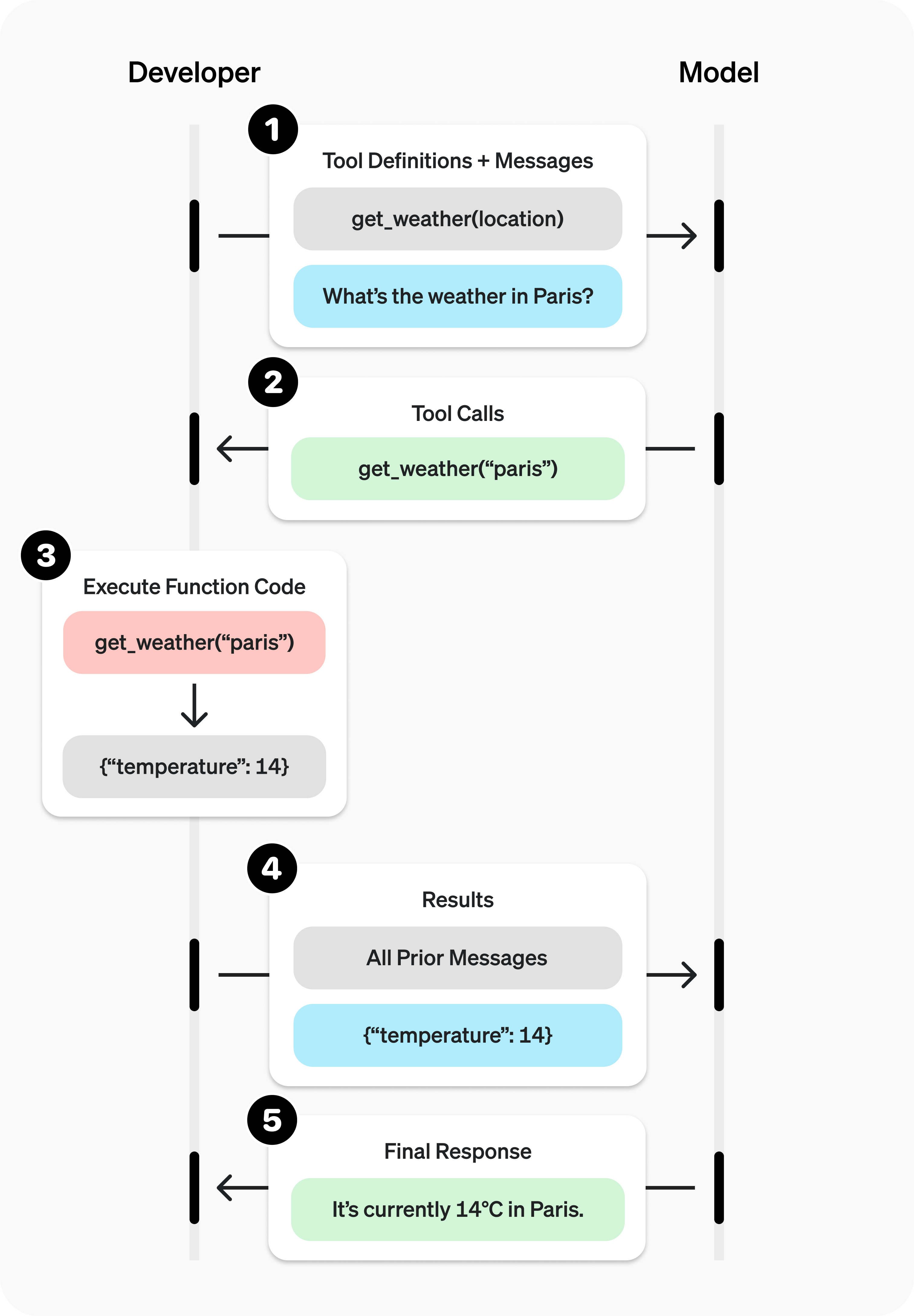
Function Calling Diagram: The five-step tool calling flow.
Function tool example
Let’s look at an end-to-end tool calling flow for a function tool that calls get_current_weather.
As it happens, The Smarter Project implements this exact tool as part of its code base.
See get_current_weather()
Defining functions
Functions can be set in the tools parameter of each API request. A function is defined by its schema,
which informs the model what it does and what input arguments it expects.
A function definition has the following properties:
Field |
Description |
|---|---|
type |
This should always be function |
name |
The function’s name (e.g. get_current_weather) |
description |
Details on when and how to use the function |
parameters |
JSON schema defining the function’s input arguments |
strict |
Whether to enforce strict mode for the function call |
Here is an example function definition for our get_current_weather function
{
    "type": "function",
    "function": {
        "name": "get_current_weather",
        "description": "Get the current weather in a given location",
        "parameters": {
            "type": "object",
            "properties": {
                "location": {
                    "type": "string",
                    "description": "The city and state, e.g. San Francisco, CA",
                },
                "unit": {"type": "string", "enum": ["METRIC", "USCS"]},
            },
            "required": ["location"],
        },
    },
}
Because the parameters are defined by a JSON schema, you can leverage many of its rich features like property types, enums, descriptions, nested objects, and, recursive objects.