Smarter API Manifests (SAM)
Smarter provides declarative AI resource management, and Smarter API Manifests (SAM) are the declarations.
A manifest states what an AI resource should be (an LLMClient, a Plugin, a Guardrail, a Secret) and not
the steps needed to build it. You apply the manifest, and Smarter makes the resource match it: it creates the
resource if it does not exist and updates it if it does. Applying the same manifest twice gives the same result
(ie it is idempotent), so manifests can be kept in version control, reviewed like code, and
applied repeatedly across environments. The model is the one that Kubernetes
made familiar, and SAM manifests are deliberately shaped like the manifests that kubectl apply accepts.
Behind each declaration, the Smarter API does the imperative work: database writes, AWS cloud infrastructure operations and Kubernetes orchestration. You and your team describe the desired state of your AI resources, and the platform works out how to get there.
Every manifest is validated against a strongly typed schema built with Pydantic. Each resource kind has its own Pydantic model, so a manifest with a missing field, a wrong type or an invalid value is rejected with a precise error before anything is changed. The same models generate the JSON Schema that the Smarter API publishes for each kind.
Smarter manifests are utf-8 text documents, formatted as either YAML or JSON. The Smarter API that accepts them is described by an OpenAPI Specification v3.x document. The manifest framework, its Pydantic models, loader and brokers, is located in smarter/lib/manifest, and the API that applies manifests in smarter/apps/api. The Smarter API can manage escaped representations of characters outside of the utf-8 standard.
Manifest Structure
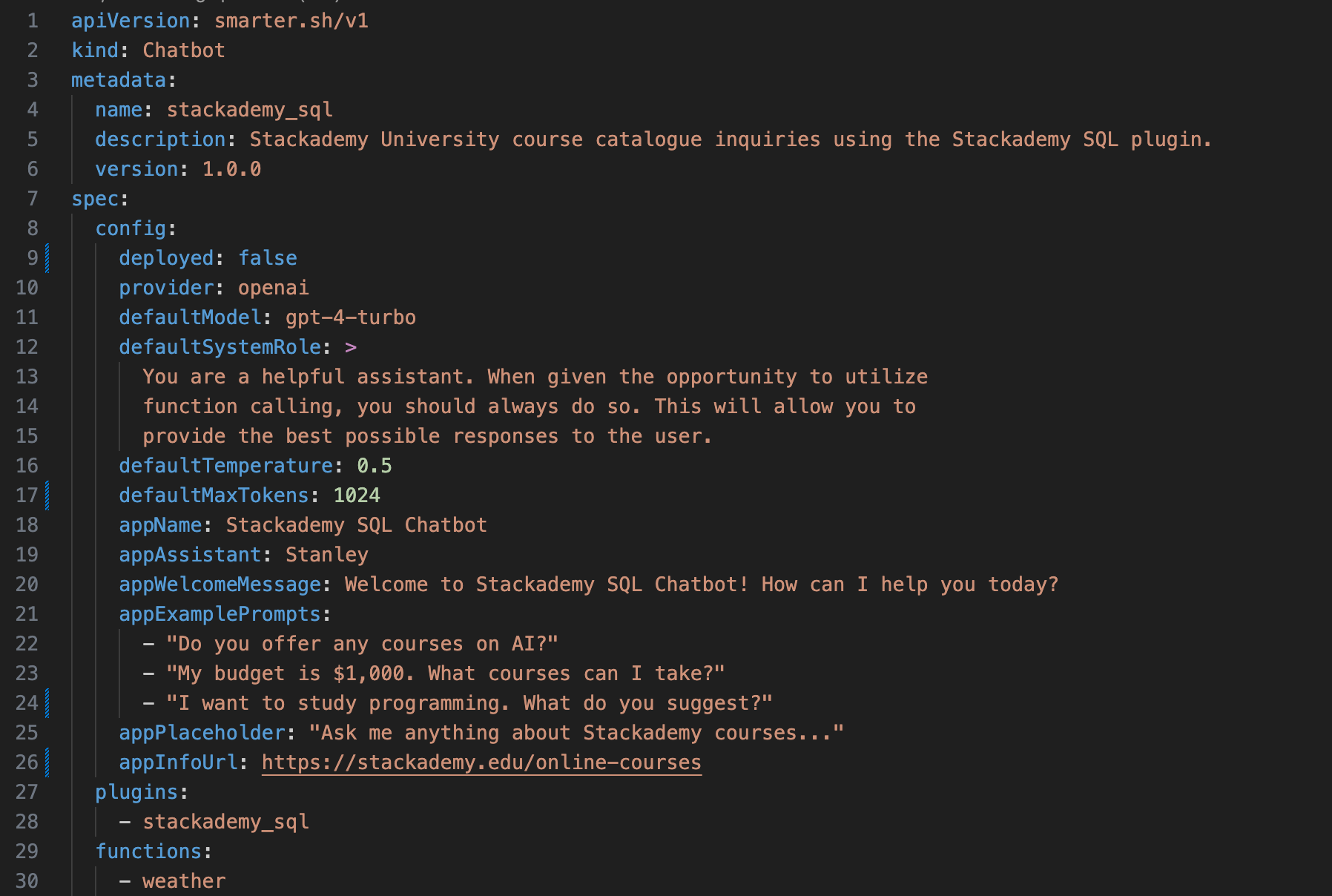
The basic structure of a Smarter API Manifest (SAM) YAML document includes the following key sections:
apiVersion: Specifies the version of the API schema that the manifest adheres to,
smarter.sh/v1.kind: Indicates the type of resource being defined, for example
Account,LLMClient,SqlPlugin,SecretorGuardrail. Each kind has a page under Smarter AI Resource Reference.metadata: Identifies and describes the resource: its
name,description,version,tagsandannotations. Every kind shares these fields, and some kinds add their own, for example a plugin’spluginClass. See Metadata below.spec: Defines the desired state and configuration of the resource. The spec section varies considerably by resource kind.
status: (Optional) Provides information about the current state of the resource. This section is read-only and managed by the system.
apiVersion: smarter.sh/v1
kind: LLMClient
metadata:
  name: stackademy_sql
  description: Stackademy University course catalogue inquiries using the Stackademy SQL plugin.
  version: 1.0.0
  tags:
    - stackademy
    - sql
  annotations:
    - acme.com/finance/cost-center: "4410"
    - acme.com/support/owner: data-platform-team
spec:
  # the LLMClient's configuration
In addition to this basic structure, there are also a number of important style conventions that Pydantic helps to enforce for SAM manifests:
YAML fields use
camelCasenaming convention.Resource names, and values that in effect are foreign keys, that is, references to other resources by name, use
snake_casenaming convention.
Pydantic is also instrumental in validating the rules and relationships between individual fields within a manifest, ensuring that manifests are well-formed and adhere to the expected structure. The Smarter API must be able to read, validate, and correctly execute the commands necessary to bring the real-world resources defined in the manifests in sync to the declaration of the manifest.
Metadata
Every kind’s metadata is validated by
AbstractSAMMetadataBase, and stored on the resource’s Django model by
MetaDataModel, the base class of every resource model.
name (required): the resource’s name, unique among the resources of its kind that the same user owns. It must be URL-friendly and less than 50 characters long. Smarter converts it to
snake_case, and logs a warning when it does.description: a brief description of the resource, ideally under 255 characters. The key is required, but its value may be empty.
version: a semantic version, for example
1.0.0. The key is required, but its value may be empty.tags (optional): a list of short labels. See Tags.
annotations (optional): a list of key-value pairs. See Annotations.
Annotations
Annotations attach arbitrary, structured data to a resource, as a list of key-value pairs:
metadata:
  annotations:
    - acme.com/finance/cost-center: "4410"
    - acme.com/support/owner: data-platform-team
    - acme.com/compliance/reviewed: true
    - acme.com/compliance/review-date: 2026-06-15
    - acme.com/support/runbook: |
        Page the data platform on-call engineer.
        Escalate to the vendor after 30 minutes.
The rules are:
Keys must be URL-friendly: letters, digits,
.,_,/and-. Smarter keeps the case of annotation keys, unlike the rest of the manifest, which it converts betweencamelCaseandsnake_case.Values may be strings, including multi-line YAML block scalars, integers, floats, booleans, dates, datetimes, decimals, UUIDs, bytes, lists, dicts, or null. String values are limited to 2,048 characters.
An annotation list item may hold one key-value pair, as above, or several.
Smarter stores annotations, unchanged, in the annotations JSON field of the resource’s model, and returns them
from smarter describe and the api/v1/cli/describe/ endpoint. Values that JSON has no type for, such as
dates, are returned as strings.
Smarter itself never interprets annotation values. That is what makes them safe to extend: an annotation means
whatever the software that reads it decides it means, and no future Smarter release will change that. By
convention, prefix each key with a domain that your organization controls, as Kubernetes does, for example
acme.com/finance/cost-center. Smarter’s own example manifests use the smarter.sh/ prefix, so don’t use
it for your own keys.
Annotations are stored as plain text, and anyone who can describe the resource can read them. Don’t put credentials in annotations. Store them in a Secret, and annotate the resource with the secret’s name if your integration needs to find it.
Integrating with Smarter: Annotations and Signals
Annotations, together with Django signals and receivers, are the principal means for other software engineering teams to build robust integrations with the Smarter platform. They let your team attach its own data to Smarter resources and act on it, without forking Smarter, changing its database schema, or waiting for a Smarter release:
Annotations carry your data. The people who write a manifest declare, in the same document that defines the resource, how your systems should treat it, for example its cost center, its owning team, its data classification, or the identifier of the record that mirrors it in your CMDB. The data travels with the resource through
apply,describe, version control and code review, like the rest of the manifest.Signals tell you when to act. Smarter sends a Django signal at each significant event in a resource’s life. A receiver, a function that your Django app connects to a signal, runs whenever the signal is sent, and receives the resource, from which it reads the annotations.
Because Smarter never interprets annotations, and because receivers connect to Smarter’s signals rather than change its code, your integration and the Smarter platform can each evolve independently.
Which Signals to Use
Django’s model signals,
post_saveandpost_delete, are sent for every resource kind, because every resource is a Django model.post_saveis sent whensmarter applycreates or updates a resource, andpost_deletewhensmarter deletedeletes it. The receiver gets the model instance asinstance.Smarter’s own signals are sent at events that are specific to a kind, for example
llmclient_called,llmclient_deployed,plugin_called,guardrail_blocked,budget_exceeded,secret_accessedandprovider_suspended. Each app declares its signals in itssignals.pymodule, for examplesmarter.apps.llmclient.signals, and documents their arguments there. Most pass the resource itself, for examplellmclient=orguardrail=.
See Django Signals for the basics, and Infrastructure for the signals that the cloud infrastructure services send.
Example
This receiver opens a ticket in the owning team’s queue each time an LLMClient is deployed, and posts its cost center to a finance system each time one is applied:
from django.db import transaction
from django.db.models.signals import post_save
from django.dispatch import receiver

from smarter.apps.llmclient.models import LLMClient
from smarter.apps.llmclient.signals import llmclient_deployed

from .tasks import open_ticket, sync_cost_center


def get_annotation(resource, key, default=None):
    """Return the value of an annotation key, or default."""
    for annotation in resource.annotations or []:
        if key in annotation:
            return annotation[key]
    return default


@receiver(post_save, sender=LLMClient, dispatch_uid="acme_llmclient_saved")
def handle_llmclient_saved(sender, instance, created, **kwargs):
    cost_center = get_annotation(instance, "acme.com/finance/cost-center")
    if cost_center is None:
        return
    # apply saves inside a database transaction. Act after it commits.
    transaction.on_commit(lambda: sync_cost_center.delay(instance.pk, cost_center))


@receiver(llmclient_deployed, dispatch_uid="acme_llmclient_deployed")
def handle_llmclient_deployed(sender, llmclient, **kwargs):
    owner = get_annotation(llmclient, "acme.com/support/owner")
    if owner:
        open_ticket.delay(queue=owner, subject=f"LLMClient {llmclient.name} was deployed")
Writing Robust Django Receivers
Register your app. Put your receivers in a
receivers.pymodule of your own Django app, import it from yourAppConfig.ready()method, and add the app toINSTALLED_APPS. See the Developer Feature Checklist.Keep receivers short, and fail safe. Smarter sends its signals with
send(), so receivers run synchronously, in the web server or Celery worker process that sent the signal, and an exception that a receiver raises propagates to the operation that sent it. Catch your own errors, and hand slow work, such as calls to other systems, to a Celery task.Act after the transaction commits.
applysaves a resource inside a database transaction. Usetransaction.on_commit(), as above, so that your integration never acts on a change that is rolled back.Read tags after the save.
applysets a resource’s tags after it saves the resource, so apost_savereceiver can see the previous tags. Annotations are saved with the resource, sopost_savealways sees the new ones. To react to tag changes, connect to Django’sm2m_changedsignal.Be idempotent.
applyworks like an upsert, so the same manifest can be applied many times, andpost_saveis sent each time. Usedispatch_uidso that each receiver is connected only once.Treat missing annotations as normal. Not every resource will carry your keys. Ignore resources that don’t, and validate the values of those that do.
The modules and classes below establish the foundation of Smarter’s SAM data models.