VS Code Extension
The Smarter Manifest extension for Visual Studio Code is the editor for Smarter manifests. It checks a manifest as you type, completes and explains its keys, fixes common mistakes, and validates, applies and deploys it on your Smarter platform, without leaving the editor. It does for Smarter’s YAML what the Kubernetes and Red Hat YAML extensions do for Kubernetes manifests, and it adds the Smarter CLI’s commands.
code --install-extension Querium.smarter-manifest
Or search the Extensions view for Smarter Manifest. The extension is on the Visual Studio Marketplace, and its source is github.com/smarter-sh/smarter-vscode-yaml.
Any YAML file whose apiVersion is smarter.sh/v1 is a manifest, whatever its name. Other YAML
files are left alone.
apiVersion: smarter.sh/v1
kind: Secret
metadata:
  name: openai_api_key
  description: The OpenAI API key of the customer support LLMClient.
  version: 1.0.0
spec:
  config:
    value: sk-xxxx
The Extension, the CLI or the SDK?
All three are clients of the same Smarter API, and apply the same manifests.
VS Code Extension |
||
|---|---|---|
For writing manifests: errors as you type, completion, help. |
For people at a terminal, and shell scripts. |
For your own software: applications, services, tests. |
Smarter: Apply Manifest |
|
|
The extension reads the CLI’s configuration file, so if you have run smarter configure, it needs
no other setup.
What It Does
Validation as you type
Each manifest is checked against the JSON Schema of its kind, which the platform generates from the
same Pydantic models that apply validates with. Problems are underlined at the exact key or value
they are about, and listed in the Problems panel:
YAML syntax errors, and values of the wrong type:
metadata.description: Must be string or null.missing required keys:
Missing required key 'version' in metadata.values outside their allowed set:
Must be one of: "hour", "day", "week", "month".unknown kinds and misspelled keys, with a suggestion:
Unknown key 'descripton' in metadata. Did you mean 'description'?
A misspelled key is worth catching early: the platform ignores keys that a kind doesn’t declare, so
the manifest would apply without the setting that you meant. These are warnings, not errors, and the
smarterYaml.unknownKeys setting turns them off.
The extension reads YAML exactly as the platform does (YAML 1.1, as Python’s PyYAML reads it), so a
value such as postalCode: 02139 is the string "02139" in the editor, as it is on the
platform. A file may hold several manifests, separated by ---.
Quick fixes
Press Ctrl+. (Cmd+. on macOS) on a problem to fix it: rename a misspelled key or kind, choose
one of a value’s allowed values, or add a missing required key.
Completion and help
Completion offers the keys that the mapping under the cursor may have, required keys first, laid out for their type, and the values of
kind,apiVersion, booleans and fields with a fixed set of values.Hovering over a key shows its type, whether it is required, its description and its default. Hovering over the
kindlinks to the kind’s page in these docs, for example Secrets.In an empty YAML file, type
smarterto insert a complete example manifest of any kind, or run Smarter: New Manifest….
Working with your platform
With an API key, the extension runs the manifest API’s commands on the manifest in the editor. They are in the Command Palette, under Smarter:, and Validate and Apply are also links above each manifest.
Command |
What it does |
|---|---|
Validate Manifest on Platform |
Validates the manifest exactly as |
Apply Manifest |
Creates the resource, or updates it to match the manifest, after you confirm. |
Deploy Resource / Undeploy Resource |
Deploys or undeploys the manifest’s resource, for the kinds that deploy. Deploying can create real, billable infrastructure. |
Delete Resource |
Deletes the manifest’s resource, after you confirm. |
Open Resource from Platform… |
Opens the manifest of an existing resource in a new editor, to read it or change it. |
Show Account (whoami) |
Shows the user and account of your API key. |
Every change to a platform goes through the same manifest API as the CLI’s, and asks you first, naming the resource and the platform.
Getting Started
Install the extension from the Marketplace.
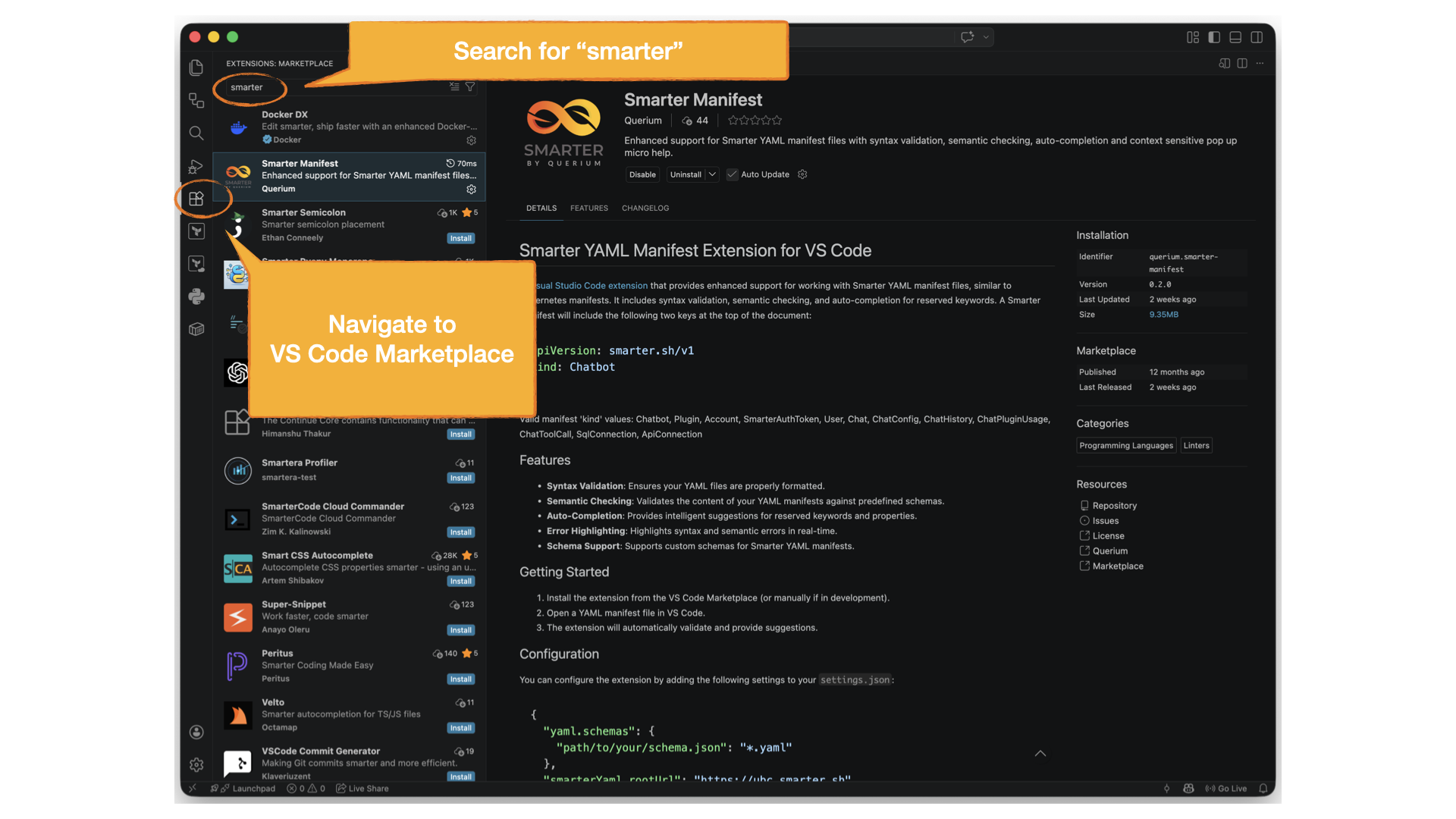
Open a manifest, or create one with Smarter: New Manifest…. Validation, completion and help work at once, with no API key.
To validate on your platform and apply, choose your platform and API key (below).
Connecting to Your Platform
The status bar shows the platform that the extension talks to. Click it, or run Smarter: Select
Platform…, to choose production, a local development platform (http://localhost:9357), or
any other URL. The choice is the smarterYaml.rootUrl setting.
Each platform has its own API key, which you create in the web console. Run Smarter: Set API Key… to save it: the extension checks it with the platform first, and keeps it in your operating system’s keychain, never in a settings file.
If you use the Smarter CLI, you can skip that step. The extension uses the key
that smarter configure saved in ~/.smarter/config.yaml for the platform’s environment:
local for localhost, alpha, beta or next for URLs that start with them, and
prod otherwise.
Settings
Setting |
Default |
Description |
|---|---|---|
|
|
The URL of your Smarter platform. |
|
|
|
|
|
Also validate on the platform when you save a manifest. Needs an API key. |
|
|
How to report a key that the kind doesn’t declare: |
|
|
Show the Validate, Apply and documentation links above each manifest. |
|
|
How long to wait for the platform, in milliseconds. |
How It Stays Current
The extension has no schemas of its own. It uses the Smarter OpenAPI Contract:
each kind’s JSON Schema, which every platform serves at /api/v1/cli/json-schema/<Kind>/, the
example manifest of each kind, and the OpenAPI document, from which the extension’s API client is
typed. A copy of the contract is bundled with the extension, for offline use, and is refreshed from
the platform’s repository as the platform changes. A new kind, field or allowed value therefore
reaches the editor without any change to the extension’s code.
Troubleshooting
The extension’s log is in the Output panel, under Smarter. It says where each schema came from, and why a request to the platform failed.
The platform was upgraded, and the editor still uses the old schemas: run Smarter: Reload Schemas.
“Authentication failed”: the API key isn’t valid for this platform. Run Smarter: Set API Key…, and check the platform in the status bar.
No errors are shown in a YAML file: check that its first lines are
apiVersion: smarter.sh/v1and akind.
The extension’s design decisions are recorded in its architecture decision records.